
Key terms
Terms that prevent failed-payment state conflicts
- Business lifecycle: the vendor-neutral state used to coordinate billing, CRM, access, messages, support, and reporting.
- Provider status: the exact invoice, subscription, order, or retry state reported by Stripe, WooCommerce, or another billing platform.
- Grace policy: the documented access and communication rule used while a recoverable payment is being retried.
- Idempotent transition: an update that produces the same correct result when the same event is delivered more than once.
- Retry exhausted: the point at which the configured retry path has ended and the final access, CRM, support, and cancellation policy must run.
Use this lesson safely
Apply the idea only after the affected path is clear.
- Identify the exact handoff, customer path, field, tag, trigger, report, or access rule before changing tools.
- Test with a low-risk example before touching live leads, payments, course access, reporting, support, or AI responses.
- Keep private client names, screenshots, customer records, payment data, passwords, and API keys out of public forms and messages.
- Document what changed, what was tested, what remains risky, and who owns the next step.
- Start with a Systems Audit when the problem touches several tools or the team cannot explain the current path.
A recurring payment failure is a billing event, not a complete decision about the member. The payment platform knows whether an invoice or renewal attempt failed. It may not know the promised grace period, the correct course tier, a manual extension, a support exception, or which CRM record controls access.
The operational failure happens when each tool makes a separate decision. Billing says past due, the CRM still says active, WordPress still grants access, the LMS removes one course but not another, the customer receives conflicting messages, and support cannot explain the current state.
Use one business lifecycle above platform-specific statuses
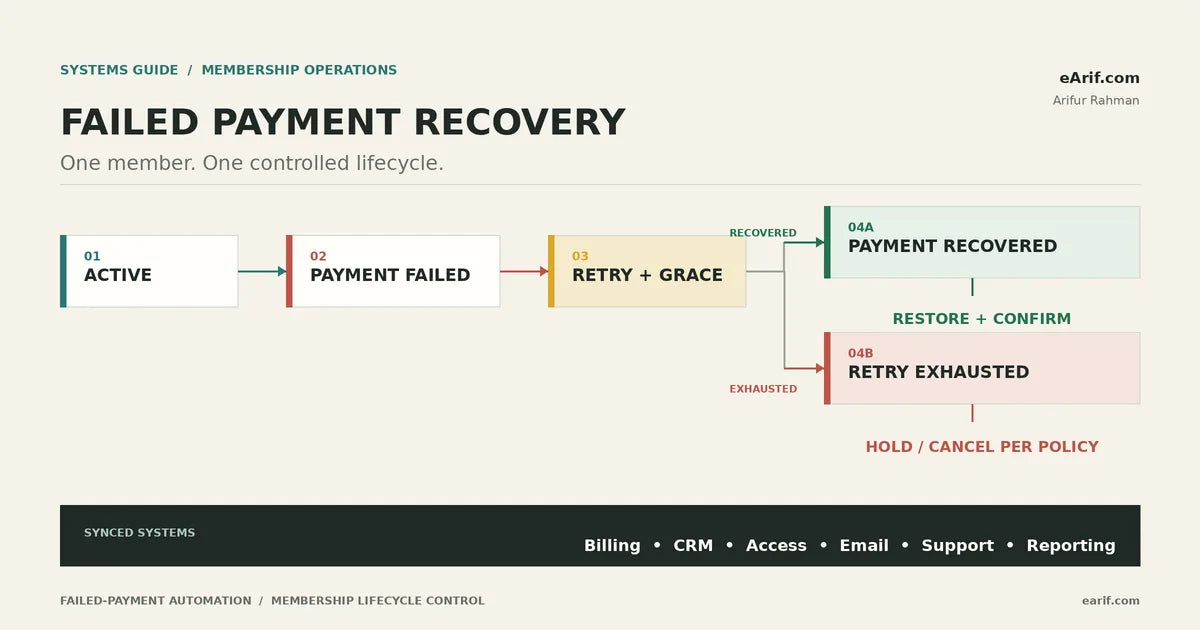
Create a small set of business states that every connected system understands: active, payment failed, retry and grace, payment recovered, retry exhausted, and reactivated. Map the billing provider's exact status into that lifecycle; do not rename provider states or assume different platforms mean the same thing.
- Billing is the evidence source for invoice, subscription, order, attempt count, next retry, and settlement.
- The business lifecycle is the coordination source for CRM, access, communications, support, and reporting.
- The access policy is an explicit rule, not an accidental side effect of a tag, email, or delayed webhook.
- The transition log is the audit trail that explains why a member gained, retained, lost, or regained access.
Map Stripe and WooCommerce states separately
Stripe Billing example
Stripe's current subscription status guide distinguishes active, past due, unpaid, canceled, incomplete, and paused states. A past-due subscription can continue through configured retries; Stripe recommends revoking product access when a subscription becomes unpaid after retries. A canceled subscription is terminal, so a later return may require a platform-appropriate new subscription rather than a simple status reversal.
Stripe Smart Retries can schedule recoverable payment attempts, while some failures are not retried. The integration must record the attempt count and next attempt when available, send the customer to the correct payment-method update path, and confirm the latest invoice or subscription state before changing access.
WooCommerce Subscriptions example
WooCommerce Subscriptions has its own order, subscription, and retry states. Its failed recurring payment retry system is configurable and is not equivalent to Stripe's status model. The current default retry rules can place the subscription on hold while a renewal order remains pending, send configured notices, and end with a failed renewal order after the retry schedule is exhausted.
Use provider-specific adapters for both platforms, then translate their confirmed state into the same business lifecycle. This prevents a Stripe past-due state, a WooCommerce on-hold state, and a CRM payment-failed tag from being treated as interchangeable facts.
Decide the access policy before connecting automation
- Grace access: define whether access stays full, becomes limited, or moves to manual review during retries.
- Immediate restriction: document the narrow conditions that bypass grace, such as an explicit cancellation or a confirmed policy exception.
- Recovery: define the exact paid evidence required before restoring the correct membership level, LMS enrollment, community role, and onboarding state.
- Retry exhaustion: define whether the member is held, canceled, downgraded, or routed to support, and which customer notice explains the result.
- Manual exception: record who approved an extension, its expiry, and how automation avoids overwriting it.
- Reactivation: distinguish paying the latest invoice, resubscribing, repurchasing, and a support-granted temporary extension.
Use this lifecycle matrix as the implementation contract
The table below is vendor-neutral. Replace each billing cell with the exact objects and statuses from the live payment platform, then make the remaining columns agree before deployment.
Failed-payment lifecycle state matrix
For every transition, store the provider object ID, event or action ID, observed timestamp, previous state, new state, rule version, and outcome. That record is what support and reporting can reconcile later.
| Lifecycle state | Billing evidence | CRM state | Access rule | Customer and support | QA proof |
|---|---|---|---|---|---|
| Active | Current subscription or renewal is confirmed in good standing for the provider. | Active member, correct offer, owner, and lifecycle fields. | Grant only the purchased tier, courses, community, and protected resources. | Normal service messages; no unresolved recovery task. | One test member matches billing, CRM, WordPress, LMS, and support views. |
| Payment failed | Failed invoice or renewal, reason class, attempt count, and provider IDs recorded. | Payment-failed transition recorded without deleting the active history. | Apply the documented first-failure policy; do not infer cancellation. | Send the approved update-payment path and create only required support alerts. | Event processes once, duplicate delivery changes nothing, and the member sees the right message. |
| Retry + grace | Next attempt, retry eligibility, and current invoice or order state confirmed. | Recovery in progress with grace deadline and exception owner. | Keep full, limited, or held access exactly as the offer policy defines. | Explain retry timing, payment update action, access impact, and support route. | Scheduled retry, email, CRM, access, and dashboard all show the same deadline. |
| Payment recovered | Latest required invoice or renewal is paid; do not rely on an old success event. | Recovered, then active, with failure history retained for analysis. | Restore the exact purchased level once and remove only the recovery restriction. | Confirm recovery, close the support task, and stop obsolete reminders. | Late or duplicate failure events cannot remove access after confirmed recovery. |
| Retry exhausted | Final provider state and completed retry history are confirmed. | Delinquent, canceled, or churn-risk state follows the approved policy. | Hold, remove, or downgrade access only according to the documented rule. | Send the final outcome and route eligible exceptions to a named owner. | No retry remains scheduled; billing, access, CRM, messages, and reporting agree. |
| Reactivated | Settlement, resubscription, or repurchase is confirmed through the correct provider path. | New active period and original recovery history remain distinguishable. | Restore the current purchased tier, not a stale historical level. | Send confirmation and close any manual extension or exception cleanly. | Reactivation works from both recovery and policy-based cancellation paths without duplicate access. |
Build for duplicate and out-of-order events
Payment webhooks can be delivered more than once, and Stripe states that event delivery order is not guaranteed in its webhook guidance. A recovery workflow must therefore read the current authoritative invoice or subscription object before applying a destructive access change.
- Verify the event or platform action before processing it.
- Store its unique ID so the same transition is not applied twice.
- Retrieve the current billing object when access or cancellation could change.
- Compare the incoming event timestamp and state with the last accepted transition.
- Write the business lifecycle state before triggering CRM, access, communication, and support actions.
- Make each downstream action safe to repeat.
- Record success, partial failure, retry, and manual exception outcomes separately.
Test the complete recovery path before production
Do not stop after proving that a failed charge exists. The test passes only when the same member is correct across every connected system.
- Normal renewal: payment succeeds and no recovery path starts.
- Recoverable failure: the first failure starts the correct retry and grace state.
- Non-retryable failure: the workflow asks for a usable payment method instead of scheduling impossible attempts.
- Successful retry: billing settles, access remains or restores correctly, stale reminders stop, and support closes.
- Retry exhaustion: the final policy runs once and no hidden retry remains.
- Duplicate event: the same provider event produces no duplicate email, task, tag, enrollment, or access change.
- Out-of-order event: an old failure arriving after recovery cannot move the member backward.
- Manual exception: a time-limited extension survives normal automation until its documented expiry.
- Reactivation: a settled invoice, resubscription, or repurchase grants only the correct current offer.
Roll out without risking live members
Use the provider's sandbox or a properly isolated test environment, synthetic test members, and redacted evidence. WooCommerce's official retry-testing guide warns that putting a live gateway into test mode can cause real renewals to fail, while staging sites can disable automatic renewals and emails by default. Confirm those controls before treating a staging result as production proof.
Deploy one rule version at a time. Keep the previous mapping and a manual recovery procedure available until the new path has completed normal renewal, failed payment, retry recovery, retry exhaustion, duplicate-event, and reactivation tests.
Measure recovery quality without inventing benchmarks
- Failed renewals by provider, offer, reason class, and billing period.
- Eligible retries, attempted retries, recoveries, and retry-exhausted cases.
- Time from first failure to recovery or final policy state.
- Billing-to-CRM, billing-to-access, and access-to-support mismatches.
- Recovery-message delivery, payment-update actions, and support exceptions.
- Reactivation success and duplicate-access incidents.
Use your own baseline before promising a recovery rate. Provider features can improve the opportunity to recover revenue, but no retry schedule guarantees collection or retention.
Choose the smallest useful next step
Use the Failed Payment and Cancellation Access Plan when the business needs a documented state map before implementation. Use payment-to-course access repair when billing and access already disagree. Use the membership access checklist before launch, or start with a Systems Audit when several tools and owners are involved.
Article FAQ
Failed-payment automation questions
Should membership access stop after the first failed payment?
Not automatically. Apply the documented offer and risk policy. A recoverable failure may enter a retry and grace state, while an unpaid, canceled, or explicitly restricted state may require access removal. Confirm the provider's current status before changing access.
What should happen when a failed payment is recovered?
Confirm the latest required invoice or renewal is paid, move the CRM to recovered and active, restore the correct current access once, stop obsolete reminders, close support tasks, and retain the failure history for reporting.
Why do failed-payment automations need duplicate-event testing?
Billing events can be delivered more than once or arrive out of order. Without idempotent processing and a current-state check, an old failure can send duplicate messages or remove access after payment has already recovered.
What should I do after I learn what is broken?
Choose the smallest safe next step. Test one low-risk handoff yourself when the path is clear, use the related service when the failure is specific, start with the Systems Audit when several tools or live customers are involved, and keep learning when the evidence is still vague.
Sources and context
Current official references for platform-specific behavior
Related eArif context
Official references
- Stripe Billing: subscription lifecycle and statuses
- Stripe Billing: Smart Retries and payment failure events
- Stripe Billing: failed-payment customer emails
- Stripe: webhook duplicate and event-order guidance
- WooCommerce Subscriptions: failed recurring payment retry system
- WooCommerce Subscriptions: testing the retry system
Make billing, access, and recovery agree.
If failed payments cross billing, CRM, WordPress, LMS, email, and support tools, map the current lifecycle and test evidence before changing live access automation.
Start with a Systems Audit