
Key terms
Terms used in the payment-to-access trace
- Qualifying payment state: the order, invoice, or subscription state that the active integration is configured to treat as paid and eligible.
- Expected state: what should be true after the buyer completes a specific step, such as one CRM tag, one WordPress user, or one course enrollment.
- Observed state: what the systems and learner account actually show, supported by timestamps, identifiers, logs, and a buyer-view test.
- First failed state: the earliest point where expected and observed evidence differ. Later failures may be consequences rather than causes.
- Entitlement: the product, membership level, course, group, lesson, or access period the buyer should receive.
- Recovery path: the controlled manual or automated process that restores valid access, records why it was needed, and protects future lifecycle changes.
Use this lesson safely
Apply the idea only after the affected path is clear.
- Identify the exact handoff, customer path, field, tag, trigger, report, or access rule before changing tools.
- Test with a low-risk example before touching live leads, payments, course access, reporting, support, or AI responses.
- Keep private client names, screenshots, customer records, payment data, passwords, and API keys out of public forms and messages.
- Document what changed, what was tested, what remains risky, and who owns the next step.
- Start with a Systems Audit when the problem touches several tools or the team cannot explain the current path.
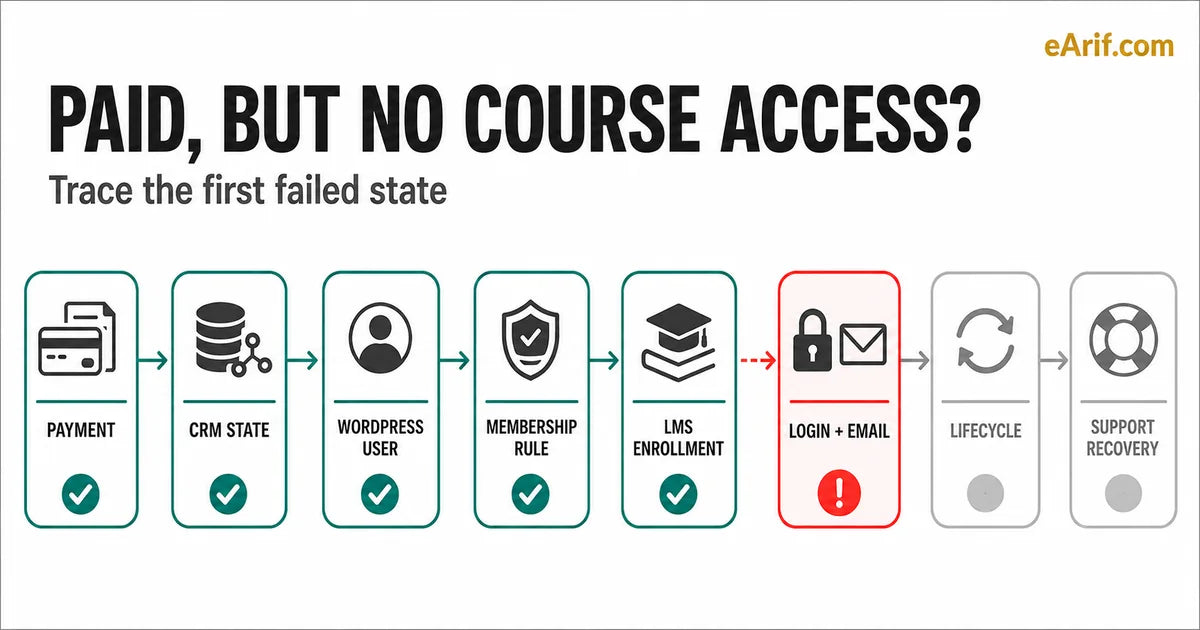
When someone pays and cannot open the course, the visible symptom appears at the end of a longer system path. The learner sees a login error, a missing course, protected content, or no welcome email. The operating evidence may begin much earlier with an order state, duplicate CRM contact, unmatched WordPress user, membership suppression rule, missing group assignment, delayed job, or lifecycle event.
The useful diagnostic question is not, "Which plugin is broken?" It is, "What was the first state that failed to become true for this buyer?" That question reduces random edits and gives support, operations, and technical owners one evidence trail.
Build one buyer timeline before opening every admin screen
Choose one affected buyer whose entitlement is clear. Record the public offer, product or price, payment timestamp and identifier, buyer email, CRM contact identifier, WordPress user identifier, membership level or access tag, expected LearnDash course or group, login or onboarding message, and the time the complaint arrived. Redact private values outside the authorized team.
Write one expected timeline in plain language. For example: order reaches the configured qualifying state; the CRM contact is found or created; the access state is applied; the correct WordPress user is linked; the membership rule permits the content; LearnDash enrolls the user directly or through a group; the login message is sent after access exists; later cancellation or retry logic maintains the intended entitlement.
Then write the observed timeline from current evidence. Do not use a present-day admin screen as proof of what happened at purchase time. Historical order notes, CRM automation history, user creation timestamps, membership logs, enrollment records, outgoing message logs, and support notes are more useful when they can be joined by the same order, contact, email, and user.
Paid Course Access Failure Diagnostic Map
Use this map when a paid course member says they cannot access the course, membership, lesson, community, download, onboarding email, or login path they expected.
- Buyer complaint evidence: capture the public offer path, checkout path, purchase time, expected access, actual access gap, first support message, and current owner before changing any rule.
- Payment state evidence: confirm successful, pending, failed, refunded, canceled, disputed, retried, or recovered payment status and the event source that should trigger access.
- CRM and tag evidence: compare contact record, duplicate contact risk, product action, tag, field, list, campaign trigger, sequence step, source, and support status against the expected buyer state.
- WordPress identity evidence: check buyer email, WordPress user creation, existing user match, role, account status, login state, password reset path, and manual override rule.
- Membership and LMS evidence: confirm Memberium level, protection rule, LearnDash enrollment, group membership, lesson access, progress expectation, and course-start email.
- Onboarding and email evidence: compare welcome email, login email, course-start email, resend rule, community invite, support note, and owner notification timing.
- Lifecycle and recovery evidence: test failed payment, retry, grace period, cancellation, upgrade, downgrade, reactivation, access removal, access restoration, and support recovery before sending more traffic.
1. Confirm the payment state that should qualify
Start with the payment or order record, not the thank-you page. A successful checkout screen can appear before every downstream system finishes. Confirm the gateway transaction, WooCommerce order or subscription, product and variation, currency, buyer email, timestamp, and the exact status the installed integration treats as eligible.
WooCommerce documents distinct order statuses, and WooCommerce Subscriptions documents separate subscription states. LearnDash's WooCommerce integration also has its own product-to-course or group configuration. The practical consequence is that "the card was charged" and "the access integration received its qualifying state" are related but not identical evidence.
Compare one successful buyer and one affected buyer at the same grain. If the order never reached the configured state, or the product was not mapped to the intended course or group, the first failed state is still in payment fulfillment. Do not compensate by applying broad CRM tags or enrolling every buyer manually. Correct the qualifying event or mapping, then replay or recover only the entitled records with an audit trail.
2. Match the CRM contact and access state
Next, confirm that the purchase resolved to the intended CRM contact. Compare normalized email, contact ID, product action, access tag or field, automation history, and any cancellation or suppression state. Duplicate contacts are especially important because payment evidence can live on one record while the tag, campaign, or WordPress link lives on another.
For CRM-driven WordPress access, a tag may mean "eligible," "active," "canceled," or "payment failed" depending on the design. A visible tag is not enough by itself. Record which automation wrote it, when it was written, which rules read it, and whether a later state removed or overrode it.
WP Fusion documents LearnDash behavior as an integration between WordPress/LMS events and CRM tags. Memberium documents tag- and membership-level behavior for its supported stack. Those documents describe capabilities, not your account's exact ownership. Confirm the installed versions and current configuration before treating a tag name as a universal access rule.
3. Verify one WordPress identity
The CRM contact and the WordPress user must resolve to the same learner identity. Confirm the user exists, the email matches the purchase and CRM record, the account was created or updated at the expected time, and the user is not being matched to an older or alternate email. Record the WordPress user ID so later checks do not depend on a display name.
A WordPress role can support administration or plugin behavior, but the role alone may not grant the course. Check the actual plugin rule that creates or updates the user and the rule that grants entitlement. Also verify password setup, reset, account status, and whether the learner is testing the same account that received access.
When an existing WordPress user buys again, the path may differ from a new buyer path. A system that can create a new user correctly may still fail to update an existing one, match a changed email, or merge a CRM identity. Test both paths before concluding that user creation is healthy.
4. Separate membership visibility from membership entitlement
Membership tools often decide whether a page is visible, hidden, redirected, or protected. Confirm the active level, tag, bundle, rule, or status that should permit the requested content. Then inspect deny, cancellation, suspension, expiration, and multiple-level logic that might override the grant.
Memberium's documentation covers user management, membership levels, payment-failure or cancellation tags, and login troubleshooting. Some Memberium pages describe version-specific interfaces and terminology. Use them as a starting point, then verify the current plugin, CRM edition, site configuration, and support guidance before changing production rules.
Test from the learner view while logged out of administrator accounts. Administrator privileges, browser sessions, cached pages, or preview links can make protected content look available during QA even when a normal member cannot enter. Visibility of a page is also not proof that LearnDash has enrolled the learner in the correct course.
5. Confirm LearnDash enrollment, group, and content rules
LearnDash documents multiple course enrollment modes and separate controls for groups, group courses, and lesson access. Confirm the course's current enrollment mode and the exact mechanism expected to enroll this learner. The mechanism might be a direct enrollment, group membership, WooCommerce product mapping, membership integration, CRM-driven action, or another approved connector.
Check the user from the LearnDash side. Is the learner enrolled directly? Is the learner in the expected group? Is the course attached to that group? Are course start dates, expiration, prerequisites, progression, lesson release schedules, or other content rules involved? A learner can reach a course page yet remain unable to enter the intended lesson because course-level and content-level controls are different states.
Do not change a course to an open mode just to make one support ticket disappear. That can alter access for every visitor. If the entitlement is valid, use a documented temporary enrollment while the team fixes the proven mapping or automation. Then verify that the permanent rule can grant, preserve, remove, and restore access correctly.
6. Test login, onboarding, and message timing
Sometimes access exists but the learner cannot discover or use it. Test the exact login URL, account email, password setup or reset, welcome message, course-start message, and any community invitation. Confirm that the message references the same account and destination that now hold the entitlement.
Message timing matters. If an onboarding email is sent before user creation or enrollment finishes, a buyer may follow a valid link into an account that is not ready. If the message is delayed, suppressed, bounced, or sent to a duplicate contact, the buyer may report "no access" even though the course is present.
Test in a private browser session as the learner, not in an administrator session. Record whether the problem is authentication, authorization, enrollment, content timing, or communication. Those categories route to different owners and should not be combined into one generic resend button.
7. Reproduce lifecycle and exception paths
A new successful purchase is only one state. Recurring access must also account for renewal, retry, grace period, failed payment, suspension, cancellation, refund, chargeback, upgrade, downgrade, multiple memberships, expiration, and reactivation. Write the expected access result for every lifecycle state your offer actually uses.
Then confirm event ordering. A retry event can arrive after a failure state; a cancellation can coexist with a paid-through date; an upgrade can add one entitlement before the old entitlement is removed. If two automations write competing tags or levels, the final visible state may depend on timing instead of business policy.
Use the separate failed-payment automation guide when the problem centers on billing lifecycle and recovery. This page remains the broad post-purchase diagnostic owner. It should not absorb pre-launch testing, WooCommerce-specific implementation, or a fixed repair request.
8. Give support a controlled recovery path
Support needs enough visibility to help a valid buyer without making undocumented global changes. A recovery record should include the entitlement evidence, first failed state, temporary action, permanent owner, learner communication, retest result, and rollback or expiry condition.
When entitlement is confirmed, a temporary manual grant can protect the learner while the permanent path is repaired. The grant should not erase the evidence of why automation failed, and it should not create access beyond the purchased scope. When entitlement is uncertain, route the case for payment or account verification instead of guessing.
After repair, retest from the original event through learner login. Confirm both the affected buyer and a new low-risk test path. Close the incident only when the expected state, observed state, permanent rule, recovery note, and owner are aligned.
Common actions that make diagnosis harder
- Changing course enrollment mode globally to solve one buyer complaint.
- Adding broad access tags before confirming the qualifying order and contact identity.
- Testing only as a WordPress administrator.
- Assuming a visible course page proves enrollment or lesson authorization.
- Deleting cancellation or failed-payment rules before mapping what reads them.
- Resending an email without confirming that its account and destination are correct.
- Using current state as proof of historical event order.
- Closing the ticket after a manual grant without repairing or documenting the permanent path.
Eight-stage paid course access evidence matrix
Read the rows in order. Stop at the first mismatch, preserve the evidence, and assign the smallest safe correction before testing later stages again.
| Stage | Expected state | Evidence to capture | Common mismatch | Safe next action |
|---|---|---|---|---|
| 1. Payment | One qualifying paid order or subscription maps to the purchased entitlement. | Transaction and order IDs, product or variation, status, timestamp, buyer email, order notes. | Charged payment but nonqualifying status, wrong product mapping, delayed or missing fulfillment event. | Correct or replay the proven fulfillment state for entitled records; do not grant access globally. |
| 2. CRM state | The intended contact has the required product, tag, field, or lifecycle state. | Contact ID, normalized email, duplicate search, automation history, writers, readers, negative states. | Payment and access data land on different contacts, or a later rule removes the grant. | Resolve identity and rule ownership before adding or removing tags. |
| 3. WordPress user | The CRM contact resolves to one active WordPress learner account. | User ID, email, creation time, role, account status, reset path, CRM link. | User not created, existing user not updated, alternate email, or learner uses another account. | Repair the user match and retest login without changing course-wide permissions. |
| 4. Membership rule | The active level or rule permits the purchased protected content. | Levels, tags, grant and deny rules, suspension or cancellation state, logged-out buyer test. | Visibility and entitlement are confused, or a deny state overrides the grant. | Fix the narrow rule conflict and preserve lifecycle evidence. |
| 5. LMS enrollment | The user is enrolled directly or through the intended group and content rules allow entry. | Enrollment mode, product mapping, direct courses, groups, group courses, dates, prerequisites, lessons. | Page is visible but user is not enrolled, group lacks the course, or lesson controls block entry. | Repair the exact enrollment or content mapping; avoid opening the course globally. |
| 6. Login and email | The learner receives a usable login path after the account and entitlement exist. | Message timestamps, recipient, login URL, reset result, delivery status, private-session learner test. | Email precedes enrollment, goes to a duplicate contact, or points to the wrong account or destination. | Correct sequencing or account guidance, then retest as the learner. |
| 7. Lifecycle | Renewal, failure, cancellation, upgrade, downgrade, and reactivation follow written access policy. | Event order, paid-through date, grace rule, state changes, automation logs, restoration result. | Competing rules, race conditions, or incomplete recovery leave the final access state wrong. | Define state precedence and test every material transition before bulk recovery. |
| 8. Support recovery | A valid buyer receives controlled access while the permanent path is owned and retested. | Entitlement proof, temporary action, owner, learner note, expiry or rollback, permanent retest. | Manual grant hides the root cause or remains beyond the purchased scope. | Document, limit, repair, retest, and close with an owner trail. |
32-point browser-local paid course access checklist
Use these checks for one affected or low-risk test buyer. Selections stay in this browser and are not submitted to eArif.com.
Interpret the first mismatch before choosing a service
If payment is not in the qualifying state, stay with checkout or payment fulfillment. If payment qualifies but the CRM or WordPress identity is wrong, repair identity and state synchronization. If membership permission is right but LearnDash enrollment is wrong, repair the course or group mapping. If access exists but the learner cannot sign in or discover it, fix authentication and communication. If the path works for new buyers but fails after billing changes, use lifecycle evidence rather than rebuilding initial enrollment.
The following pages have deliberately separate intent:
- This guide is the broad informational owner for diagnosing why a paid learner has no access.
- Course access repair services after payment is the commercial router after the failed state or service type is known.
- Payment-to-course access repair is for an affected live path with a defined repair boundary.
- Memberium and LearnDash access audit is paid diagnosis when the rules or owner remain unclear.
- Memberium and LearnDash access checklist before launch is pre-launch QA.
- Payment-to-course access checklist is the platform-neutral self-check.
- WooCommerce to LearnDash access after purchase is the WooCommerce-specific event and recovery guide.
- Failed payment automation for memberships owns billing lifecycle and recovery design.
- Memberium and LearnDash consultant is for architecture, governance, and ownership decisions.
- Systems Audit is for unknown risk across several live tools or customer paths.
What to include in a privacy-safe diagnostic handoff
Use the public offer URL, tool names and versions, expected entitlement, visible symptom, stage where evidence first differs, redacted timestamps and identifiers, current owner, temporary recovery state, and retest expectation. Do not send passwords, API keys, card data, unredacted customer records, private client screenshots, or unrestricted administrator access in a first message.
This guide cannot determine the failure without current evidence from the installed stack. Plugin versions, custom code, caching, hosting, queue behavior, CRM configuration, payment gateways, and business rules can change the path. Official documentation explains platform controls, but it does not prove how a specific site is configured or guarantee that an indexing, enrollment, recovery, or support action will succeed.
Article FAQ
Paid course access questions
Payment is completed, so why is the course still missing?
A completed payment is one state. The CRM contact, WordPress user, membership permission, LearnDash enrollment or group, login path, and lifecycle rules must also reach their expected states. Trace the first mismatch instead of treating payment success as proof of downstream access.
Should support manually enroll a paid learner?
A documented temporary grant can protect a learner when entitlement is confirmed, but it should have a defined scope, owner, expiry or rollback condition, and permanent repair. A manual grant should not hide the evidence or open access beyond the purchase.
Why can access work for most buyers but fail for only some?
Affected buyers may follow a different path: an existing WordPress user, alternate email, duplicate CRM contact, different product variation, group assignment, renewal, retry, upgrade, cancellation, cached session, or message sequence. Compare the affected path with a known-good buyer at the same stage.
What should happen after the first failed access state is found?
Preserve the evidence, confirm the buyer's entitlement, and restore valid access with a controlled temporary recovery when needed. Assign a permanent owner, repair the smallest proven break, then retest the path from payment through learner login. Use the course-access service router when the required map, audit, setup, or repair is already clear.
Sources and context
Current official documentation used for this guide
Related eArif context
- Payment-to-course access repair
- Memberium and LearnDash access audit
- Course access repair service router
- Memberium and LearnDash pre-launch checklist
- Platform-neutral access checklist
- WooCommerce to LearnDash access guide
- Failed-payment lifecycle guide
- Memberium and LearnDash consultant
- LearnDash and WordPress LMS services
- Proof and evidence standards
Official references
- LearnDash: course enrollment modes
- LearnDash: WooCommerce integration
- LearnDash: group access settings
- LearnDash: group courses
- LearnDash: lesson access
- WooCommerce: order statuses
- WooCommerce Subscriptions: subscription statuses
- WP Fusion: LearnDash integration
- Memberium for Keap: create and manage users
- Memberium for Keap: membership levels
- Memberium for Keap: payment failure, cancellation, and suspension tags
- Memberium for Keap: login troubleshooting
Version note: Memberium documentation may describe interface labels or behavior for a specific product version. Confirm the active installation and current vendor guidance before changing production access.
Repair the first proven access failure.
If a paid learner is blocked and the failed state is known, request a scoped payment-to-course access repair. If several rules or tools remain unclear, start with the paid access audit.
Request access repair