
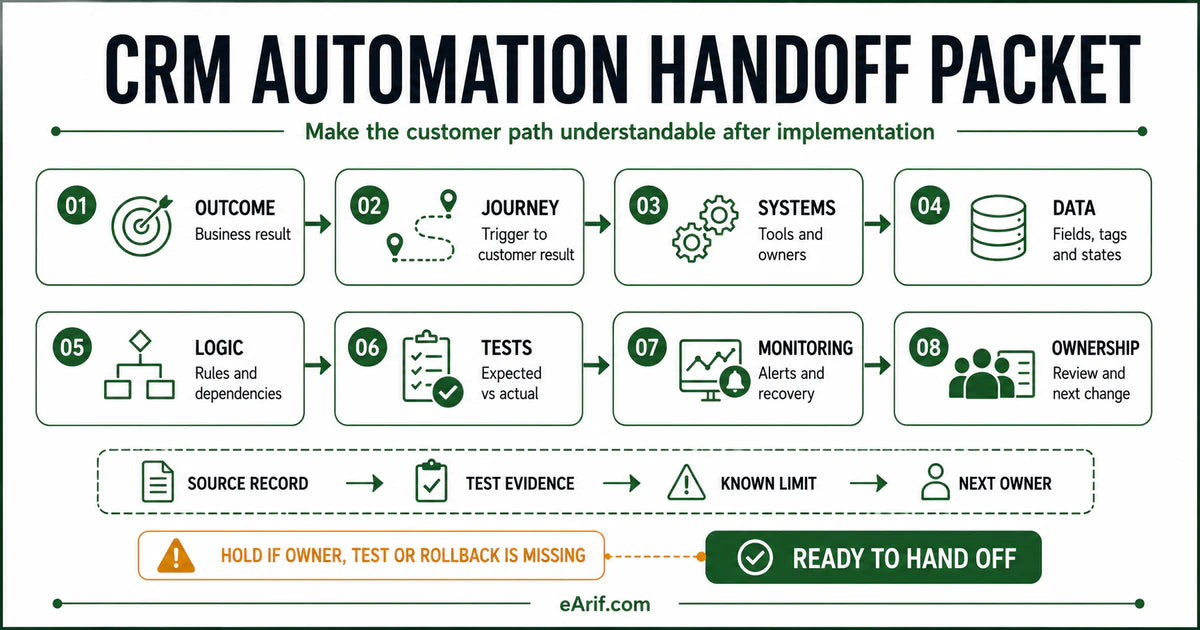
Key terms
Terms that make a handoff document operational
- Handoff packet: the minimum set of journey, system, data, logic, test, monitoring, recovery, and owner records needed to operate the delivered path.
- State contract: the agreed status or value each system should hold after an event, including the authoritative source and allowed transitions.
- Evidence location: the specific log, history, record, event, report, or test note that proves what happened.
- Runbook: a repeatable procedure for a known operating task or recovery action; it is one component of the wider handoff.
- Known limit: a deferred item, unsupported case, access restriction, plan dependency, or unresolved risk that must not be presented as complete.
- Change boundary: the fields, tags, workflows, permissions, events, reports, or connected systems that should not change until impact and rollback are reviewed.
Use this lesson safely
Apply the idea only after the affected path is clear.
- Identify the exact handoff, customer path, field, tag, trigger, report, or access rule before changing tools.
- Test with a low-risk example before touching live leads, payments, course access, reporting, support, or AI responses.
- Keep private client names, screenshots, customer records, payment data, passwords, and API keys out of public forms and messages.
- Document what changed, what was tested, what remains risky, and who owns the next step.
- Start with a Systems Audit when the problem touches several tools or the team cannot explain the current path.
A handoff document is system memory, not project decoration
The implementation may work on delivery day and still be difficult to own one month later. A form name can change, a user can leave, an app connection can expire, a payment can arrive late, a field can be reused, or a workflow can be edited without the next team understanding the dependency. The handoff packet keeps the operating model visible after the original builder leaves the screen.
This guide concerns implementation-to-operations handoff: transferring a CRM automation, integration, tracking path, membership flow, reporting process, or AI-assisted workflow to the people responsible for operating it. It is different from an SDR-to-AE sales handoff, a support escalation note, or a generic project closeout. Those may be documented separately.
A practical packet can be short when the system is simple. Length is not the quality test. A one-page record with exact owners, states, tests, and evidence can be more useful than a forty-page document that repeats screenshots without explaining decisions.
1. Start with the business outcome and scope boundary
Write the outcome before listing tools. Name the customer or team action that begins the path, the observable result that should follow, and what the delivered scope does not cover. For example: a qualified website inquiry should create or update one CRM contact, retain source information, assign an owner, create the agreed opportunity state, and start the approved first-response path. Payment, proposal, fulfillment, and long-term nurture may be separate scopes.
Include the current environment, relevant account or workspace, launch date, last reviewed date, document owner, technical owner, business owner, and approval owner. Do not place passwords, private keys, full customer exports, or payment details in the document. Point to the approved credential manager or access process instead.
2. Map the customer journey as observable state transitions
A useful diagram follows the record, not the interface. Show the trigger, every tool boundary, the authoritative state after each handoff, the customer-visible result, and the evidence location. If a lead form sends data to an integration platform and then to a CRM, write which event identifies the submission, which value matches an existing contact, which fields may be overwritten, and where a failed write appears.
Include normal, returning, duplicate, delayed, cancelled, refunded, failed, and recovered paths when those states can occur. The happy path alone does not explain how the system behaves under real operating conditions. Link the deeper failure-diagnosis model from Why CRM handoffs break when the journey is already producing mismatches.
3. Keep a current system, connection, and owner inventory
List every system that can create, read, update, route, suppress, report, or delete an important state. Record its role, owning team, administrative owner, connected account, authentication owner, data it receives, data it writes, and the approved evidence location. Include forms, calendars, CRM, payment, ecommerce, LMS, membership, email, integration, analytics, dashboard, support, and AI services only when they touch the documented path.
An inventory is not a license list. It should answer who maintains the component, how another owner finds it, and what depends on it. AWS operational-excellence guidance treats identifiable and discoverable owners as an operating requirement, while NIST configuration guidance separates system inventory, baselines, and controlled changes. The same principle is useful for small CRM stacks without implying a certification.
4. Document the data dictionary and state contract
For each critical field, tag, status, stage, role, event, or entitlement, record its purpose, type, allowed values, authoritative source, overwrite rule, required conditions, downstream readers, retention or privacy boundary, and what an empty value means. A field named status is not self-explanatory if the CRM, payment platform, LMS, and dashboard each use a different status model.
Document identity rules explicitly: the contact match key, duplicate policy, merge behavior, account or company matching, and what happens when the identifier is missing or changes. Then document state transitions: which event may move the record, which transitions are forbidden, and which system wins when values disagree.
5. Explain automation logic and dependencies in plain language
Record the trigger, enrollment or re-entry policy, filters, branches, waits, timing and timezone rules, stop conditions, retry behavior, suppression rules, connected credentials, webhooks, API limits, and downstream actions. Link to the live workflow or asset, but also explain the intent so a future owner can distinguish an intentional branch from an accidental condition.
Name collisions and dependencies. Two workflows may update the same owner. A form may write a source field that an import later overwrites. A payment event may arrive before a customer record is available. A delayed action may continue after a workflow revision. HubSpot exposes workflow revision history; HighLevel exposes execution and audit logs; Zapier and n8n expose run histories and retry behavior. The handoff should point to the relevant account evidence instead of copying private logs into a public document.
6. Attach test evidence, not only a statement that testing passed
For each material case, record a clearly labelled test identifier, date and timezone, starting conditions, expected state at each handoff, actual result, evidence location, reviewer, and disposition. A passing test should be reproducible. A failed or deferred test should remain visible with its owner and next decision.
Test actions can create real records, messages, orders, access, or analytics events. Use a development environment, test mode, rollback mode, or a no-private-data QA record where the platform supports it. Salesforce warns that Flow debugging can perform live actions unless rollback mode is selected. Zapier notes that action tests can make live changes. Shopify recommends testing pixel events with its Pixel Helper, and Google provides DebugView and validation tools for analytics events. The handoff must state which test method was used and what it does not prove.
7. Define monitoring, alerting, and recovery before the first failure
Choose a small set of signals that reveal whether the path is operating: expected entry volume, failed or held runs, unassigned records, missing required states, payment-to-access mismatches, message suppression, event discrepancies, dashboard freshness, and support incidents. Name the evidence location, review frequency, warning threshold, incident owner, business owner, and escalation route.
Write recovery instructions for likely failure states. Include containment, evidence preservation, replay or retry conditions, duplicate prevention, manual fallback, customer communication owner, rollback boundary, and the point where a focused repair should become a broader Systems Audit. Do not promise that every platform retains logs forever; record current retention and export requirements from the actual account.
8. Finish with change control, acceptance, and the next review
Record what changed, why it changed, who approved it, which cases were tested, what remains open, how to contain or reverse the change, and when the document should be reviewed. Assign one owner to maintain the packet. A document with no maintenance owner becomes a snapshot of an old system.
Use an acceptance review with the receiving owner. Ask that person to locate the workflow, explain the customer path, find a test example, identify one failure signal, describe the first recovery action, and name the approval needed before a risky edit. If those actions cannot be completed, the handoff is not ready even when the document exists.
Minimum viable one-page handoff template
- Outcome and scope: trigger, intended result, included path, exclusions, environment, launch date.
- Journey: ordered systems, expected state after each handoff, customer-visible outcome, evidence link.
- Inventory: component, role, owner, admin context, connection owner, critical dependency.
- Data: identity key, critical fields and states, authority, overwrite and transition rules.
- Logic: trigger, conditions, timing, re-entry, stop, retry, suppression, and downstream effects.
- Tests: case, test ID, expected, actual, evidence, reviewer, result, open risk.
- Operations: signal, threshold, cadence, alert owner, containment, recovery, escalation.
- Change record: version, decision, approver, rollback boundary, next owner, next review date.
Keep links permission-aware and durable. If an internal URL requires access, name the system and navigation path so the receiving owner can still find it. Store private evidence in the approved workspace, not in a public article, email thread, or intake form.
Eight-part CRM automation handoff evidence matrix
Use the matrix as an acceptance gate. A row is ready only when the receiving owner can locate the evidence and explain the operating decision. Unknown is a valid status; silently assumed is not.
| Packet section | Minimum evidence | Owner question | Hold condition | Review trigger |
|---|---|---|---|---|
| Outcome and scope | Entry event, intended result, environment, exclusions, launch date | Which business result does this path own? | The team lists tools but cannot name the result or boundary | Offer, audience, environment, or intended result changes |
| Journey | Ordered handoffs, expected states, customer-visible result, evidence locations | Where should the record go next? | A tool boundary or authoritative state is missing | A form, booking, payment, access, message, or report path changes |
| Systems and owners | Component inventory, role, admin owner, connection owner, dependencies | Who can inspect and maintain each component? | A critical component has no discoverable accountable owner | An app, user, credential, permission, or integration changes |
| Data and states | Identity key, field dictionary, authority, overwrite and transition rules | Which system wins when values disagree? | Critical fields or statuses have conflicting meanings | A field, tag, stage, role, event, entitlement, or merge rule changes |
| Automation logic | Trigger, conditions, timing, re-entry, stop, retry, suppression, side effects | Why does each branch exist? | Logic depends on an undocumented value, credential, workflow, or delay | A trigger, branch, wait, action, API, webhook, or schedule changes |
| Test evidence | Case ID, starting state, expected, actual, evidence, reviewer, result | Can another owner reproduce the test safely? | Only the happy path or a screenshot was reviewed | A material configuration, platform behavior, or customer path changes |
| Monitoring and recovery | Signals, thresholds, cadence, alert owner, containment, replay, escalation | How will the team know and respond when it fails? | No failure signal, recovery owner, or duplicate-safe action exists | Volume, risk, retention, support process, or failure pattern changes |
| Acceptance and change control | Version, change record, approver, rollback boundary, next owner, review date | Who approves and documents the next risky change? | The receiving owner cannot explain or operate the path | Ownership changes or the scheduled review date arrives |
32-point browser-local handoff readiness worksheet
Check an item only after the current evidence is available. Your progress stays in this browser and is not submitted. A completed checkbox means reviewed, not automatically healthy; keep the result, evidence link, owner, and open risk in the private handoff record.
How to use the worksheet without creating false confidence
Do not convert the 32 checks into a universal health percentage. One missing payment-recovery owner can matter more than twenty complete descriptive fields. Classify each item as verified, failed, unknown, not applicable with reason, or blocked by owner decision. Prioritize current customer harm, irreversible or duplicate actions, privacy and access risk, missing recovery, and unclear ownership before presentation polish.
Use platform evidence as an example, not a substitute for the packet
Current platforms expose different evidence and retain it for different periods. HighLevel execution logs can show contact paths and errors, while its audit logs identify selected account changes. HubSpot revision history can show who changed a workflow and when. Zapier run history and n8n executions expose workflow results and retry options. Salesforce Flow debugging, Shopify Pixel Helper, and Google Analytics DebugView support specific testing jobs. Confirm current plan access, retention, and behavior in the live account; do not promise a log or rollback feature only because another platform has one.
Choose the next route from the evidence
- Use this article and worksheet when the system is understood and the team needs a structured handoff record.
- Use the CRM automation audit checklist when the current state still needs a broad self-check.
- Use Why CRM handoffs break when the visible issue is a customer-journey failure rather than missing documentation.
- Use monthly CRM automation support when the path is stable but recurring monitoring and controlled changes need an owner.
- Start with the Systems Audit when several tools, live customers, payments, access, reports, or unclear dependencies are involved.
Article FAQ
CRM automation handoff document questions
What is the difference between a handoff document, runbook, and SOP?
The handoff document explains the delivered system, its outcome, journey, components, data, logic, evidence, limits, and ownership. A runbook gives repeatable steps for one operating or recovery task. An SOP defines a standardized organizational procedure. A useful handoff can link to runbooks and SOPs without copying them.
Are screenshots enough for a CRM automation handoff?
No. Screenshots can help locate a setting, but they do not explain intended behavior, authoritative state, dependencies, test conditions, failure evidence, recovery, or ownership. Pair selected screenshots with text, links, state definitions, and reproducible test records.
Who should own the handoff document after launch?
Assign one accountable maintenance owner and name the business, technical, monitoring, recovery, and approval owners relevant to the path. Review the document when ownership, tools, logic, fields, permissions, customer states, or operating risk changes.
When does missing documentation require a Systems Audit?
Use a Systems Audit when the team cannot explain a live path across several tools, customer-impacting failures already exist, authoritative states conflict, or no safe test, containment, recovery, and change boundary can be identified from current evidence.
Sources and context
Official references for ownership, change, testing, and evidence
Related eArif context
Official references
This guide is vendor-neutral. The following primary sources support the operating principles and illustrate where current platforms expose ownership, change, test, execution, and recovery evidence. They do not create one universal handoff standard.
- NIST SP 800-53 Rev. 5: configuration change control, testing, documentation, inventory, and planning
- AWS Well-Architected: processes and procedures have identified owners
- AWS Well-Architected: operational readiness, runbooks, playbooks, monitoring, and improvement
- HighLevel: workflow execution logs and enrollment history
- HighLevel: audit logs and change accountability
- HubSpot: view and revert workflow changes
- Zapier: test workflow steps and understand live test effects
- Zapier: run statuses, logs, troubleshooting, and recovery
- n8n: execution history and retry options
- Salesforce: test and troubleshoot Flows with rollback considerations
- Shopify: test custom pixels and inspect received events
- Google Analytics: verify events with DebugView and diagnostic tools
Sources were reviewed July 28, 2026. Platform interfaces, retention, permissions, plans, and test behavior change; verify the current official documentation and the actual account before using a platform-specific procedure.
Make the live system understandable before the next change.
If your team inherited a CRM automation path with unclear owners, tests, dependencies, or recovery, start with a Systems Audit and turn the current evidence into a controlled handoff.
Start with a Systems Audit