
Key terms
CRM handoff terms used in this guide
- CRM handoff: a transfer of customer data, state, responsibility, or an expected action from one system or owner to the next.
- State contract: the agreed input, transformation, output, owner, completion evidence, and recovery rule for one handoff.
- Identity key: the value used to decide whether an incoming person, company, order, or membership matches an existing record.
- Idempotency: processing a repeated event without creating an unintended duplicate action.
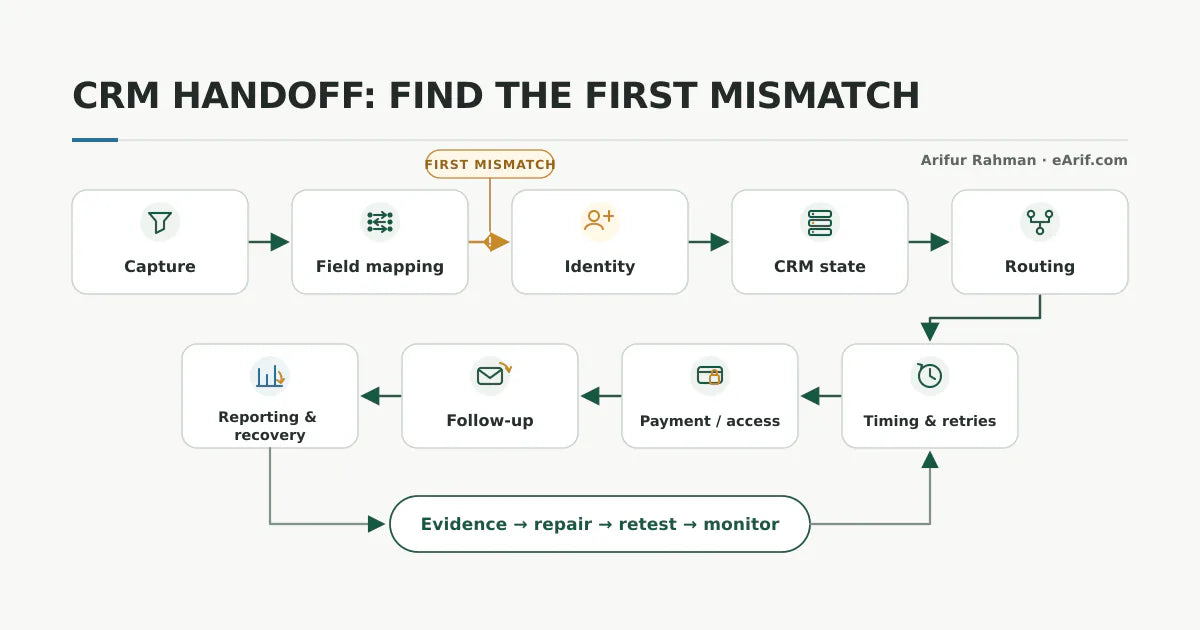
- First mismatch: the earliest boundary where observed behavior no longer matches the documented path.
- Reconciliation: comparing source events, destination records, business outcomes, and exceptions to prove which handoffs completed.
Use this lesson safely
Apply the idea only after the affected path is clear.
- Identify the exact handoff, customer path, field, tag, trigger, report, or access rule before changing tools.
- Test with a low-risk example before touching live leads, payments, course access, reporting, support, or AI responses.
- Keep private client names, screenshots, customer records, payment data, passwords, and API keys out of public forms and messages.
- Document what changed, what was tested, what remains risky, and who owns the next step.
- Start with a Systems Audit when the problem touches several tools or the team cannot explain the current path.
A CRM handoff is a state contract, not just a connector
A connector answers whether one tool can call another. A reliable handoff answers six harder questions: what state enters, how it is transformed, what the destination must contain, who owns the next action, what proves completion, and how a failed record is recovered. If one answer is missing, the workflow can report success without delivering the intended business outcome.
For example, a form-to-CRM integration is not complete merely because an API request returned successfully. The contact must match or create the correct record, preserve source and consent data, enter the intended lifecycle state, route to a valid owner, trigger the right next step, and remain visible in a failure or reconciliation report. The same contract applies to booking-to-pipeline, payment-to-access, order-to-follow-up, and CRM-to-dashboard handoffs.
This distinction matters because platforms implement state differently. HubSpot documents lifecycle stages as properties that can change through record creation, associations, manual updates, workflows, or connected apps. Salesforce assignment rules evaluate ordered conditions and can route a lead to a user or queue. Stripe documents that webhooks can be retried, duplicated, and delivered out of order. These are not edge cases to hide; they are design constraints to include in the handoff contract.
The 9 places CRM handoffs usually break
1. The entry event does not represent the promised customer action
The workflow starts from the wrong signal. A page view is treated as a form success, a calendar view is treated as a booking, an order creation is treated as payment, or a tag change is treated as access delivery. The trigger may fire exactly as configured while representing an earlier or different state than the team believes.
Write the public action and success condition separately. For a form, prove the success response rather than a button click. For a booking, define the appointment status that counts. For a payment, define whether the workflow needs an authorized, paid, refunded, disputed, or subscription-state event. The source event must match the business promise before downstream logic can be trusted.
2. Required data is missing, malformed, or mapped to the wrong property
A source can send a valid payload that the destination cannot use. Common examples include a blank email, phone number in an unexpected format, free text sent into a controlled option, a source value written to the wrong field, a date interpreted in another timezone, or an object ID placed where a display name was expected.
Compare the actual source payload with the destination field contract. Record field names, types, allowed values, required status, formatting rules, defaults, and what should happen when a value is absent. Do not silently invent a value to force the record through; route incomplete records to review when the missing data affects identity, consent, ownership, payment, or access.
3. Contact identity and deduplication rules disagree
One system may match contacts by email while another uses a record ID, phone number, company domain, order ID, or an integration-specific key. A changed email, shared company address, guest checkout, imported record, or merge can cause one person to become two records or two people to become one.
HubSpot's official duplicate-management guidance describes matching potential contact and company duplicates using record properties, while Salesforce provides lead duplicate rules that can compare leads with leads and contacts. The practical lesson is platform-neutral: choose the identity key deliberately, document merge behavior, and test both create and update paths. Never assume that a successful create action means the correct record now owns the next step.
4. Lifecycle, stage, tag, or status definitions drift
Marketing may define a lead as a form submission, sales may require qualification, the CRM may use a lifecycle property, and an automation may rely on an old tag. A record can then be simultaneously labelled new, qualified, customer, inactive, or unassigned depending on which screen is viewed.
Create a small state dictionary with entry criteria, exit criteria, allowed transitions, owner, timestamp, and exceptions. HubSpot notes that lifecycle stages can be updated by several mechanisms and that default automatic behavior moves stages forward. That is useful behavior, but it also means a workflow that assumes a backward transition or a disconnected app that applies a default stage can produce an unexpected state. Diagnose the transition, not only the final label.
5. Routing produces an owner field but no owned action
A lead can have an owner and still be lost. The owner may be inactive, the queue may be unmonitored, notification may be disabled, territory data may be blank, capacity rules may have no fallback, or a later workflow may reassign the record. Completion must include an accountable next action, not only a populated field.
Salesforce recommends a catch-all assignment rule so records that miss earlier criteria still reach a default owner or queue. Apply the same principle in any CRM: define fallback ownership, notification evidence, acceptance or first-touch evidence, and an escalation timer. Measure unassigned records and time to first owned action separately.
6. Timing, retries, and event order change the result
Connected systems do not always finish in the order shown on a workflow canvas. Enrichment can arrive after routing. A payment event can arrive before the customer record. A temporary timeout can trigger a retry after the first attempt already completed. A delayed action can evaluate fields that changed while it waited.
Stripe explicitly states that webhook delivery order is not guaranteed, automatic retries occur, and duplicate events can appear. HubSpot documents workflow conditions that retry after rate limits, timeouts, and webhook failures. Design for the current source state rather than assuming one perfect sequence. Store stable event or object IDs, make repeated processing safe, and retrieve authoritative state when order matters.
7. Payment, booking, membership, or fulfillment state is simplified too early
A binary paid or not-paid field is often too weak. Orders can be pending, authorized, paid, partially refunded, fully refunded, disputed, cancelled, renewed, overdue, or recovered. Appointments can be scheduled, confirmed, rescheduled, cancelled, no-show, or completed. Membership access can be granted, pending, paused, expired, revoked, or restored.
Map the states that change customer access, communication, support, and reporting. Do not send onboarding before the qualifying state is confirmed. Do not revoke access from one noisy event without checking the current payment and subscription object. Link the state model to a recovery path so support can explain and correct an exception without creating another automation.
8. Follow-up is triggered without verifying the customer-facing outcome
A workflow can send a message because the CRM field changed even though the preceding customer outcome failed. A welcome email may arrive before access exists. A sales reminder may continue after a booking. A failed-payment message may be sent after recovery. The CRM shows activity, but the customer experiences contradiction.
Gate customer-facing communication on the state it describes. If a message says access is ready, verify access. If it says a meeting is booked, verify the current booking. If it says payment failed, check that no successful retry has superseded the event. Add a human review step when confidence is low or the message could affect money, access, consent, or a live relationship.
9. Logs prove tool execution but not business completion
Automation histories are necessary but incomplete. Zapier documents distinct run statuses, HTTP logs, replay behavior, and Zap history. HubSpot separates workflow-level and record-level errors. These tools help locate technical failure, but a successful run still does not prove the correct owner acted, the buyer received access, the message was appropriate, or the report counted the record correctly.
Use two layers of evidence: execution evidence from the connector and outcome evidence from the destination or customer path. Reconcile a small sample regularly. Keep a failed-record queue with reason, owner, first seen time, current state, recovery action, and closure evidence. A handoff is healthy when exceptions are visible and recoverable, not when the dashboard reports zero errors.
Trace the first mismatch instead of rebuilding everything
- Freeze one expected path. Choose one form, booking type, offer, payment path, or access rule. Write the exact successful outcome.
- Create one privacy-safe test. Use a clearly labelled QA record that does not contain private customer data and will not enter unsafe live messaging.
- Capture source evidence. Record the success response, event or object ID, timestamp, payload fields, and source status.
- Inspect each destination in order. Check identity match, field values, lifecycle state, owner, workflow enrollment, downstream state, and report visibility.
- Stop at the first mismatch. Later symptoms may disappear once the earliest broken contract is repaired.
- Repair the smallest bounded rule. Preserve rollback notes and do not delete fields, tags, workflows, or records merely because they appear unused.
- Repeat the same test and reconcile. Prove both technical execution and the customer-facing outcome, then document the owner and monitoring rule.
CRM handoff failure matrix
Use the visible symptom to choose where to inspect first. The table is a diagnostic starting point, not proof that the named boundary is the root cause.
| Visible symptom | First boundary to inspect | Evidence to compare | First safe action | Likely owner |
|---|---|---|---|---|
| Form says success but no CRM record exists | Capture and destination validation | Form success response, integration run, required fields, destination error, record search, and source timestamp | Submit one labelled test and compare the exact payload with destination requirements. | Website and CRM operations |
| A duplicate contact appears | Identity and create-or-update logic | Email, phone, record ID, company domain, merge history, import source, and matching rule | Pause blind creation and prove which key should update the existing record. | CRM administrator |
| Fields or tags contain the wrong values | Mapping and transformation | Source value, destination type, formatter, default, allowed option, and previous workflow update | Replay with a controlled value only after the mapping and overwrite order are documented. | Integration owner |
| Lead is assigned to the wrong person or nobody | Routing criteria and fallback | Territory inputs, rule order, active users, queues, capacity, reassignment history, and notification | Test each decision branch and add a monitored catch-all owner. | Revenue or sales operations |
| Workflow says success but the next step did not happen | Execution vs outcome evidence | Run status, step output, destination record, customer-facing result, and exception queue | Verify the destination state rather than replaying the whole workflow immediately. | Automation and destination owners |
| Payment succeeded but access is missing | Payment state, identity, and fulfillment | Current order or subscription, event ID, customer key, product mapping, access rule, user account, and enrollment | Confirm authoritative payment state and repair one test account before bulk replay. | Commerce and membership operations |
| Customer receives the wrong or duplicate follow-up | Message gate, re-entry, and stop rules | Current customer state, workflow membership, wait steps, competing automations, DND or consent, and send history | Stop unsafe sends, identify the state that should gate the message, and test re-entry. | Lifecycle marketing owner |
| Reports disagree about completed handoffs | Metric definition and reconciliation | Event, contact, lead, order, owner action, date basis, exclusions, duplicate rules, and refresh time | Define completion once, then compare a small row-level sample across systems. | Operations and reporting owner |
| The issue returns after each repair | Ownership, monitoring, and change control | Change log, workflow versions, failed-record queue, alerts, owner response, test cases, and rollback notes | Move from isolated repair to a cross-system audit and recurring health review. | Systems owner |
24 checks before repairing a CRM handoff
Work through the checks with one bounded customer path. The goal is to gather enough evidence for a safe decision, not to make every checkbox green before asking for help.
How to test a CRM handoff without risking live customers
Use a clearly labelled QA identity that your team can recognize and remove from normal sales, billing, support, and marketing decisions. Do not use a real customer record merely because it already demonstrates the issue. A safe test should avoid private data, real charges, live entitlement changes, and customer-facing messages unless those actions are explicitly part of a controlled test.
- Record the current workflow version, active rules, and expected result before editing.
- Choose a test path that reaches the same trigger and mapping logic as the public journey.
- Use a unique source marker so the record can be found in every system.
- Capture timestamps, event or run IDs, destination record IDs, and screenshots with private values redacted.
- Stop at the first mismatch and preserve the failed evidence.
- Make one bounded change, then repeat the same test.
- Check for duplicate records, duplicate messages, stale access, wrong owners, and reporting side effects before release.
Metrics that reveal handoff health
A single workflow success rate is not enough. Monitor a small set of measures tied to the contract:
- Capture completion: expected source events that produce a valid destination record.
- Identity exceptions: duplicate, unmatched, merged, or manually corrected records.
- Data completeness: records missing the fields required for state, routing, consent, access, or reporting.
- Routing exceptions: unassigned records, inactive owners, unmonitored queues, and reassignment after the initial route.
- Time to owned action: elapsed time from qualifying event to an accountable next step.
- Outcome completion: records where booking, payment, access, follow-up, or another promised result is proven.
- Recovery age: time failed records remain unresolved, grouped by reason and owner.
Keep metric definitions separate from the tools that display them. When GA4, CRM, and dashboard totals differ, use the GA4, CRM, and Looker Studio discrepancy guide to reconcile grain, identity, dates, attribution, freshness, joins, and aggregation.
Choose repair, rebuild, or audit from the evidence
- Repair one handoff when the first mismatch is reproducible, one owner controls the rule, the downstream effects are bounded, and rollback is clear.
- Rebuild a workflow when the current logic cannot express the documented state contract, old dependencies are proven, and the replacement can run through complete regression tests before cutover.
- Use a CRM automation audit when the customer path is known but several fields, tags, workflows, owners, or reports need a safe repair order.
- Use Systems Audit when the issue crosses CRM, payments, bookings, WordPress, course access, ecommerce, reporting, support, or AI-assisted follow-up, or when live-customer risk prevents isolated testing.
Do not delete tags, fields, workflows, duplicate records, historical activity, or integration credentials as a diagnostic shortcut. First prove dependencies, export the relevant configuration, and document what another system still expects.
Safe context to prepare before asking for help
Prepare the public source path, current tools, expected outcome, first visible symptom, approximate business impact, workflow or rule name if known, one redacted test timeline, and the deadline. Do not send passwords, API keys, payment records, full CRM exports, private customer screenshots, or unredacted access logs in the first message.
For a narrow known path, use the CRM automation audit checklist. For implementation diagnosis, review the CRM automation audit. For cross-system uncertainty or live-customer risk, start with Systems Audit.
Article FAQ
CRM handoff questions before a repair
Why are website leads not reaching the CRM?
The form can succeed while the CRM handoff fails because of missing required fields, expired credentials, destination validation, duplicate rules, field-type mismatches, rate limits, filters, or a disconnected integration. Trace one labelled submission from the form success response through the integration run and destination record search before changing the form or CRM.
Why does the workflow say successful when the customer path still failed?
A successful run usually proves that configured steps executed, not that the intended customer outcome occurred. Verify the destination record, owner action, payment or booking state, access result, follow-up, and reporting entry. Treat execution evidence and outcome evidence as separate handoff requirements.
When should a CRM handoff problem become a Systems Audit?
Use Systems Audit when the same failure crosses several tools or teams, affects live leads, bookings, payments, memberships, course access, ecommerce, reporting, support, or AI follow-up, has returned after earlier fixes, or cannot be tested safely as one bounded workflow.
What should I do after I learn what is broken?
Choose the smallest safe next step. Test one low-risk handoff yourself when the path is clear, use the related service when the failure is specific, start with the Systems Audit when several tools or live customers are involved, and keep learning when the evidence is still vague.
Sources and context
Official documentation behind the failure model
Related eArif context
Official references
- HubSpot: use lifecycle stages
- HubSpot: review and manage duplicate records
- HubSpot: troubleshoot common workflow errors
- Salesforce: set up assignment rules
- Salesforce: standard lead duplicate rule
- Stripe: webhook delivery behavior and best practices
- Zapier: troubleshoot workflow errors
- Zapier: view and manage Zap history
Find the first broken handoff before rebuilding.
Use Systems Audit when forms, CRM records, routing, payments, access, follow-up, and reporting no longer agree and the failure crosses more than one tool or owner.
Start with a Systems Audit