
Key terms
Terms used in the eight-gate audit
- Advertised contract: the product, variant, price, currency, availability, promise, market, landing page, and action a shopper sees after clicking an ad.
- Buying-path proof: evidence that a representative shopper can move from landing page to cart, checkout, payment result, confirmation, and expected order processing.
- Catalog parity: agreement between the product data submitted to an ad or shopping channel and the title, image, price, currency, availability, variant, and purchase action on the landing page.
- Decision-useful tracking: measurement that is clear enough to support a launch, hold, repair, or budget decision even when analytics and commerce reports do not match exactly.
- High-risk gate: a boundary whose failure can make the advertised product unbuyable, misleading, operationally unsupported, or impossible to measure responsibly.
- Controlled launch test: a deliberately limited product, market, channel, budget, and review window used only after the relevant high-risk gates have evidence.
- Scoped hold: pausing the affected product, market, feed, or campaign instead of assuming every store activity must stop.
- Evidence owner: the person responsible for recording the finding, deciding the next action, preserving rollback context, and confirming the retest.
Use this lesson safely
Apply the idea only after the affected path is clear.
- Identify the exact handoff, customer path, field, tag, trigger, report, or access rule before changing tools.
- Test with a low-risk example before touching live leads, payments, course access, reporting, support, or AI responses.
- Keep private client names, screenshots, customer records, payment data, passwords, and API keys out of public forms and messages.
- Document what changed, what was tested, what remains risky, and who owns the next step.
- Start with a Systems Audit when the problem touches several tools or the team cannot explain the current path.
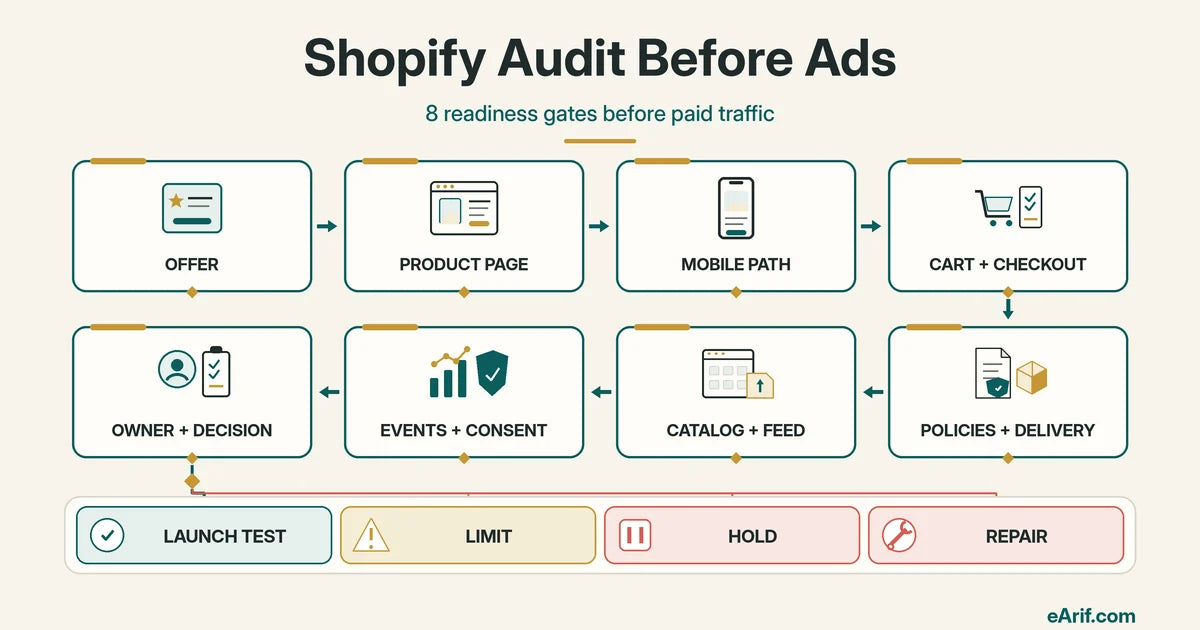
Start with the ad destination, not the ad account. Paid traffic amplifies the storefront path that already exists. If the advertised variant is unavailable, the mobile selector is unclear, shipping appears unexpectedly, a market uses the wrong currency, the feed disagrees with the page, or one purchase is counted twice, campaign data cannot repair the underlying handoff.
Shopify's general store checklist separates store setup, organization, testing, launch, sales channels, and promotion. Shopify also provides a Launch Check that scans store data, admin settings, storefront elements, and other areas, but Shopify tells merchants to review the results and manually confirm business fit. A before-ads audit uses the same principle: automated status is useful evidence, not approval to spend.
Gate 1: define the offer and campaign contract
Name the exact product or collection, default variant, landing URL, target market, currency, primary action, campaign objective, spend limit, decision date, and report owner. Record what the ad will promise and what the landing page must prove. A broad store audit without this contract can produce a long issue list without answering whether the intended campaign is ready.
For international targeting, check the actual market experience. Shopify Markets can change language, currency, product availability, pricing, and theme behavior by country or channel. Use Shopify's Markets guidance to preview the intended country and confirm that the advertised product can be bought under the expected experience. Do not infer United States, United Kingdom, Canada, or Australia readiness from a single home-country browser session.
Gate 2: verify product and landing-page integrity
The destination should make the advertised product easy to identify and buy. Review the title, primary image, description, variant choices, price, currency, availability, quantity rule, delivery context, purchase option, and buy button. Shopify's product details documentation explains that product records can carry media, pricing, inventory, shipping, variants, purchase options, metafields, status, publication, and search information. Those fields become separate failure points when the ad names one product state and the landing page exposes another.
For Google product ads and free listings, the requirement is more specific. Google's Merchant Center landing-page guidance says submitted product information is checked against the page, including title, image, price, currency, availability, variant, and a working purchase action. Test the exact destination and default variant used by the feed or ad, not only the generic product handle.
Gate 3: test the mobile buying path
Use a narrow mobile viewport and a real device when available. Confirm that the campaign landing page loads without a blocking popup, the offer remains readable, the intended variant can be selected, price and delivery context stay visible, the primary action is not covered, cart feedback is clear, and checkout can begin. Repeat the test with the consent state expected for the target market.
Mobile readiness is not a screenshot review. It is an interaction trace. Record the page, viewport or device, market, variant, consent choice, action attempted, result, and first blocked step. A page can look polished above the fold while the variant selector, sticky CTA, discount field, accelerated checkout, or cart drawer fails later.
Gate 4: prove cart, checkout, payment, and order behavior
Use an authorized Shopify test method suitable for the store. Shopify's test-order guidance says a test order can verify order processing, inventory, shipping, email notifications, and taxes. It also warns that customers cannot place live orders while a payment provider is in test mode. Plan the test window, owner, and rollback before changing payment settings.
Exercise more than a successful card path. Check a valid product and variant, quantity, discount behavior, shipping method, tax display, payment success, payment failure, confirmation page, order record, inventory movement, notification, fulfillment route, cancellation or refund expectation, and return to the storefront. A campaign should not be used as the first checkout test.
Gate 5: make policy, contact, and delivery facts findable
Before asking a new shopper to pay, confirm that public contact information, delivery timing, shipping cost context, return or refund conditions, privacy information, and material product disclosures are accurate and easy to reach. Shopify's consumer-protection guidance explains that merchants are responsible for public-facing contact, refund, fulfillment, and delivery information and should obtain qualified advice for their circumstances. This article is an operational checklist, not legal advice.
Match operational reality. If an advertised product ships from another location, has a restricted destination, is final sale, requires a subscription, is backordered, or has a longer handling window, the storefront and campaign review should surface the applicable facts before launch. Do not publish a generic policy that the fulfillment team cannot follow.
Gate 6: reconcile catalog, feed, market, and landing page
Confirm the product is active, published to the intended channel and market, and represented by accurate titles, descriptions, images, identifiers where applicable, variant data, price, currency, availability, shipping, and destination URL. Shopify's Google & YouTube channel guidance explains that eligible Shopify product information can sync to Merchant Center. A connected channel does not prove every product is eligible or every submitted value matches the landing experience.
Review channel diagnostics and distinguish account, feed, product, variant, landing-page, shipping, and policy issues. Google's product-data optimization guidance recommends mapping the journey from search to checkout and keeping product data accurate and aligned with landing pages. Its shipping guidance requires complete, correct shipping information. Resolve a product disapproval or mismatch before directing more product-ad traffic to the same boundary.
Gate 7: test events, attribution inputs, and consent behavior
Inventory every path that can send customer-event or conversion data: Shopify app pixels, custom pixels, the Google channel, tag management, ad-platform integrations, historical theme code, server events, and imported conversion actions. Shopify documents app and custom pixel paths in Pixels and customer events. Do not add another sender until the current ownership and duplicate risk are known.
Use Shopify Pixel Helper or the integration's supported test path where appropriate. Shopify's custom-pixel testing guidance covers page, product, cart, checkout, shipping, and completion events and shows whether a subscription callback succeeds or fails. Test the site's intended consent behavior instead of bypassing it to manufacture a pass. Shopify's customer privacy guidance explains that privacy settings and consent choices can change collection and advertising behavior.
For GA4, one controlled order should produce the intended ecommerce sequence and one explainable purchase. Google's ecommerce setup guidance identifies events such as add_to_cart, begin_checkout, add_shipping_info, add_payment_info, and purchase. Verify transaction_id, value, currency, and items against privacy-safe order facts. Exact agreement between Shopify, GA4, and ad platforms is not required for every use case, but unexplained missing, duplicate, wrong-currency, or wrong-destination signals are not decision-ready.
Gate 8: assign operating ownership and a release decision
Name who monitors inventory, fulfillment, failed payments, support, refunds, feed diagnostics, pixels, analytics, campaign changes, and post-launch exceptions. Define the first review time, evidence source, stop condition, and rollback owner. A technically functional store can still be unready when nobody owns the first failed order or knows which report controls the decision.
Finish with one of four states. Launch test means the relevant high-risk gates passed and remaining low-risk unknowns have owners. Limit means one product, market, channel, budget, or duration is constrained while a noncritical unknown is observed. Hold means the affected campaign should not send traffic through a failed buying, policy, catalog, or measurement boundary. Repair means the first failed gate, smallest change, owner, rollback, and retest are documented. None of these states guarantees campaign approval, traffic, conversion rate, revenue, or return on ad spend.
Eight-gate Shopify pre-ad decision matrix
Use the matrix to classify the affected product, market, or campaign. A hold can be scoped; a passing row is evidence for one tested path, not proof that every device, customer, channel, or future change will behave identically.
| Readiness gate | Minimum evidence | Hold or limit signal | First safe action | Primary owner |
|---|---|---|---|---|
| 1. Offer contract | Named product, variant, destination, market, currency, objective, spend limit, and decision date | Ad promise or target market does not match the page or commercial reality | Correct the campaign contract or destination before creative review | Campaign and ecommerce owner |
| 2. Product page | Visible product identity, image, price, currency, availability, variant, delivery context, and purchase action | Price, variant, availability, image, claim, or buy action is wrong or unclear | Hold the affected product ad and repair the landing state | Merchandising and storefront owner |
| 3. Mobile path | Representative mobile session reaches cart with the intended variant and no blocked action | Popup, selector, sticky element, layout, or consent state blocks the path | Fix the first blocked interaction and repeat the same device path | Theme and QA owner |
| 4. Cart and checkout | Authorized success and failure tests cover cart, discount, shipping, tax, payment, confirmation, order, inventory, and notification | Order cannot complete or creates the wrong commercial state | Hold purchase traffic through the affected checkout path | Checkout and operations owner |
| 5. Policies and delivery | Accurate contact, fulfillment timing, shipping, return or refund, privacy, and material disclosure routes | Store promise is absent, contradictory, unsupported, or not operationally owned | Correct the public information and obtain qualified advice where needed | Merchant and policy owner |
| 6. Catalog and feed | Active product and variant data match the intended channel, market, landing page, price, currency, availability, and shipping | Disapproval, mismatch, wrong URL, wrong market, stale availability, or feed conflict | Hold the affected product or catalog campaign until diagnostics clear | Catalog and channel owner |
| 7. Events and consent | Known sender inventory, expected consent behavior, one explainable purchase, and useful attribution inputs | Missing or duplicate purchase, wrong value or currency, wrong destination, or unexplained consent gap | Limit to a test the business can reconcile manually; do not scale on untrusted signals | Tracking and privacy owner |
| 8. Owner and decision | Launch, limit, hold, or repair decision with evidence, owner, stop rule, review time, and rollback | No accountable monitor or no response path for inventory, order, support, feed, or tracking exceptions | Assign the owner and escalation route before launch | Business decision owner |
| Controlled launch test | All applicable high-risk rows have evidence; bounded unknowns have owners and limits | Any applicable hold condition remains unresolved | Launch the defined test only, preserve the baseline, and review at the agreed time | Named release owner |
32-point browser-local Shopify audit before ads
Check only what you can prove for the intended product, market, and campaign. Selections stay in this browser and are not submitted to eArif.com. Never enter passwords, API keys, private customer data, payment details, full order records, or confidential account screenshots.
Run the audit in a fixed sequence
- Freeze the campaign contract: record the intended product, variant, URL, market, currency, objective, limit, and decision date before changing the store.
- Capture the landing state: check the advertised destination as a new visitor on representative desktop and mobile paths, including the intended market and consent choice.
- Trace the buying path: move from product to cart, checkout, payment result, confirmation, order record, inventory, notification, and fulfillment with an authorized test method.
- Reconcile public promises: compare the ad and product claim with price, availability, shipping, delivery, contact, return, refund, privacy, and material disclosure information.
- Inspect the catalog boundary: compare submitted product and variant data, destination, market, shipping, and channel diagnostics with the live page.
- Inspect measurement last: inventory senders, test consent behavior, verify expected events and one purchase, and separate collection from processed reporting.
- Classify the first failed gate: avoid a broad redesign when one product, checkout, feed, or sender boundary explains the risk.
- Make a scoped release decision: name launch test, limit, hold, or repair; assign the owner, rollback, retest, stop condition, and first review.
Use representative test cases
A single happy-path desktop order is weak evidence. Select a small, risk-based set that matches the planned campaign. Include the advertised product and default variant, a representative mobile device, the target market and currency, one shipping destination, one discount or promotion when advertised, one authorized payment success, one payment failure, and the intended consent state. Add an out-of-stock, backorder, subscription, local-pickup, or international case only when that state is relevant.
Do not create fake public reviews, customer accounts, private order exports, or live payment activity merely to fill a checklist. Use Shopify's supported test methods and privacy-safe references. Record only the facts needed to identify the boundary: test timestamp and timezone, public URL, product or variant identifier, market, device, consent choice, expected result, actual result, first failed gate, and redacted error.
Separate what can be checked publicly from what needs authorized access
- Public storefront checks: landing-page identity, visible product facts, mobile interactions, contact and policy routes, public shipping context, cart behavior before private details, structured product information, broken links, and obvious blocking overlays.
- Authorized Shopify checks: product publication, market and channel settings, inventory state, payment test mode, order timeline, fulfillment, notifications, customer events, pixel status, and app ownership.
- Authorized channel checks: Merchant Center or ad-platform diagnostics, submitted product data, conversion settings, audience use, and campaign destination.
- Authorized analytics checks: property and stream, event requests, DebugView or Realtime, transaction parameters, key-event settings, UTM inputs, and processed reports.
- Qualified policy review: legal requirements, jurisdiction-specific disclosures, privacy choices, consent design, regulated claims, and contract language.
Build a privacy-safe release packet
The release packet should be short enough to review. Include the campaign contract, tested URLs and variants, target market, device and consent cases, checkout method, catalog diagnostic summary, event-owner inventory, one redacted order reference, pass and fail evidence by gate, unresolved unknowns, release decision, owner, stop rule, rollback, and retest date. Exclude passwords, access tokens, customer names, contact details, addresses, payment data, unredacted order exports, and confidential advertising information.
Keep evidence statements precise. Use “the tested mobile path reached checkout” instead of “mobile is perfect.” Use “the intended product has no current Merchant Center issue in the reviewed account” instead of “Google approved the store.” Use “one purchase reached the named property once” instead of “tracking is fixed forever.”
Choose the correct eArif route
- Use this page for the broad informational question: what should be audited before Shopify ads?
- Use the Shopify tracking before ads checklist when the task is a tracking-only self-assessment.
- Use the Shopify GA4, pixel, and tracking audit when several senders, pixels, consent rules, conversions, or reports may conflict.
- Use Shopify GA4 purchase event not showing when one order is missing, delayed, malformed, or duplicated in GA4.
- Use Shopify GA4 setup when the intended tracking implementation is already known and needs configuration.
- Use Shopify launch QA before ads when a fixed-scope commercial review of storefront, mobile, checkout, policy, and tracking readiness is needed.
- Use Systems Audit when checkout, fulfillment, CRM, customer access, reporting, and team ownership form one live cross-tool risk.
Limits of a pre-ad audit
A passing audit does not guarantee ad-platform approval, feed approval, campaign delivery, attribution accuracy, conversion rate, revenue, profitability, return on ad spend, search visibility, or future behavior after the store changes. It proves only the reviewed evidence for the defined product, market, channel, device, consent state, and time. Recheck the affected gates after material theme, app, product, price, market, checkout, policy, pixel, feed, or fulfillment changes.
Article FAQ
Shopify audit-before-ads questions
What should I audit before running Shopify ads?
Audit the campaign contract, advertised product and landing page, mobile buying path, cart and checkout, policies and delivery facts, catalog and feed parity, events and consent behavior, and operating ownership. Finish with a scoped launch, limit, hold, or repair decision.
Does Shopify tracking need to be perfect before ads?
No, but it must be decision-useful for the planned test. The team should know which sender owns each required event, whether one controlled order produces one explainable purchase, what consent changes, which report supports each decision, and which unknowns require a spend limit or hold.
Should I hold all Shopify ads when one audit check fails?
Not automatically. Scope the hold to the affected product, market, feed, checkout path, or campaign when the evidence supports that boundary. Hold broader traffic when the same failure affects every advertised path or when checkout, policy, or operational risk cannot be contained.
What should I do after I learn what is broken?
Choose the smallest safe next step. Test one low-risk handoff yourself when the path is clear, use the related service when the failure is specific, start with the Systems Audit when several tools or live customers are involved, and keep learning when the evidence is still vague.
Sources and context
Current Shopify and Google references used for this guide
Related eArif context
- Shopify tracking before ads checklist
- Shopify GA4, pixel, and tracking audit
- Shopify GA4 purchase event not showing
- Shopify GA4 setup service
- Shopify launch QA before ads service
- Shopify and ecommerce automation services
- Systems Audit
- About Arifur Rahman
- Proof and evidence boundaries
- Contact with privacy-safe context
Official references
- Shopify: general checklist for starting a store
- Shopify: Launch Check
- Shopify: placing a test order
- Shopify: product details page
- Shopify: getting started with Markets
- Shopify: consumer-protection and public store information
- Shopify: Google & YouTube channel
- Shopify: pixels and customer events
- Shopify: testing custom pixels
- Shopify: customer privacy settings
- Google Merchant Center: landing-page requirements
- Google Merchant Center: optimize product data
- Google Merchant Center: shipping data requirements
- Google Analytics: ecommerce setup questions
Prove the store path before buying more traffic.
If the storefront, checkout, catalog, tracking, consent, and operating owners need one fixed-scope review, use the Shopify launch QA service to document blockers, bounded unknowns, and the smallest safe next step.
Review Shopify launch QA