
Problem-specific checks
The checklist focuses on the real handoff behind this topic so you can inspect what should happen, what happens now, and where the path breaks.
Interactive GoHighLevel systems guide
Check trigger fit, contact enrollment, branches, timing, delivery, logs, recovery, and ownership before sending more leads through a GoHighLevel workflow.
What You Receive
The checklist focuses on the real handoff behind this topic so you can inspect what should happen, what happens now, and where the path breaks.
The form asks for your tools and one plain-language issue. Do not send passwords, API keys, payment details, private exports, or customer records.
The notes help separate a self-check from a deeper audit need, especially when leads, payments, access, reporting, ads, or client delivery are at risk.
Each checklist connects to the related service page, Learning Cave guide, and Systems Audit path so the next step matches the actual problem.
Checklist Request Readiness
Use this map when a search result, AI answer, social post, community reply, video, referral, team question, or content-library route sends the reader to a checklist before the request context is clear.
Name why the reader arrived: self-check a CRM handoff, debug a GHL workflow, confirm tracking before ads, inspect payment-to-access, map a Keap to GHL migration, or prepare a safer Systems Audit request.
Identify whether the checklist affects leads, bookings, payments, course access, memberships, ecommerce orders, reporting, support, migration, ads, AI review, or team ownership.
Match the checklist to the decision: CRM audit for customer-path diagnosis, GHL workflow debug for trigger behavior, Shopify tracking before ads for measurement trust, membership access for payment-to-access, and Keap to GHL migration map for platform change risk.
Check whether live leads, payments, access, ads, reports, private data, support promises, deadlines, or team dependencies change whether the reader should self-check, ask one question, use a service, or start Systems Audit.
Use the checklist when one path can be inspected, the related service when one broken object is known, Systems Audit when several tools share risk, Learning Cave when the reader still needs plain-language diagnosis, or Contact when safe context is ready.
Send only redacted examples, current tools, expected path, visible symptom, checklist requested, first safe check, live-risk state, owner, timing, proof need, privacy boundary, and next route.
Safe checklist-request intake should include only source intent, checklist type, current stack, expected customer path, visible symptom, first safe check, live-risk state, proof or privacy need, owner, timing boundary, next route, and redacted example.
Route by checklist-request evidence: use CRM automation audit checklist when the customer path is unclear, GHL workflow debug checklist when trigger behavior is the question, Shopify tracking before ads checklist when measurement trust blocks spend, membership access checklist when payment-to-access is the risk, Keap to GHL migration map when platform change could break tags, campaigns, payments, or access, Learning Cave when the reader still needs diagnosis, Services when one broken object is known, Systems Audit when live risk crosses tools, and Contact when safe context is ready.
Checklist-To-Inquiry Router
Use the checklist internally when the issue is low risk, isolated, and testable without changing live leads, buyers, members, reports, payments, or support paths.
If the checklist exposes an active failure, reply with the current stack, what should happen, what happens now, the affected step, business risk, and one redacted example.
Use the related service when one workflow, form, field, tag, trigger, access rule, dashboard, migration map, or AI approval step clearly needs audit, setup, repair, or documentation.
Start the Systems Audit when the request crosses several tools, owners, customer states, payments, access rules, reporting dependencies, support paths, or AI handoffs.
Checklist preview
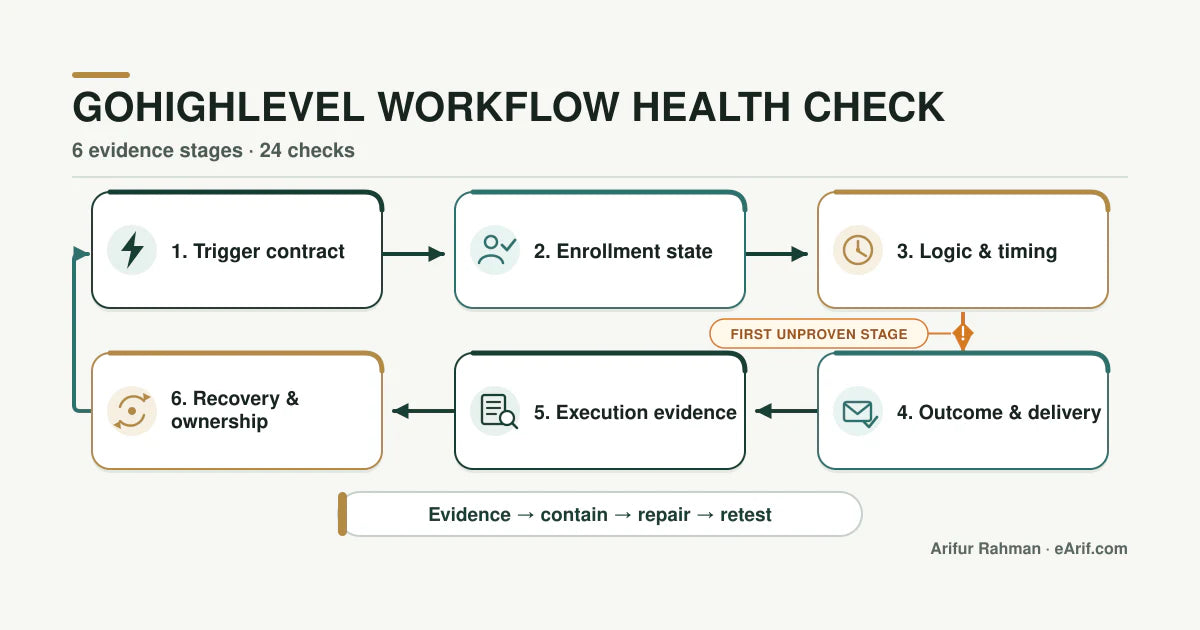
This is a preventive and recurring QA checklist, not a list of random settings. Choose one workflow and one intended outcome, then trace a small test set through six stages. Do not use one successful test contact as proof that fresh, returning, excluded, cancelled, failed, and recovered contacts will behave correctly.
A workflow can pass for a fresh contact and fail for the customer states that matter most. Use clearly labelled QA records and prevent them from entering unsafe live messages, payments, or customer-facing sequences.
When no message or pipeline update appears, first determine whether the contact failed to enroll or enrolled and then stopped. HighLevel's current execution and enrollment views are designed to expose the contact path, skipped nodes, error states, entry and exit status, and execution context. That distinction prevents a delivery failure, wait step, removed contact, or downstream error from being mislabelled as a trigger problem.
HighLevel documents many event-specific triggers and filters. A Form Submitted trigger can be restricted to selected forms. Appointment Status can be filtered by status, calendar, event type, tag, participant enrollment, and who modified the appointment. Workflow settings control re-entry and other contact behavior, while appointment and invoice triggers have documented re-entry exceptions. Record the current configuration and the exact test event instead of relying on an old screenshot or team memory.
Before a material edit, preserve the published state and version context. HighLevel's version history records saved workflow states and supports restoring a prior version as a new draft. A rollback option is useful only when the team also records what changed, which test failed, and which production state remains authoritative.
Pause or contain active harm first. Preserve one failing execution, locate the earliest confirmed mismatch, make the smallest responsible change, and retest the full set. Avoid deleting workflows, tags, fields, or snapshots merely because they appear unused.
Use the GoHighLevel account audit when the issue crosses workflows, calendars, pipelines, forms, users, domains, email, phone, or integrations. Use Systems Audit when tools outside HighLevel also control payment, access, reporting, fulfillment, support, or AI follow-up. Share only redacted evidence through safe intake after reviewing the privacy boundary.
HighLevel changes its workflow interface and capabilities over time. Confirm the current support documentation and the actual sub-account configuration before treating any example as a production instruction.
Use the earliest stage without evidence as the starting point. A later missing message or pipeline update does not prove that the trigger failed.
| Stage | Evidence to capture | Healthy signal | Failure signal | Next check |
|---|---|---|---|---|
| Trigger contract | Real event, trigger type, filters, source object, timestamp | The event and configured trigger describe the same business action | No enrollment and the real event differs from the trigger or filter | Reproduce the public event and compare every trigger filter |
| Enrollment state | Contact ID, prior enrollment, re-entry state, exclusion state | The intended contact enters once or repeats only by policy | The contact is skipped, duplicated, already active, or unexpectedly re-enrolled | Inspect enrollment history and workflow settings |
| Logic and timing | Evaluated fields, branch, wait, schedule, removal reason | The contact follows the expected path with explainable timing | A condition, wait, stop rule, or another workflow changes the route | Highlight the contact path and inspect the first skipped or waiting node |
| Outcome and delivery | CRM change, message detail, task, opportunity, appointment, webhook result | The destination state matches the promise to the customer or team | The workflow completes but the external or customer-visible result is wrong | Check the destination record and delivery evidence |
| Execution evidence | Execution status, error detail, contact history, entry and exit state | Success, skip, removal, wait, and error states are distinguishable | The team cannot explain what ran or why the contact stopped | Preserve the exact execution before editing |
| Recovery and ownership | Retry, manual fallback, version, owner, alert, review date | Exceptions are visible, recoverable, assigned, and retested | Failures depend on memory or risky manual rebuilding | Assign the owner and document rollback and recovery |
Check an item only after reviewing current evidence. Completion means reviewed, not automatically healthy. Record pass, fail, unknown, evidence, owner, and repair decision in your working notes.
Request-Fit Decision
LM-GHL-001
Use this request when the health check finds an unknown, failed, skipped, duplicated, waiting, or unrecoverable state in a GoHighLevel workflow and you need help choosing the smallest safe repair.
Arif traces the real event through enrollment, execution, destination outcome, and recovery evidence instead of diagnosing from the workflow canvas alone.
The buyer learns whether the first gap sits in the source event, trigger, enrollment, logic, timing, action, destination, execution evidence, or recovery ownership.
Escalate when several workflows or account areas disagree, live leads or customer messages are affected, or tools outside HighLevel control payment, access, reporting, or fulfillment.
This is not a request for guaranteed lead results, unsafe messaging changes, or diagnosis from credentials, API keys, payment data, full exports, or unredacted contact records.
Get the checklist
Share the workflow purpose, real trigger source, first failed or unknown stage, customer effect, and one redacted execution example. Do not send credentials or private contact data.
Do not include passwords, API keys, payment details, private exports, customer records, or private sub-account data. Describe the trigger and failure in plain language.
Lead Magnet Request Source Route Boundary
A checklist request, lead magnet page view, form click, email reply, saved link, social click, AI summary, browser-agent visit, or search visit is not checklist-delivery proof, not sender-readiness proof, not lead-quality proof, not service-start proof, not ranking proof, not AI citation proof, and not permission to request passwords, API keys, exports, payment details, customer records, workflow logs, tracking data, CRM records, or private screenshots.
Use the selected checklist when one customer path can be inspected safely, and use the related service page when one broken object is already clear.
Use Systems Audit when the request crosses tools, owners, payments, access rules, tracking, reporting, support, AI handoffs, or active customer impact.
Use Proof, Privacy, and AI Search Profile before treating a checklist request, reply, source visit, or AI answer as evidence of fit, delivery, ranking, or safe access.
No checklist delivery, Email 0, nurture automation, contact import, suppression-list change, segment upload, retargeting audience, paid action, signup proof claim, form-delivery proof claim, lead-quality claim, service-fit claim, or first-reply send is authorized by this request copy without exact approval.
Checklist FAQ
No. The checklist helps you inspect one problem path yourself. Use the Systems Audit when the issue touches live leads, payments, access, reporting, migration, ads, or more than one tool.
Share the tools involved, what should happen, what happens now, and whether there is a launch, ad spend, client delivery, payment, access, or reporting risk. Do not send passwords, API keys, payment details, private exports, or customer records.
Use the related service page when the checklist shows that the problem is active, customer-facing, or hard to isolate. The service page explains the audit, repair, migration, tracking, or support path for the same issue.
The request is routed by topic so the right checklist and follow-up notes can be sent. If your message shows audit intent, the next reply should point to the relevant audit path or ask one clarifying question.
A checklist request becomes qualified when the reply includes the current stack, the affected customer path, what should happen, what happens now, business risk, and one safe example. If the issue is isolated, use the related service. If it crosses several tools or live customers, start with the Systems Audit.