
Key terms
Five records that separate a trigger failure from an outcome failure
- Source event: the real form submission, appointment change, pipeline transition, payment, tag change, reply, or other event expected to start the path.
- Contact or event state: the contact, appointment, opportunity, payment, tag, fields, consent, and timestamps present when qualification is evaluated.
- Enrollment history: the evidence that a contact entered, was blocked, completed, or left a workflow.
- Execution log: the path showing which trigger and actions ran, waited, skipped, failed, or removed the contact.
- Outcome evidence: the CRM update, delivered message, task, opportunity, appointment, webhook response, or downstream state the workflow was meant to produce.
Use this lesson safely
Apply the idea only after the affected path is clear.
- Identify the exact handoff, customer path, field, tag, trigger, report, or access rule before changing tools.
- Test with a low-risk example before touching live leads, payments, course access, reporting, support, or AI responses.
- Keep private client names, screenshots, customer records, payment data, passwords, and API keys out of public forms and messages.
- Document what changed, what was tested, what remains risky, and who owns the next step.
- Start with a Systems Audit when the problem touches several tools or the team cannot explain the current path.
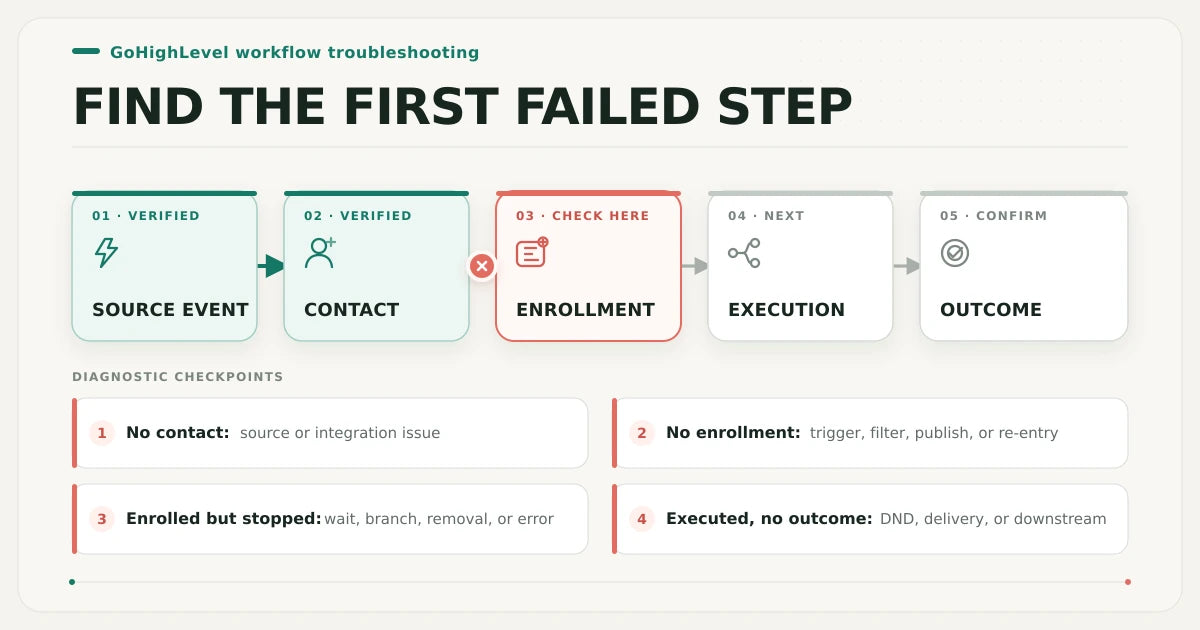
A workflow can look correct in the builder and still receive the wrong event, the wrong object state, or no qualifying contact. The most reliable diagnosis is not to inspect every setting at once. Start at the real customer action, preserve its timestamp and record identity, and stop at the first stage where evidence disappears.
Classify the failure before editing
Use four states to narrow the problem quickly:
- No contact or event record: the failure is before workflow enrollment. Inspect the public form, calendar, checkout, integration, location, and source-object creation.
- The contact exists but has no enrollment: inspect the selected trigger, filters, saved and published state, re-entry, active enrollment, required object, and contact state at that timestamp.
- Enrollment exists but the path stops: the trigger worked. Inspect the highlighted execution path, wait, branch, removal, stop rule, validation error, and action detail.
- Execution completes but the result is absent: inspect DND, consent, delivery status, destination record, webhook receiver, provider response, and any downstream system.
This distinction matters because changing a trigger cannot repair an email delivery failure, a wait step, a branch that evaluated correctly against unexpected data, or a destination that rejected the action.
1. Reproduce the real source event
Test the same public path a real lead uses. Record the exact page, form, calendar, pipeline action, payment path, tag operation, or integration event; the test timestamp; the intended sub-account; and a clearly labelled QA contact. An internal test button can prove that an individual action is configured, but it may bypass the public source, object creation, attribution, existing contact state, or status transition that controls real enrollment.
Use a fresh test contact first, then a repeat-contact case only after the fresh path is understood. Do not use an existing customer record or send credentials, API keys, payment details, exports, or unredacted contact data through public intake.
2. Confirm the expected CRM record exists
After the public action, locate the contact and the event-specific record. A form path should create or update the intended contact. An appointment trigger depends on appointment state. A pipeline-stage trigger depends on an opportunity transition. A payment trigger depends on the payment event and its configured filters. A contact-tag trigger depends on the relevant tag change. If the source action occurred but the required record or transition does not exist, the workflow is downstream of the actual failure.
Capture the contact ID, event timestamp, source, object status, relevant field values, tag state, appointment or opportunity identity, and whether another automation changed the record immediately afterward. A screenshot without the record identity and timestamp is weak evidence because it cannot be matched reliably to enrollment or execution history.
3. Compare the trigger, filters, and published state
Open the workflow only after the source and CRM state are known. Confirm that it is saved and published in the intended sub-account and that the trigger listens to the exact object and event produced by the public path. Event-specific filters are decisive. A Form Submitted trigger can be limited to selected forms. Appointment Status, Pipeline Stage Changed, Payment Received, and Contact Tag triggers each evaluate their own event data and configured filters.
Review every filter against values that existed when the event fired, including blank values. Do not compare only the contact's current state after other actions have run. HighLevel can also highlight configuration errors when a workflow is saved; resolve the actual trigger, action, If/Else, or wait error instead of duplicating the workflow to hide it.
4. Inspect enrollment and re-entry
Enrollment history answers the first decisive question: did this contact enter? If no enrollment record exists, remain focused on the source event, trigger, filters, workflow publication, and eligibility. If the contact entered previously, check whether it is still active, completed, removed, or prevented from returning by the workflow's re-entry setting.
Re-entry is not a universal retry switch. Current workflow settings govern whether a contact can return, while appointment- and invoice-related triggers have documented behavior and exceptions. Define the business rule first: should a repeated form, new appointment, reschedule, later payment, or repeated tag event create another run? Then test that event with the correct record state instead of repeatedly submitting the same contact and expecting a new enrollment by default.
5. Trace the first stopped execution step
If enrollment exists, stop calling it a trigger failure. Use execution logs and the contact path to identify the first action that is waiting, skipped, removed, or failed. Check the evaluated branch values, removal reason, error details, and the action immediately before the stop.
Wait actions deserve their own review. A contact can be held until a date, event, reply, condition, or time window; timezone and past-date behavior can change when it continues. A workflow may also stop after a response or be affected by another workflow that removes the contact, changes a tag, field, opportunity, appointment, or other condition. Preserve one failed execution before making edits so the original path remains explainable.
6. Verify the action and destination outcome
An executed action is not the same as a delivered customer outcome. For email or SMS, inspect channel-specific DND or unsubscribe state and the available delivery evidence. Global or channel-specific DND can block communication without proving that enrollment failed. For internal notifications, tasks, tags, fields, opportunities, appointments, webhooks, and integrations, inspect the actual destination record or provider response.
Write the expected outcome in observable terms: a message delivered to a QA address, a task assigned to a named owner, an opportunity moved once, an appointment updated, or a webhook receiver acknowledging the event. If the workflow reports completion but the destination is wrong, diagnose the destination contract and downstream system.
7. Check conflicts, contain risk, and choose the smallest repair
Search for other workflows and manual processes that touch the same tags, fields, statuses, opportunities, appointments, DND settings, or contact removal rules. Use timestamps to establish order. Two correct automations can still conflict when one changes the state the other expects.
Contain active customer harm before editing broadly. Pause unsafe customer-facing actions only when necessary, preserve the failing example, document the current version, change the smallest responsible setting, and rerun the same source event. A successful repair should prove both execution and the final customer or team outcome.
Examples by trigger family
- Form submission: confirm the real form submitted, the contact was created or updated, the selected-form filter matches, and the workflow was published before the test.
- Appointment status: confirm the appointment record, current status, calendar or group, relevant participant state, and the exact event created by booking, rescheduling, cancellation, or status change.
- Pipeline stage change: confirm that an opportunity actually moved from one stage to another and that filters refer to the same pipeline and stage.
- Payment received: confirm the payment event and configured product, status, and source filters rather than inferring payment from a contact tag alone.
- Contact tag: confirm that the expected tag event occurred after the workflow was active and that another automation did not immediately reverse the state.
Keep immediate troubleshooting separate from preventive QA
This guide owns the immediate symptom: one GoHighLevel workflow is not triggering or not producing its expected result. The GoHighLevel workflow health check is the preventive owner for launch and recurring review. The workflow audit roadmap is the paid fixed-scope diagnosis route. Use the broader account audit when workflows, calendars, pipelines, forms, users, domains, email, phone, or account structure disagree. Use Systems Audit when payment, access, ecommerce, reporting, fulfillment, support, or AI follow-up outside HighLevel controls the result.
GoHighLevel first-failed-step diagnostic matrix
Start with the earliest row whose evidence is missing or contradicts the expected path. Do not repair a later stage until the earlier contract is proven.
| Stage | Evidence to capture | Healthy signal | Failure signal | Next action |
|---|---|---|---|---|
| 1. Source event | Public path, event type, timestamp, location, QA identity | The intended customer action completes in the correct sub-account | The action fails, reaches another asset, or produces no event | Repair the public source or integration before the workflow |
| 2. CRM record | Contact ID, event object, status, fields, tags, opportunity or appointment ID | The expected record and transition exist at the test time | The contact or required object is absent or has different state | Trace source-to-CRM creation and object mapping |
| 3. Trigger contract | Published state, trigger, object, filters, validation errors | Configuration matches the recorded event and values | The workflow is draft, invalid, listening elsewhere, or filters exclude the event | Correct the smallest trigger or filter mismatch and republish |
| 4. Enrollment | Enrollment history, prior run, active state, re-entry policy | The contact enters once or repeats according to the business rule | No enrollment, duplicate enrollment, or repeat entry is blocked unexpectedly | Resolve eligibility, active enrollment, or re-entry behavior |
| 5. Execution path | Highlighted path, wait, branch values, removal reason, error detail | Each node runs or waits for an explainable reason | The contact is skipped, stuck, removed, or failed at a specific node | Repair that node or the state it evaluates |
| 6. Outcome | Delivery status, CRM change, task, opportunity, appointment, webhook response | The customer or team sees the defined result | The workflow completes but delivery or destination state is wrong | Inspect DND, provider evidence, and downstream destination |
| 7. Recovery owner | Conflict timeline, containment, rollback, owner, retest evidence | The smallest change is owned, reversible, and retested end to end | Several automations conflict or the fix cannot be reproduced | Contain risk and use the appropriate focused or systems audit |
21-point GoHighLevel workflow trigger diagnostic
Check an item only after you have current evidence for one clearly labelled QA contact and event. The selections remain in this browser and are not submitted.
What to record before requesting help
Prepare a privacy-safe failure packet: the workflow purpose, public source, expected trigger, expected outcome, actual outcome, QA timestamp, contact or object ID with private values redacted, first stage without evidence, current customer risk, and the smallest change already tested. Do not send passwords, API keys, customer exports, payment details, private messages, or unrestricted account access in the first contact.
Repair, rebuild, or audit?
- Repair one setting when the first failed stage is proven and the change is narrow, reversible, and safe to retest.
- Rebuild only after diagnosis when the workflow structure itself prevents an explainable path, safe recovery, or maintainable ownership.
- Use the workflow audit roadmap when several selected workflows need an evidence-backed issue list and repair order.
- Use the account audit when the failure crosses multiple HighLevel account areas.
- Use Systems Audit when tools outside HighLevel control the customer result or active business risk.
Article FAQ
GoHighLevel workflow-not-triggering questions
Why is my GoHighLevel workflow not triggering for a fresh contact?
First prove that the real public action created the expected contact and event record. Then compare the published trigger and every filter with the values present at that timestamp. If there is no enrollment record, the source event, trigger contract, publication state, filter, or eligibility is still unproven.
Why did the contact enroll but the message was not sent?
Enrollment proves the trigger worked. Inspect the execution path, waits, branches, removal or error detail, then check channel-specific DND, unsubscribe state, delivery evidence, and the message provider. A missing message after enrollment is not automatically a trigger failure.
Why does a GoHighLevel test work once but fail for the same contact later?
The contact may already be active, completed, removed, or unable to re-enter. Its tags, fields, appointment, opportunity, DND, or workflow history may also differ on the repeat event. Define the intended repeat-event rule, inspect enrollment history, and test the correct event instance.
What should I do after I learn what is broken?
Choose the smallest safe next step. Test one low-risk handoff yourself when the path is clear, use the related service when the failure is specific, start with the Systems Audit when several tools or live customers are involved, and keep learning when the evidence is still vague.
Sources and context
Current official HighLevel references
Related eArif context
Official references
- HighLevel: execution logs and enrollment history
- HighLevel: workflow error highlighting and resolution
- HighLevel: workflow settings overview
- HighLevel: Form Submitted trigger
- HighLevel: Appointment Status trigger
- HighLevel: Pipeline Stage Changed trigger
- HighLevel: Payment Received trigger
- HighLevel: Wait workflow action
- HighLevel: Do Not Disturb settings
- HighLevel: Contact Tag trigger
Trace the first failed step before rebuilding.
Use the fixed-scope workflow audit when selected GoHighLevel workflows need an evidence-backed issue list, risk order, and repair roadmap.
Review the workflow audit roadmap