
Key terms
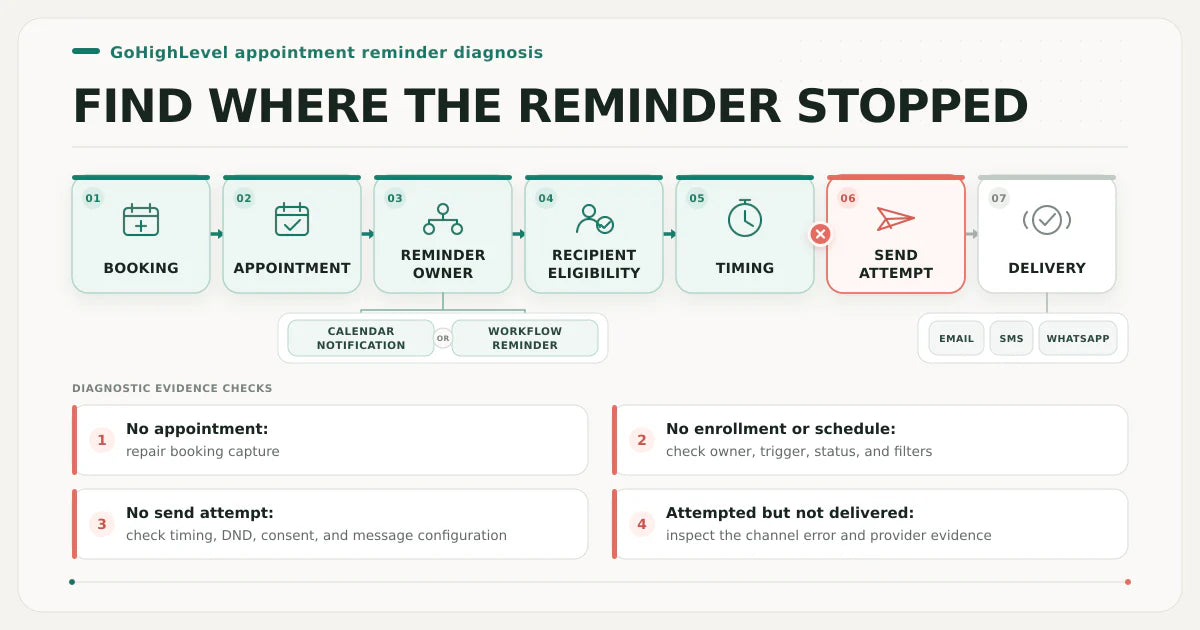
Seven records that locate a missing appointment reminder
- Booking evidence: the public booking URL, test timestamp, calendar, form values, source, and clearly labelled QA contact used to reproduce the problem.
- Appointment record: the appointment ID, status, start time, timezone display, calendar, assigned user, contact, guests, and reschedule or cancellation history.
- Reminder owner: either a calendar-level notification or a workflow action. Both can send appointment messages, but they have different settings and evidence.
- Recipient eligibility: whether the intended contact, guest, user, or additional recipient has the required address or number, channel permission, DND state, and message configuration.
- Timing evidence: the appointment time, account and display timezone, reminder offset, workflow wait, allowed sending window, and past-date behavior.
- Send attempt: the calendar notification event, workflow execution action, or conversation message record showing whether HighLevel tried to send.
- Delivery evidence: the sent, delivered, failed, skipped, undelivered, bounced, rejected, or provider-specific result for email, SMS, or WhatsApp.
Use this lesson safely
Apply the idea only after the affected path is clear.
- Identify the exact handoff, customer path, field, tag, trigger, report, or access rule before changing tools.
- Test with a low-risk example before touching live leads, payments, course access, reporting, support, or AI responses.
- Keep private client names, screenshots, customer records, payment data, passwords, and API keys out of public forms and messages.
- Document what changed, what was tested, what remains risky, and who owns the next step.
- Start with a Systems Audit when the problem touches several tools or the team cannot explain the current path.
A missing reminder is an outcome, not a diagnosis. Calendar notifications and workflow actions can both produce appointment messages, and a contact can fail at several points before or after a send attempt. Use one privacy-safe booking test and follow its records in chronological order. Do not change the live configuration until the first missing or contradictory record is identified.
Classify the symptom before editing
Start by placing the failure in one of four states:
- No appointment record: the public booking, calendar embed, form, integration, or appointment-creation action failed before reminder logic could run.
- Appointment exists but no reminder is scheduled or executed: identify the reminder owner and inspect appointment status, receiver settings, trigger filters, workflow publication, enrollment, waits, DND, consent, and timing.
- A message was attempted but failed or was skipped: inspect the recorded channel error, recipient data, sending configuration, DND, opt-out state, sender setup, or WhatsApp template status.
- The platform reports a send but the recipient did not receive it: distinguish submission from delivery and inspect provider, carrier, mailbox, spam, device, and final delivery evidence.
This classification prevents a common mistake: changing workflow triggers when the actual failure is a calendar notification, changing calendar settings when the workflow never enrolled, or duplicating a message that was already submitted but not delivered.
1. Reproduce the real booking path
Use the same public page, calendar link, funnel step, form, or external booking integration used by a real lead. Record the URL, selected calendar or service, meeting type, form values, intended sub-account, timestamp, and a clearly labelled QA contact. An admin-side test or manually created contact may bypass the public booking source, assigned-user selection, guest creation, appointment status, source fields, or timezone display that controls the real reminder.
Confirm that the public action finishes successfully and produces one intended appointment. If no appointment exists, reminder configuration is downstream of the actual problem. Trace the booking asset, calendar assignment, required fields, integration, and appointment-creation action before inspecting message settings.
2. Verify the appointment record and state
Open the appointment created by the test. Capture its ID, calendar, contact, guests, assigned user, start time, timezone display, appointment status, and whether it is new, rescheduled, cancelled, showed, no-show, invalid, normal, or recurring. Compare that state with the notification or workflow condition expected to send.
Calendar notifications can distinguish booked appointments by confirmed or unconfirmed status and provide separate events for cancellation, reschedule, reminder, and follow-up. Workflow triggers can also filter by appointment status, event type, calendar, calendar group, participant choice, tag, and who modified the appointment. A message configured for Confirmed cannot repair an appointment that remains Unconfirmed, and a trigger filtered to one calendar will not respond to a booking recorded elsewhere.
3. Identify who owns the reminder
Open the intended calendar's Notifications settings and the relevant workflow. Name exactly one owner for each expected message. Calendar-level notifications can be configured for contacts, guests, users, and additional email addresses or phone numbers. Workflow reminders depend on a trigger, enrollment, actions, and timing. If both systems send the same channel at the same offset, document the duplicate before changing either path.
Calendar notifications are usually the simpler owner for direct appointment confirmations, reminders, reschedule notices, cancellations, and follow-ups. A workflow is appropriate when the message depends on pipeline stage, tags, custom fields, assigned owner, no-show recovery, branching, internal tasks, or a broader sequence. This is an implementation choice, not a ranking rule: use the owner whose evidence and business logic are easiest to explain and maintain.
4. Confirm the intended recipient is eligible
Check whether the message targets the contact, appointment guest, assigned user, another user, or an additional recipient. Confirm the actual email address or mobile-capable number, country code, appointment relationship, assigned-user state, and any merge fields needed by the message. Use redacted values in notes and public support requests.
Review DND and opt-out state by channel. Do not clear permanent DND or disregard consent merely to make a reminder send. HighLevel's messaging policy requires opted-in recipients and identifies sender and opt-out requirements for initial SMS communication. For WhatsApp messages outside the customer-service window, confirm that the intended template exists in HighLevel and is approved and available. For email, confirm the sender configuration and review deliverability evidence rather than assuming an executed action reached the inbox.
5. Reconcile reminder timing and timezone
Write the appointment time, reminder offset, account timezone, calendar or user display timezone, contact-facing time, workflow timezone setting, allowed sending window, and the actual time the contact reached the wait. Then calculate when the reminder should have resumed. Do not infer timing from the message copy alone.
A workflow Wait action can run relative to an upcoming appointment or booking and has defined behavior when the event time has already passed. A late enrollment, reschedule, imported appointment, changed timezone, or advanced sending window can place the expected send time in the past or move it to another allowed window. Calendar notifications and workflow waits should be tested separately because their ownership and execution evidence differ.
6. Inspect enrollment, execution, and the send attempt
If a workflow owns the reminder, check enrollment history for the exact QA contact and booking timestamp. If there is no enrollment, inspect the Customer Booked Appointment or Appointment Status trigger, selected calendar, status, event type, participant setting, filters, saved and published state, and the event actually produced by the booking. If enrollment exists, the trigger worked; inspect the first waiting, skipped, removed, or failed node in execution logs.
If the calendar owns the reminder, confirm the correct notification is enabled for the intended receiver and channel and that the appointment state and schedule qualify. In either case, locate the message or action record that proves a send was attempted. Preserve the failed record before editing so the original state, timestamp, action detail, and error remain explainable.
7. Read channel delivery evidence and retest
For SMS, open the conversation message and record any error badge or code. A failed message was blocked before carrier submission; an undelivered result generally means it was submitted but did not reach the handset. Check DND, number capability, country code, sender or registration state, account restrictions, provider response, and final carrier status using the evidence available for the account.
For email, inspect the message detail and sending-provider evidence for skipped, failed, bounced, rejected, or delivered state. Review sender identity, domain configuration, authentication, recipient address, mailbox filtering, and whether the account uses LC Email or an external SMTP provider. For WhatsApp, confirm the connected number, recipient eligibility, DND, conversation window, selected template, template approval state, and variable values.
After identifying the first failed stage, change the smallest responsible setting, preserve rollback context, and repeat the same public booking path. A complete retest proves the appointment record, correct reminder owner, expected schedule, send attempt, and final QA delivery without creating an unintended duplicate.
Reschedules, cancellations, guests, and repeat bookings
Do not assume a reschedule is the same event as the original booking. Verify the new appointment state and how the chosen trigger or notification responds. HighLevel documents that a rescheduled appointment is treated as a new one for the Appointment Status trigger, while receiver and enrollment behavior can differ by trigger. Test original booking, reschedule, cancellation, and no-show as separate cases when those states matter.
When appointments include guests, confirm whether the calendar notification includes guests and whether the workflow enrolls Contact only, Contact and Guests, or Guests only. A primary contact receiving the reminder does not prove that guest logic is correct. Repeated appointments also require explicit ownership so one booking does not produce stale waits or duplicate reminders from a previous appointment.
Keep symptom, prevention, and paid implementation separate
This page owns the missing calendar-reminder symptom. The workflow-not-triggering guide owns a broader automation that does not enroll or execute. The workflow health check is the preventive QA owner. The calendar, pipeline, and reminder setup page is the focused implementation route. Use the GoHighLevel account audit when calendars, users, email, phone, workflows, pipelines, or account settings disagree, and Systems Audit when an external calendar, CRM, payment, reporting, support, or AI tool controls the result.
GoHighLevel missing-reminder diagnostic matrix
Start with the earliest row whose evidence is absent or contradicts the expected booking path. A later delivery problem cannot be repaired reliably until the earlier appointment and ownership records are proven.
| Stage | Evidence to capture | Healthy signal | Failure signal | Next action |
|---|---|---|---|---|
| 1. Booking | Public URL, calendar, QA contact, source values, timestamp | The real booking path completes once in the intended sub-account | No booking, wrong asset, duplicate booking, or integration error | Repair booking capture before reminder logic |
| 2. Appointment | Appointment ID, status, time, timezone, contact, guests, assigned user | The expected record and state exist for the test | The record is absent, in another calendar, or has an unexpected status | Correct appointment creation, assignment, or status handling |
| 3. Reminder owner | Calendar notification or workflow name, receiver, channel, event | One explainable owner is enabled for the intended message | No owner, wrong receiver, disabled notification, or duplicate owners | Choose and configure the smallest maintainable owner |
| 4. Eligibility | Email or phone, guest/user relation, DND, consent, template and merge fields | The intended recipient and channel are valid and permitted | Missing data, DND, opt-out, invalid number, unavailable template, or blank values | Respect consent and repair recipient or message configuration |
| 5. Timing | Appointment time, reminder offset, timezones, wait, sending window, past-date rule | The expected send time is future, valid, and explainable | Late enrollment, passed date, shifted timezone, or blocked window | Correct the schedule and retest the same timing case |
| 6. Send attempt | Calendar event, enrollment, execution path, message detail, timestamp | The intended action executes once at the expected time | No enrollment, waiting, skipped, removed, failed, or no calendar event | Repair the first missing schedule or execution record |
| 7. Delivery and recovery | Channel status, error code, provider evidence, smallest change, retest result | The QA recipient receives one correct reminder and evidence is retained | Failed, undelivered, bounced, rejected, filtered, or duplicated outcome | Repair the channel or provider issue and retest end to end |
28-point GoHighLevel appointment reminder diagnostic
Check an item only after you have current evidence for one clearly labelled QA booking. Selections remain in this browser and are not submitted.
What to record before requesting help
Prepare a privacy-safe reminder failure packet: the public booking path, intended calendar, appointment status, expected reminder owner, receiver type, channel, expected send time, actual stop point, available execution or message status, business risk, deadline, and a redacted QA example. Do not send passwords, API keys, customer exports, payment details, private messages, or unrestricted account access through the first contact.
Repair one setting, rebuild the reminder, or audit the account?
- Repair one setting when the first failed stage is proven and the change is narrow, reversible, and safe to retest.
- Rebuild the reminder path only when ownership is duplicated, timing cannot be explained, or the existing structure prevents reliable recovery and maintenance.
- Use the calendar and reminder setup service when booking, appointment state, pipeline movement, reminders, no-show handling, and follow-up need one owned implementation path.
- Use the workflow audit roadmap when several selected reminder workflows need execution evidence and a repair order.
- Use the account audit or Systems Audit when the failure crosses multiple HighLevel areas or external tools.
Article FAQ
GoHighLevel calendar-reminder questions
Should GoHighLevel appointment reminders use calendar notifications or a workflow?
Use one clear owner per message. Calendar notifications are suitable for straightforward booking, confirmation, reminder, reschedule, cancellation, and follow-up messages. Use a workflow when the message depends on tags, fields, pipeline stage, branching, no-show recovery, assigned ownership, or a broader sequence. Document and test the chosen owner so the same reminder is not sent twice.
Why do GoHighLevel reminders send to some contacts but not others?
Compare the appointment record, receiver type, email or phone, country code, DND and opt-out state, consent, status, timing, template, merge fields, and channel error for one working and one failing QA case. Different recipient data or eligibility often explains a partial failure better than rebuilding the shared reminder.
Why did a rescheduled GoHighLevel appointment miss or duplicate reminders?
A reschedule can create a new appointment event and can leave an earlier workflow wait active depending on the chosen design. Verify the new appointment record, trigger event, calendar notification, enrollment, wait target, and old execution before changing the workflow. Test original booking and reschedule as separate cases.
What should I do after I learn what is broken?
Choose the smallest safe next step. Test one low-risk handoff yourself when the path is clear, use the related service when the failure is specific, start with the Systems Audit when several tools or live customers are involved, and keep learning when the evidence is still vague.
Sources and context
Current official HighLevel references
Related eArif context
Official references
- HighLevel: calendar email, in-app, SMS, and WhatsApp appointment notifications
- HighLevel: Appointment Status workflow trigger
- HighLevel: Customer Booked Appointment workflow trigger
- HighLevel: workflow Wait action
- HighLevel: workflow execution logs and enrollment history
- HighLevel: troubleshooting SMS delivery
- HighLevel: Do Not Disturb settings
- HighLevel: LC Phone messaging policy
- HighLevel: calendar appointment timezone preferences
- HighLevel: creating and checking WhatsApp templates
- HighLevel: email sending and deliverability guidance
Repair the reminder path without creating duplicate messages.
Use the focused calendar, pipeline, and reminder setup when one owned booking path needs appointment-state, reminder, no-show, and follow-up repair.
Review calendar and reminder setup