
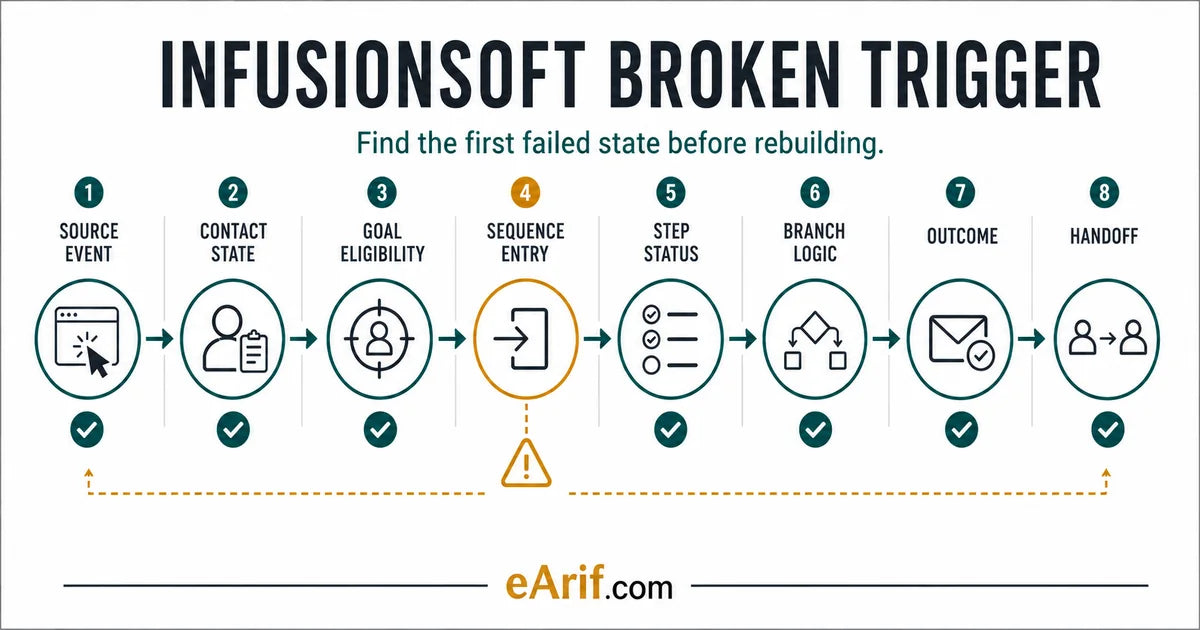
Key terms
Terms that separate a broken trigger from a broken outcome
- Source event: the dated action that should satisfy a goal or start a path, such as a new tag application, form submission, purchase, internal form, appointment, API call, or manual sequence action.
- Goal eligibility: the exact conditions that determine whether that contact and event may satisfy the configured goal, including timing, selected object, prior automation state, and any-contact setting.
- Sequence entry: evidence that the contact moved into the intended sequence after the goal or manual action.
- Step status: the interface-specific state of a sequence or action, such as active, completed, skipped, cancelled, upcoming, queued, or done.
- Branch logic: the Decision Diamond, tag, field, owner, or fallback rule that chooses the next sequence.
- First failed state: the earliest point where observed evidence stops matching the documented path.
- Controlled retest: one authorized, privacy-safe test contact and one new source event run after the smallest change.
- Repair record: the symptom, first failed state, before-state, change, test result, remaining risk, owner, monitoring window, and rollback note.
Use this lesson safely
Apply the idea only after the affected path is clear.
- Identify the exact handoff, customer path, field, tag, trigger, report, or access rule before changing tools.
- Test with a low-risk example before touching live leads, payments, course access, reporting, support, or AI responses.
- Keep private client names, screenshots, customer records, payment data, passwords, and API keys out of public forms and messages.
- Document what changed, what was tested, what remains risky, and who owns the next step.
- Start with a Systems Audit when the problem touches several tools or the team cannot explain the current path.
A campaign can look broken for several different reasons. The source event may never happen. The event may happen on the wrong contact. The contact may not qualify for the goal. The contact may enter a sequence and wait on a timer. A Decision Diamond may route it elsewhere. The automation may complete correctly while the downstream email, task, tag, payment, access rule, or owner handoff fails.
Those are different failures and they should not receive the same repair. Start by identifying the exact Keap product and interface in use. Current Keap Pro and Max Advanced Automation history exposes action states such as active, completed, skipped, cancelled, and upcoming, while Max Classic campaign views also use active, queued, and done states. Menu names and available evidence differ. Record the product, builder, campaign, goal, sequence, and contact before following a screen-specific instruction.
Use one affected contact and one expected path
Write the expected path in one line before opening the campaign: new source event creates or updates this contact, satisfies this goal, enters this sequence, passes this branch, performs this action, produces this customer or owner outcome. Then choose one recent affected contact and, where safely available, one known-good comparison. Use redacted references in notes and public requests.
Keap's current contact activity guidance shows that the chronological feed can include email, task, automation, pipeline, and web-form activity. Its Advanced Automation history guidance adds goal, sequence, and step detail but notes a 30-day or 25-item evidence limit. Absence from a limited view is therefore not proof that an older event never happened. Preserve other dated evidence where the repair window is longer.
Eight stages for finding the first failed state
- Prove the source event. Identify what actually happened, when, in which account, through which form, tag writer, purchase, internal form, appointment, API, import, or manual action. A screenshot of the campaign canvas does not prove the event occurred.
- Confirm the contact state. Verify the intended contact record, duplicate-contact risk, exact tag or field values, owner, product, consent or delivery state, and whether the event updated the same record you are inspecting.
- Test goal eligibility. Compare the event with the configured goal. Check exact tag, product, form, category, timing, prior state, and whether the goal allows contacts that were not already in the automation.
- Prove sequence entry. Confirm the automation is published or ready, the goal is connected to the expected sequence, and the contact actually entered. A manual start is a separate event and should not be mistaken for proof that the original trigger works.
- Read the step status. Determine whether the contact is waiting, active, queued, completed, skipped, cancelled, upcoming, done, or removed in the interface being used. Inspect timers and action readiness before editing the trigger.
- Evaluate branch logic. Record the tag and field values at the moment a Decision Diamond or rule was evaluated, the order of routes, and the fallback behavior. Current values may not reproduce historical branch state.
- Verify the outcome. Separate campaign movement from the intended result. Confirm whether the email sent, task was created, tag changed, payment state updated, access changed, owner was notified, report reflected the event, or support could see the next action.
- Document handoff and rollback. Name the first failed state, smallest change, test contact, expected and actual result, owner, monitoring period, unresolved dependencies, and exact rollback step.
Tag goals are event-driven, not static-membership checks
Keap's current tag-applied goal guidance says a selected tag can satisfy the goal when it is applied by a user, the system, or the API, and that the goal can be configured for retroactive behavior for contacts who already have the tag. Separately, Keap's current republishing guidance says a newly added goal responds to future actions rather than pulling contacts in from past activity. Record the builder version, configured retroactive setting, publication time, prior tag state, and actual application event instead of assuming one rule. Removing the tag after the goal fires does not stop the resulting sequence.
For a tag-trigger symptom, record the tag ID and exact name, the writer, application timestamp, automation publication state, contact history, and resulting sequence entry. Do not test by repeatedly removing and reapplying a production tag to a live customer without understanding every campaign, report, access rule, and integration that reads it. Use the Keap tag dependency checklist when the tag has unknown readers or writers.
Purchase goals require order and entry evidence
Keap's Max Classic purchase-goal guidance ties the goal to the first payment for an order and distinguishes general, product-specific, and category-specific purchase conditions. It also explains that contacts not already in the automation may require the goal's any-contact behavior. That makes the product, order, first-payment state, goal configuration, prior automation state, and publication time part of the diagnosis.
Do not use a historical purchase as the only retest. Current republishing guidance notes that newly published purchase-goal behavior applies to new purchases. Use an authorized low-risk transaction only when payment testing is approved, or route the issue to a scoped diagnosis when a real transaction cannot be repeated safely.
Queued does not always mean stuck
Keap's queued-contact guidance distinguishes active, queued, and done states. A contact can be queued after completing a sequence when no connected process remains. That can indicate a missing connection, or it can be the intended end of the path. Compare the canvas connection and expected next sequence before treating queued as an execution error.
Infusionsoft broken-trigger evidence matrix
Use the earliest row that matches the evidence. The matrix is a diagnostic order, not an instruction to edit every stage. Hold live changes whenever the source event, account, contact, downstream dependency, test permission, or rollback path is unknown.
| Observed symptom | Evidence to inspect | Likely boundary | Safe next action | Proof of progress |
|---|---|---|---|---|
| No activity after a tag should fire | Tag ID and name, writer, timestamp, prior tag state, configured retroactive setting, publication state, contact history | Source event, configured retroactive behavior, or goal eligibility | Verify the current setting; use one new approved tag event when a future action is required | The configured behavior and intended sequence entry match the same contact's evidence |
| Purchase happened but follow-up did not | Product or category, order, first payment, goal setting, prior automation state, publication time | Purchase-goal eligibility or payment state | Confirm exact purchase condition and any-contact behavior before retesting | Authorized new purchase produces the intended entry without duplicate actions |
| Form submitted but contact did not enter | Public or internal form, account, contact match, submission evidence, goal object, publication state | Wrong form, duplicate contact, or unpublished goal | Run one privacy-safe submission and follow the resulting contact record | Submission, contact update, goal, and sequence form one dated chain |
| Contact entered but appears active or waiting | Timer, action readiness, scheduled time, contact timezone, current history status | Expected wait or blocked sequence step | Compare configured timing with observed time before changing the trigger | The step executes at the expected time or the blocked action is isolated |
| Contact is queued at the end | Sequence completion, outgoing connection, next goal or sequence, configured end state | Missing connection or intentional path completion | Decide whether a next path should exist; do not restart blindly | Canvas and documented outcome agree on the final state |
| Contact took the wrong branch | Decision Diamond order, tags, fields, owner, else rule, values at evaluation time | Branch rule or stale state | Reproduce with controlled values and preserve the original rule set | Each representative state reaches its documented sequence |
| Campaign moved but customer outcome failed | Email status, task, tag, owner notification, payment, access, integration, report | Downstream action or handoff, not the trigger | Move the diagnosis to the first missing outcome without changing a proven goal | Campaign state and external outcome share one traceable test record |
| API or integration behavior is inconsistent | Account, contact ID, tag ID, endpoint, response, retry, dedupe, credential owner, execution log | External writer, wrong object, or retry behavior | Use redacted request and response evidence; test one idempotent path | One execution changes the intended record once and reports a reviewable result |
32-point browser-local Infusionsoft campaign diagnostic
Check only what current evidence proves. Selections stay in this browser and are not submitted to eArif.com. Use redacted references; do not enter customer names, email addresses, payment data, credentials, API keys, or private screenshots.
Diagnose the trigger type before touching the canvas
Tag applied
Prove a new application event and identify the writer. A user, automation, integration, or API can apply the same tag. Keap's current tag-goal guidance exposes a retroactive setting, while its current republishing guidance says a newly added goal responds to future activity. Confirm the product, builder version, configured setting, publication time, prior tag state, and actual event before deciding whether an existing tag is eligible. Check every dependency before removing and reapplying a production tag.
Form or internal form submitted
Follow the submission into the exact contact record. Confirm the account, form object, goal publication, duplicate behavior, field and tag changes, and resulting sequence entry. Keap's internal-form goal guidance requires the form to be published before it is available. A successful form confirmation does not by itself prove that the intended campaign goal or contact record was used.
Product purchased
Check product or category selection, first-payment state, any-contact behavior, campaign publication time, and whether the contact was already in the automation. Keep purchase diagnosis separate from failed-payment, subscription, refund, cancellation, and access recovery unless those states are the actual failure. Use the payment-to-access repair route when the campaign moves but a buyer still lacks the promised access.
API or integration action
The Keap REST API reference exposes contact-tag operations using contact and tag identifiers and returns distinct result states. A useful trace records the application account, contact ID, tag ID, endpoint or operation, timestamp, response, retry behavior, and external execution owner without publishing credentials or customer data. A successful external run is not enough if it updated the wrong contact or tag.
Do not confuse a branch problem with a trigger problem
Keap's current Decision Diamond guidance explains that routes can use tags, custom fields, contact fields, rule order, and else logic. If the contact enters the campaign but takes the wrong sequence, preserve the trigger and inspect values at the time of evaluation. Current tags or fields may have changed after the route was chosen.
The distinction between tags and fields matters. Keap's current tags-versus-fields guidance says tags can trigger campaign goals, while simply populating a custom field on a record does not inherently fire a campaign sequence. Forms can satisfy goals with field data, and both tags and fields can be used in Decision Diamonds. Treat storage, triggering, and routing as separate jobs.
Republish only after preserving the before-state
Republishing can change how future contacts move through active automation. Review the relevant Advanced Automation republishing guidance before assuming existing timers, links, purchase goals, or contacts will behave like a new test. For Max Classic, Keap's version and restore guidance says a saved version can preserve campaign structure, but it does not preserve every content or decision-setting detail. Capture the specific objects being changed and write the rollback step rather than relying on a version name alone.
Use a controlled retest protocol
- Freeze the hypothesis. Name one first failed state and one expected change. Do not edit trigger, sequence, branch, email, tag, and integration together.
- Preserve evidence. Record the current campaign state, goal settings, sequence connections, branch rules, relevant action settings, affected contact history, and rollback.
- Prepare one low-risk test. Use an authorized test contact with no private production data. Decide what source event is safe to repeat and what must remain untouched.
- Publish the smallest change. Verify the correct account and automation. Record the publication time and owner.
- Create one new event. Apply the selected tag, submit the test form, run the approved internal form, perform the authorized purchase, or execute the controlled integration action after publication.
- Trace every stage. Capture source event, contact state, eligibility, sequence entry, step status, branch, outcome, and handoff in order.
- Check duplicate effects. Confirm that the retest did not create duplicate contacts, repeated emails, duplicate tasks, multiple tags, extra purchases, conflicting access, or repeated external writes.
- Close or roll back. Keep the change only when the expected path passes and remaining risks have an owner. Otherwise use the written rollback and retain the evidence.
Manual sequence control is a recovery action, not trigger proof
Keap's manual start and stop guidance says stopping one sequence does not remove a contact from other sequences, and starting a sequence begins at its start unless the contact is already in it. A later goal can cause the contact to enter related sequences again. Record each manual action so a temporary recovery does not hide the original trigger defect or create repeat communication.
Choose the right next route
- Use this guide when one campaign symptom is visible and the account owner can inspect a low-risk contact path safely.
- Use the Keap Campaign Repair Diagnosis when one broken or confusing campaign needs a documented first-failed-state diagnosis and repair steps.
- Use the Keap campaign repair service when the failed path is known and an authorized focused implementation is needed.
- Use the Keap tag cleanup checklist when unknown writers, readers, reports, access rules, or API IDs make tag testing unsafe.
- Use Keap and Infusionsoft cleanup when several campaigns, tags, fields, products, or reports are hard to trust.
- Use Systems Audit when payment, WordPress, membership, LMS, reporting, integrations, support, or several customer paths are involved.
What the repair handoff should contain
Document the exact account and product, campaign, source event, goal, sequence, branch, action, expected outcome, affected contact reference, known-good comparison, first failed state, before-state, smallest change, publication time, test event, observed result, duplicate-effect check, remaining risks, business owner, technical owner, support owner, monitoring date, and rollback. Keep names, email addresses, payment data, credentials, API keys, complete exports, and private screenshots out of public requests.
Limits of this guide
This is a diagnostic method, not a platform guarantee or instruction to change a specific live campaign. Keap product editions, interfaces, permissions, builders, integrations, payment paths, and external access systems differ. Verify the current account and official documentation before acting. Do not use a live customer, payment, access state, or production tag as a test without authorization and a recovery plan.
Article FAQ
Infusionsoft and Keap broken-trigger questions
Why did a Keap tag goal not start the campaign?
A tag-applied goal depends on the exact Keap product, builder, goal setting, publication timing, prior contact state, and application event. Current guidance exposes a retroactive setting, while current republishing guidance says newly added goals respond to future activity. Record the configured behavior and verify sequence entry on the same contact before changing the campaign.
Why is a contact queued in an Infusionsoft campaign?
Queued can mean the contact completed a sequence and has no connected process left. Compare the current sequence, outgoing connections, next goal or sequence, and documented end state before treating queued as a stuck trigger.
Should I republish a Keap automation that is not working?
Not as the first diagnostic step. Preserve the before-state, identify the first failed state, review how republishing affects current and future contacts, make one scoped change, then create one new authorized test event after publication.
Can I manually restart an Infusionsoft sequence?
Max Classic supports manual sequence control, but it is a recovery action rather than proof that the original trigger works. A stopped contact may remain in other sequences, and a later goal can start related sequences again, so document the action and check for duplicate communication.
Sources and context
Current official Keap and Infusionsoft references used for this guide
Related eArif context
- Keap Campaign Repair Diagnosis
- Keap campaign repair service
- Keap tag cleanup checklist
- Keap tag and custom-field map
- Keap and Infusionsoft cleanup
- Payment-to-course access repair
- CRM handoff documentation guide
- Keap and Infusionsoft services
- Learning Cave
- About Arifur Rahman
- Proof and evidence boundaries
- Contact with privacy-safe context
Official references
- Keap: tag-applied goal behavior
- Keap: Advanced Automation contact history
- Keap: active, queued, and done campaign states
- Keap: republishing Advanced Automations FAQ
- Keap: available Advanced Automation triggers
- Keap Max Classic: product-purchased trigger
- Keap Max Classic: Decision Diamonds
- Keap Max Classic: manually start or stop a sequence
- Keap Max Classic: version, restore, and unpublish campaigns
- Keap Max Classic: internal-form goals
- Keap Max Classic: custom fields versus tags
- Keap Developer Portal: REST contact and tag operations
Find the first failed state before changing the campaign.
If one Keap or Infusionsoft campaign is broken or confusing, the fixed diagnosis service maps the trigger path, evidence, repair order, test, and handoff before implementation.
Review the diagnosis service