
Key terms
Terms that turn a tag list into a cleanup decision
- Write source: any manual action, form, import, campaign, sequence, order process, integration, or API call that applies or removes the tag.
- Read dependency: any campaign goal, Decision Diamond, search, broadcast, report, access rule, integration, or API process that checks the tag.
- Usage evidence: a dated record showing when, where, and why the tag was applied, removed, searched, or used in a live path.
- Replacement contract: the preferred tag, field, rule, owner, and timing that will replace an old tag without changing the intended customer state.
- Quarantine: a controlled period when a tag is no longer chosen for new work but remains available while writers, readers, tests, and rollback evidence are verified.
- Retirement record: the approved decision, dependency checks, replacement, test results, date, owner, and rollback note kept before final removal.
Use this lesson safely
Apply the idea only after the affected path is clear.
- Identify the exact handoff, customer path, field, tag, trigger, report, or access rule before changing tools.
- Test with a low-risk example before touching live leads, payments, course access, reporting, support, or AI responses.
- Keep private client names, screenshots, customer records, payment data, passwords, and API keys out of public forms and messages.
- Document what changed, what was tested, what remains risky, and who owns the next step.
- Start with a Systems Audit when the problem touches several tools or the team cannot explain the current path.
Keap and Infusionsoft accounts can accumulate launch tags, test tags, lead-source tags, campaign-progress tags, payment tags, access tags, duplicated names, and tags whose original owner has left. The visible problem is clutter. The operating risk is that the same tag may still move a contact through automation, select a broadcast audience, affect a report, grant access, or connect an external system.
The cleanup question is therefore not How many tags should this account have? It is Can the team explain every tag that can still change a customer, campaign, report, or connected system? Keap has multiple product generations and interfaces, so confirm the exact account and builder before following any menu path. The method below is deliberately dependency-based rather than screen-based.
Why tag count is weak deletion evidence
Keap's current tag-management guidance describes tags as contact labels used for marketing segmentation and provides management, broadcast, export, and bulk actions. It also notes that some interfaces search fewer tags than the account can contain. That can make a large library inconvenient, but inconvenience does not identify which tag is safe to remove.
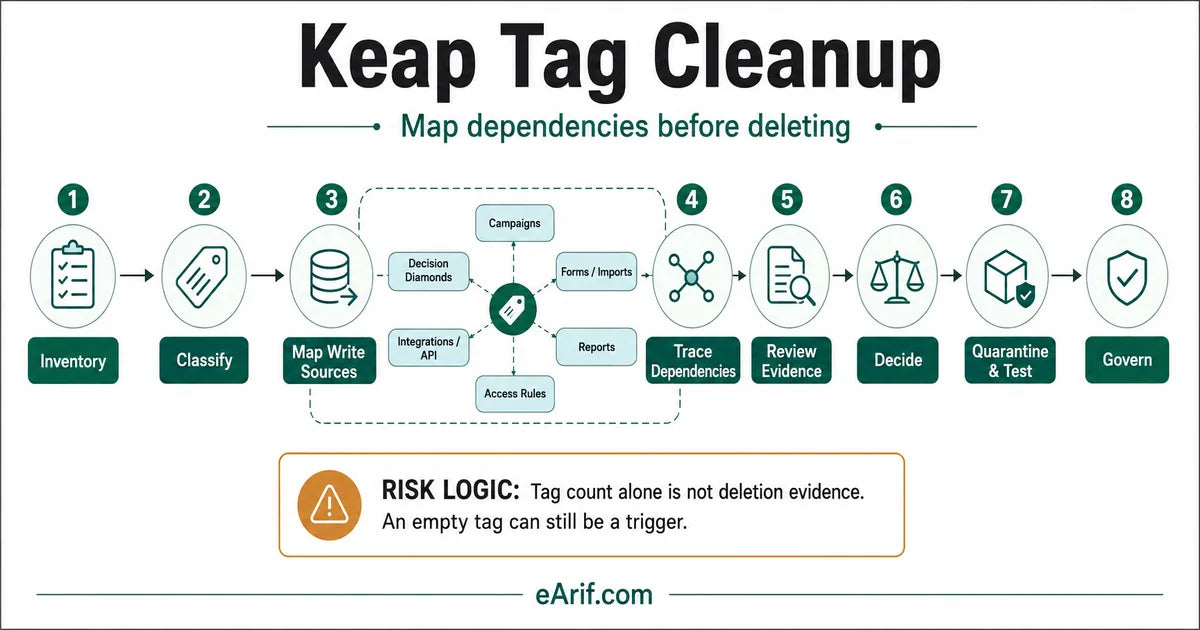
- Zero contacts does not mean zero dependency. Keap's own cleanup guidance warns that an empty tag may still be a trigger tag.
- A recent application does not prove current purpose. A manual bulk action, import, old form, campaign process, or integration may still be writing the wrong tag.
- A duplicate name does not prove duplicate behavior. Two similar tags can feed different campaigns, reports, products, brands, or access systems.
- An old date does not prove retirement readiness. Seasonal campaigns, annual renewals, lifecycle milestones, and recovery paths may be intentionally quiet.
The safe unit of cleanup is one tag plus its writers, readers, evidence, replacement, test, owner, and rollback path.
Build one inventory row per tag
Start with the current tag-management view and a privacy-safe working sheet. Do not export or publish customer-level data for a public review. One row should contain the tag ID where available, exact name, category, account or brand, intended purpose, business owner, contact count, most recent application evidence, every known write source, every known read dependency, proposed replacement, decision state, test status, and final approval.
Use a controlled vocabulary for decisions: keep, move category, rename, merge, migrate to a field or rule, quarantine, retire, or unknown. Unknown is a valid temporary state. It is safer than inventing certainty.
Eight stages for dependency-first cleanup
- Inventory identifiers. Capture exact names, categories, IDs where exposed, account version, brand context, contact counts, and any existing notes. Preserve a before-state that another operator can review.
- Classify purpose. Separate source, status, behavior, campaign progress, product, payment, access, owner, reporting, admin, test, and unknown tags. Decide whether the state belongs in a tag at all or whether a field, opportunity stage, order state, or external system owns it.
- Map write sources. Check manual and bulk actions, forms, landing pages, imports, campaign sequences, Easy Automations where relevant, order processes, Zapier or Make scenarios, WordPress connectors, webhooks, and API calls.
- Trace read dependencies. Check tag goals, campaign starts and stops, Decision Diamonds, search criteria, saved searches, broadcast lists, reports, payment or product actions, membership and LMS access, support views, and external automation.
- Review evidence. Use the Tag Tracker when available, contact searches, recent campaign examples, integration histories, and one known-good and known-problem contact. Record dates and redacted references instead of relying on memory.
- Choose the decision. Keep tags that still express a useful state. Move or rename only with dependency review. Merge only after choosing one preferred state and updating every writer and reader. Quarantine anything uncertain.
- Transition and test. Create the replacement contract, update writers and readers in a controlled order, test representative paths, monitor for an agreed period, and preserve a rollback route before final removal.
- Retire and govern. Remove a tag only after approval and proof. Record the date, owner, replacement, tests, and affected systems. Require a purpose and owner for every future tag.
Tag categories and bulk actions need their own review
Categories are not merely visual folders. Keap's Max Classic category guidance says deleting a category is permanent and reassigns its tags to the unnamed category. Review and move the tags before changing a category.
The bulk apply/remove guidance also states that choosing all tags in a category affects the current tags and tags added to that category in the future. That makes category membership part of the dependency map. A cleanup that moves tags between categories can alter the reach of a saved bulk process even when no campaign was edited.
Decision Diamonds, reports, and APIs can hide dependencies
Decision Diamonds can route contacts using tags, custom fields, and other contact fields. The Tag Tracker can show when a tag was applied, while contact searches can combine any, all, and negative tag logic. These are different evidence types: application history, current membership, and routing logic should not be treated as the same thing.
External integrations add another boundary. The Keap REST API applies and removes tags with numeric tag IDs. A label-only inventory is incomplete when custom code or an integration stores those IDs. Confirm the current writer, credential owner, error handling, and rollback plan without exposing credentials or customer data.
Keap tag dependency decision guide: retirement matrix
Before Keap tags are deleted, merged, renamed, migrated, or reported on, classify the business purpose as access or membership tags, campaign trigger or goal tags, source or lead-status tags, payment, product, or failed-payment tags, reporting or segment tags, unknown or duplicate tags, or another documented state. Use the matrix to choose the next evidence check. It is not an automatic deletion rule. A tag moves to retirement only when its writers, readers, replacement, test, approval, and rollback state are complete.
| Observed signal | Dependency to prove | Risk if guessed | Safe next action | Decision output |
|---|---|---|---|---|
| Zero contacts | Campaign goal, sequence, form, integration, API, or future-state trigger | An empty trigger is deleted and the next eligible contact cannot enter the intended path | Search campaign and integration configuration; review Tag Tracker and one controlled trigger test | Keep, quarantine, or retire with trigger proof |
| Two similar names | Whether writers, readers, brands, products, and lifecycle meanings are identical | Distinct audiences or customer states are merged | Compare contacts, recent applications, campaigns, reports, access rules, and external IDs side by side | Keep both, rename for clarity, or merge to one preferred tag |
| Old campaign tag | Seasonal use, restart behavior, manual sequence control, re-entry, or recovery path | A quiet but valid annual or exception process fails later | Confirm campaign publication, goals, active sequences, owner, next use date, and a representative contact | Keep with owner, quarantine until next cycle, or retire |
| Lead-source or reporting tag | Saved search, broadcast, attribution, dashboard, owner routing, or historical cohort use | Reports and audience definitions change without a documented metric decision | Record the reporting grain, date window, source of truth, replacement field, and downstream consumers | Keep, migrate to a field, or preserve as historical-only |
| Payment, product, or access tag | Purchase actions, failed-payment recovery, cancellation, WordPress, Memberium, LearnDash, or support override | A paying customer loses access or an ineligible contact keeps it | Run grant, removal, failure, cancellation, and recovery tests with authorized low-risk records | Keep, replace through a staged migration, or escalate to a broader audit |
| Tag moved between categories | Category-wide bulk actions and operator procedures that include current and future category tags | A later bulk action reaches an unintended audience | Review category actions, saved procedures, permissions, and team instructions before the move | Move with updated procedure or keep until the dependency is removed |
| Integration or API tag | Stored numeric ID, external account, retry path, error handling, and current technical owner | The integration writes nowhere, writes the wrong state, or cannot roll back | Trace one redacted request or execution, update the mapping in staging where possible, and test apply/remove behavior | Keep ID stable, migrate deliberately, or retire after external confirmation |
| Unknown owner or purpose | Historical notes, recent contacts, campaigns, reports, integrations, and business process owner | Cleanup converts missing documentation into an irreversible decision | Place the tag in quarantine, block new use, assign an investigator, and set a review date | Unknown until evidence supports keep, merge, migrate, or retire |
32-point browser-local Keap tag cleanup checklist
Check only what you can prove in the current account. Selections stay in this browser and are not submitted to eArif.com. Use redacted references; do not enter names, email addresses, payment data, credentials, API keys, or private screenshots.
How to merge duplicate tags without losing the intended segment
- Name the state. Write one sentence defining what the preferred tag means and what event applies or removes it.
- Compare the populations. Use tag searches and recent examples to find contacts with each tag, both tags, and neither tag where relevant. Do not export private contact data into public tools.
- Compare every writer and reader. A contact-level overlap is not enough. Check campaigns, Decision Diamonds, forms, imports, bulk procedures, reports, access rules, integrations, and numeric API IDs.
- Choose one replacement contract. Document the preferred tag, field, or rule; business owner; technical owner; historical treatment; effective date; and rollback.
- Update in a controlled order. Prepare the replacement, update readers that can safely accept both states, update writers, then verify that the old state stops receiving new applications.
- Quarantine before retirement. Keep the old tag available during the agreed monitoring period. Mark it as unavailable for new work through documentation and team procedure rather than relying on memory.
- Test and approve. Run representative acquisition, campaign, report, integration, access, failure, and recovery paths before final removal.
Use a representative cleanup proof plan
A tag-library cleanup is not proved by a tidier settings screen. Select only the scenarios that apply to the account and document expected state, observed state, evidence, owner, and rollback for each.
- A new contact receives the intended source tag from the correct form or import.
- A campaign applies and removes the expected progress or lifecycle tag once.
- A tag goal starts the intended path for a new eligible contact.
- A Decision Diamond routes contacts with and without the tag correctly.
- A saved search, broadcast segment, and report return the intended population.
- A product, payment, cancellation, or failed-payment state changes the correct tag where applicable.
- A membership or LMS access rule grants, removes, and restores access where applicable.
- An integration or API applies and removes the replacement tag using the intended ID and account.
- The quarantined tag receives no unexplained new applications during the monitoring window.
- The documented rollback can restore the prior state without relying on private data or undocumented credentials.
What the cleanup handoff should contain
A useful handoff includes the inventory, purpose dictionary, naming and category rules, writer map, reader map, evidence references, decision state, replacement contracts, transition order, test results, quarantine dates, final approvals, rollback notes, and recurring governance owner. It should explain unresolved unknowns instead of hiding them.
Keep customer names, email addresses, payment information, credentials, API keys, complete exports, and private screenshots out of a public request. A first review can use tag names, categories, redacted IDs, system names, approximate counts, affected processes, and one privacy-safe example.
Choose the right next step
- Use this checklist when the account owner can inspect Keap safely and wants to organize the evidence before making a decision.
- Use the Keap tag and custom-field map when you need a fixed-scope read-only inventory and dependency map before cleanup, reporting, campaign repair, or migration.
- Use the Keap CRM cleanup audit when tags, fields, lists, campaigns, forms, products, reports, and integrations need broader prioritization.
- Use Infusionsoft campaign trigger diagnosis when one specific campaign path is already failing.
- Use the Keap-to-GoHighLevel migration map when the tag decision is part of a platform migration.
- Use Systems Audit when payment, access, reporting, CRM, WordPress, integrations, and team ownership create one cross-tool risk.
Limits of this guide
This guide is a dependency-review method, not an instruction to delete a specific tag. Keap product versions, automation builders, permissions, integrations, and external access systems differ. Verify the current account and official documentation before changing live customer paths. No tag-count target guarantees cleaner reporting, faster automation, better deliverability, or safer operations.
Article FAQ
Keap tag cleanup questions
Which Keap tags are safe to delete?
A Keap tag is a retirement candidate only after every known writer and reader is mapped, recent and seasonal evidence is reviewed, a replacement and owner are documented, representative paths pass, a quarantine period completes, and rollback is available. Zero contacts or an old name is not enough.
Can I delete an empty Keap tag?
Not from contact count alone. Keap's official cleanup guidance warns that a trigger tag can be empty. Check campaign goals, sequences, forms, imports, integrations, API IDs, category procedures, reports, and access rules before deciding.
Should duplicate Keap tags be merged?
Merge only when both tags represent the same business state and their contact populations, writers, readers, reports, integrations, access behavior, and history can move to one documented replacement. Similar names do not prove identical behavior.
What should I do after I learn what is broken?
Choose the smallest safe next step. Test one low-risk handoff yourself when the path is clear, use the related service when the failure is specific, start with the Systems Audit when several tools or live customers are involved, and keep learning when the evidence is still vague.
Sources and context
Current official Keap and Infusionsoft references used for this guide
Related eArif context
- Keap tag and custom-field map
- Keap CRM cleanup audit
- Keap and Infusionsoft cleanup sprint
- Infusionsoft campaign trigger diagnosis
- Keap-to-GoHighLevel migration map
- Payment-to-course access repair
- Failed-payment automation guide
- Dashboard source-of-truth setup
- Learning Cave
- About Arifur Rahman
- Proof and evidence boundaries
- Contact with privacy-safe context
Official references
- Keap: view and manage tags
- Keap Max Classic: use tags to create contact lists
- Keap Max Classic: tag categories
- Keap Max Classic: bulk apply or remove tags
- Keap Max Classic: apply or remove tags in a sequence
- Keap Max Classic: Decision Diamonds
- Keap: Tag Tracker report
- Keap Max Classic: manually start or stop a campaign sequence
- Keap Developer Portal: REST API tag operations
- Keap: organize and transition an Infusionsoft tag library
Map the dependencies before cleaning the account.
If you cannot confidently name every writer, reader, owner, replacement, test, and rollback path, start with the fixed-scope Keap tag and custom-field map.
Review the mapping service