
Key terms
Terms that prevent a vague human-in-the-loop design
- Preparation task: a bounded AI output such as a summary, category, missing-information flag, CRM note, or draft reply.
- Material action: a message or system change that can affect scope, price, timing, access, qualification, billing, consent, reputation, or a customer promise.
- Approval gate: a workflow state that blocks the material action until an authorized person records an explicit decision.
- Escalation route: the owner and destination for cases the normal reviewer should not decide, including legal, billing, privacy, urgent support, or unsafe-access issues.
- Output contract: the required fields, allowed values, evidence links, missing-data behavior, and forbidden content for the AI response.
- Evaluation set: redacted test cases with expected decisions and acceptance criteria used before launch and after material changes.
Use this lesson safely
Apply the idea only after the affected path is clear.
- Identify the exact handoff, customer path, field, tag, trigger, report, or access rule before changing tools.
- Test with a low-risk example before touching live leads, payments, course access, reporting, support, or AI responses.
- Keep private client names, screenshots, customer records, payment data, passwords, and API keys out of public forms and messages.
- Document what changed, what was tested, what remains risky, and who owns the next step.
- Start with a Systems Audit when the problem touches several tools or the team cannot explain the current path.
AI should assist the lead owner, not become the unaccountable owner
The useful question is not whether AI can write a follow-up email. It can. The operating question is whether the business can prove which source the output used, what the model was allowed to infer, who checked the result, what action was approved, what reached the prospect, and what was recorded in the CRM.
OpenAI's current agent guidance recommends risk-rating tools, pausing or escalating high-risk actions, and planning human intervention when failure thresholds are exceeded or an action is sensitive, irreversible, or high stakes. NIST's AI Risk Management Framework separately calls for defined roles, documented human oversight, testing, monitoring, and ongoing review. Those principles become practical in a CRM only when the workflow has explicit states and evidence.
The default design on this page is therefore AI prepares; rules validate; a person decides; the system acts; the CRM records. This is not a claim that every lead message always needs manual review. A fixed acknowledgement that has already passed legal, brand, consent, and deliverability review can be deterministic. The approval gate is for generated or material decisions where context can change the right answer.
The eight-stage AI lead follow-up workflow
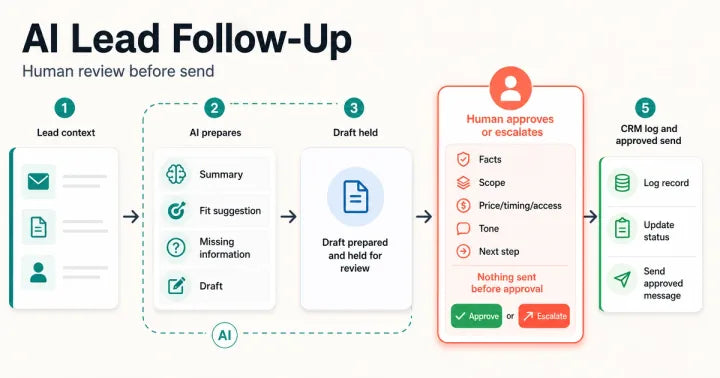
- Capture the original lead context. Retain the form, chat, email, call note, referral note, landing page, source, campaign context, timestamp, consent state, and current CRM record. Do not replace the source with an AI summary.
- Validate identity and minimum inputs. Apply deterministic rules for required fields, spam, malformed values, duplicate candidates, existing customer state, open opportunities, opt-out status, ownership, and service region before asking a model to reason.
- Request one bounded AI output. Ask separately for a factual summary, request category, fit suggestion, missing information, risk flags, draft CRM note, or draft reply. Require an output contract instead of an unstructured paragraph that mixes facts and decisions.
- Run non-model checks. Confirm required fields, allowed categories, maximum length, blocked claims, prohibited data, source references, links, channel rules, and whether the output attempts a material action. A model should not grade its own high-risk output as the only control.
- Assign a risk route. Low-risk preparation can enter the normal review queue. Missing or conflicting context goes to hold. Pricing, scope, timing, access, refunds, complaints, legal language, private data, unsupported claims, or high-value exceptions go to an authorized owner or specialist.
- Present a review packet. Show the source beside the AI output, highlight inferred values, list missing information, display the proposed action, and give the reviewer clear approve, edit, reject, and escalate choices. A bare Approve button without source context is not meaningful review.
- Execute only the approved action. Send the approved message or write the approved CRM change with the final text, reviewer, decision, timestamp, channel, recipient, and idempotency or duplicate-control key. Re-check consent and current CRM state at execution time when a delay could make the draft stale.
- Observe outcome and improve. Track held, approved, edited, rejected, escalated, failed, bounced, replied, booked, duplicate, and stale cases. Review examples, update the evaluation set, document prompt or workflow changes, and keep rollback and manual handling available.
The crawlable equivalent of the visual is: lead source - validation - AI preparation - deterministic checks - risk route - human decision - approved action - CRM evidence and monitoring. A hold or escalation can occur before any send at stages two through seven.
Use explicit states instead of one vague AI status
A practical queue can use states such as source_received, preparation_requested, needs_review, held_missing_context, approved, edited_and_approved, rejected, escalated, action_started, action_completed, and action_failed. The exact labels can change. What matters is that a team can distinguish preparation from approval and approval from execution.
Do not let an AI-produced confidence score silently become approval. Confidence can help prioritize review, but it does not prove the facts, policy, current customer state, or authority to make a promise. Use deterministic rules and named ownership for material decisions.
Build the review packet around evidence
The reviewer should not have to search across five tools to decide whether a draft is safe. Put the minimum useful evidence together:
- the untouched source message and its timestamp;
- current CRM identity, lifecycle or pipeline state, owner, and recent relevant activity;
- the AI summary with each inferred field clearly identified;
- missing or conflicting information;
- the proposed CRM write and customer-facing draft;
- policy, offer, price, region, access, consent, and escalation flags;
- the exact action that approval will execute;
- approve, edit, reject, and escalate controls with reviewer identity.
If approval happens in email, chat, or a workflow tool, preserve the decision in the system of record. n8n's current documentation provides one implementation example: selected AI tool calls can pause and request human approval before execution. The platform feature is not the whole design; source visibility, reviewer authority, stale-state checks, CRM evidence, failure handling, and evaluation still need to be defined.
Separate deterministic acknowledgements from generated sales decisions
Teams often combine two different jobs into one AI reply. The first is operational acknowledgement: confirm receipt, state the normal review window, and provide a safe next step. The second is a sales decision: interpret fit, recommend scope, discuss price or timing, request access, or make a promise. The first may be a pre-approved template. The second needs context and accountability.
This separation can reduce response delay without giving a model permission to improvise. For example, a valid form can trigger an approved acknowledgement immediately while the AI prepares an internal summary and draft for a human queue. If required context is missing, the system can hold the generated draft while the acknowledgement remains truthful.
Three example routes
Route 1: deterministic acknowledgement
A new inquiry passes spam, required-field, consent, duplicate, and owner checks. The system sends a fixed message confirming receipt and the normal review window. AI prepares an internal summary but sends nothing. Evidence includes the source ID, template version, send result, CRM owner, and due task.
Route 2: generated draft with normal review
The lead asks a clear service question with enough public-safe context. AI prepares a summary, category, missing-information list, CRM note, and draft. A named owner compares the draft with the source, edits any inferred claim, approves the final message, and the workflow logs both the decision and sent content.
Route 3: hold and specialist escalation
The inquiry includes a refund demand, legal threat, private account data, unsupported guarantee request, urgent support issue, or access request. The workflow suppresses normal drafting or labels it internal-only, assigns the correct escalation owner, records why the case is held, and prevents any customer-facing send until that owner decides.
What this workflow cannot guarantee
Human review does not guarantee a correct decision. Reviewers can miss context, approve too quickly, or apply policy inconsistently. AI output can remain wrong even when it matches a schema. CRM data can be stale. A message can be approved and still fail delivery. Monitoring can detect only what the team has made observable.
Controls should therefore be layered: limited data access, narrow tools, deterministic validation, source visibility, role-based approval, test cases, sampled review, execution evidence, monitoring, recovery, and controlled change. Use the Privacy page before moving private records or credentials, the Proof page before making outcome claims, and the handoff documentation guide before another team owns the workflow.
Choose the control from the action, not from AI confidence alone
This table assigns a default control to common lead-follow-up tasks. Adjust the route for the business, channel, jurisdiction, data, account permissions, and risk. A low-risk label is not permanent permission.
| Task | Useful AI role | Default control | Evidence before completion |
|---|---|---|---|
| Summarize an inquiry | Extract stated need, urgency, requested next step, and missing context. | Internal preparation; reviewer checks against source before reuse. | Source ID, summary, inferred-field labels, reviewer correction. |
| Suggest a category or fit | Apply an approved taxonomy and explain the suggestion. | Human confirms category, routing, and no-fit decisions. | Taxonomy version, suggestion, rationale, final owner decision. |
| Draft a CRM note | Prepare structured facts, questions, risks, and next action. | Validate fields; human approves material or inferred content. | Final note, source link, reviewer, timestamp, CRM record ID. |
| Send receipt acknowledgement | AI usually unnecessary. | Use a pre-approved deterministic template after consent and identity checks. | Template version, recipient, consent state, delivery result, due owner. |
| Draft a normal follow-up | Prepare a source-grounded message and missing-information questions. | Hold for human edit or approval before send. | Source, draft, final text, reviewer decision, send result. |
| Discuss scope, price, timing, or access | Summarize relevant context and prepare questions. | Authorized human decides and approves every commitment. | Current offer or policy source, authority, final commitment, CRM log. |
| Handle billing, legal, privacy, complaint, or urgent support | Flag and summarize for the right specialist. | Hold and escalate; no autonomous customer-facing decision. | Escalation reason, assigned specialist, response owner, resolution trail. |
| Update pipeline or lifecycle state | Suggest a state from documented criteria. | Deterministic rule or human approval for consequential state changes. | Previous state, criteria, approver or rule, new state, timestamp. |
32 checks before AI helps follow up with a lead
Use this browser-local worksheet for one defined lead path. A completed checkbox means current evidence exists; it is not a certification or guarantee. Hold launch when a critical privacy, approval, consent, execution, or recovery check is missing.
How to interpret the 32 checks
Count completion only when evidence exists for the current workflow version. Do not average away a critical gap. One missing approval block, unsafe data route, unowned escalation, duplicate send risk, or absent stop control can outweigh many completed documentation checks.
- 0-8 checks: the idea is mostly unproved. Keep it in discovery or a private prototype.
- 9-16 checks: preparation may work, but ownership, evidence, or controls remain incomplete.
- 17-24 checks: the normal path is partly reviewable; exceptions, monitoring, or recovery still need work.
- 25-31 checks: the path is substantially specified, but every unchecked item needs an owner and risk decision.
- 32 checks: all listed controls have current evidence. This still does not guarantee accuracy, safety, delivery, conversion, compliance, or future performance.
When a simple automation is better than AI
Use deterministic automation when the rule can be written clearly and maintained without model judgment. Examples include sending an approved receipt message, assigning by a known form field, creating a due task, copying an exact UTM value, or routing a named product inquiry to its owner. AI adds value when the input is genuinely unstructured and the output remains bounded, reviewable, and worth the additional operating cost.
Do not add an agent merely because it can use tools. An agent that can send messages, update CRM records, change ownership, book meetings, or call external systems increases the action surface. Start with read and prepare tasks, add one approved write at a time, and require stronger controls as reversibility, permissions, financial effect, or customer impact increases.
Prepare a safe implementation request
For a focused review, prepare the lead source, channel, current CRM, expected response path, current owner, approximate volume, existing acknowledgement, AI task you want, messages or fields that must require approval, escalation categories, response-time expectation, monitoring surface, and a redacted example. Do not send passwords, API keys, payment details, full customer exports, or unredacted private records through public intake.
Use the AI lead response workflow prototype when one intake-to-review-to-CRM path can be tested. Use the AI CRM automation consultant page when platform ownership and broader scope need definition. Start with a Systems Audit when the same decision touches several tools, live customers, payments, access, legal or privacy risk, support, or conflicting system state.
Article FAQ
AI lead follow-up and human approval questions
Can AI send the first lead reply automatically?
A fixed, pre-approved acknowledgement may be automated after identity, consent, and routing checks. A generated reply that discusses fit, scope, price, timing, access, billing, sensitive context, or another material promise should remain held for an authorized human decision.
What should the human reviewer approve?
The reviewer should compare the source with the summary, inferred fields, missing information, CRM note, proposed route, final message, and exact action. Approval should record the final content, reviewer, timestamp, and destination rather than approving an invisible or changeable payload.
How do I stop AI from inventing sales promises?
Limit the task, provide current approved sources, require structured fields, label inference, validate blocked claims, keep material drafts in a review state, and test redacted edge cases. No prompt alone can guarantee factual or policy-correct output.
Will human review make lead response too slow?
It can if the queue has no owner or service expectation. Separate immediate deterministic acknowledgement from generated sales decisions, assign a reviewer and backup, show source and draft together, alert on queue age, and escalate cases the normal owner should not decide.
Sources and context
Current primary guidance behind this workflow
Related eArif context
Official references
Reviewed Jul 29, 2026. Product behavior, retention, controls, and documentation can change; verify the selected account and current official guidance before implementation.
- OpenAI: A practical guide to building agents - tool safeguards, layered guardrails, failure thresholds, high-risk actions, and human intervention.
- OpenAI API: data controls - current endpoint retention and data-control details for teams choosing an implementation.
- OpenAI API: Evals - structured evaluation objects, criteria, runs, and reviewed outputs.
- NIST AI 600-1: Generative AI Profile - voluntary lifecycle risk-management guidance for generative AI.
- NIST AI RMF Core - governance, documented roles, human oversight, testing, monitoring, and risk response.
- n8n: Human-in-the-loop for AI tool calls - one current platform example of pausing selected tool execution for human approval.
Prototype one reviewable lead path before expanding AI authority.
Use the focused prototype when you need intake context, AI preparation, a human decision queue, approved CRM evidence, and a tested handoff without giving AI uncontrolled send authority.
Review the AI prototype