
Key terms
Terms for separating setup from journey evidence
- Tool setup: configuration and basic validation inside one platform or tightly bounded component.
- Customer journey: the end-to-end path a defined lead, buyer, member, customer, or team owner experiences from entry event to intended outcome.
- Handoff: a point where data, state, responsibility, or a customer-visible action moves between systems or owners.
- Authoritative state: the agreed system and value used to decide what is true at a specific stage, such as payment succeeded, access active, or owner assigned.
- Evidence gate: a decision point that must have an expected result, actual result, evidence location, and accountable owner before the journey is accepted.
- Recovery path: the monitored, duplicate-aware procedure for containment, retry, replay, manual completion, communication, and escalation after a failure.
Use this lesson safely
Apply the idea only after the affected path is clear.
- Identify the exact handoff, customer path, field, tag, trigger, report, or access rule before changing tools.
- Test with a low-risk example before touching live leads, payments, course access, reporting, support, or AI responses.
- Keep private client names, screenshots, customer records, payment data, passwords, and API keys out of public forms and messages.
- Document what changed, what was tested, what remains risky, and who owns the next step.
- Start with a Systems Audit when the problem touches several tools or the team cannot explain the current path.
Configuration can pass while the customer journey fails
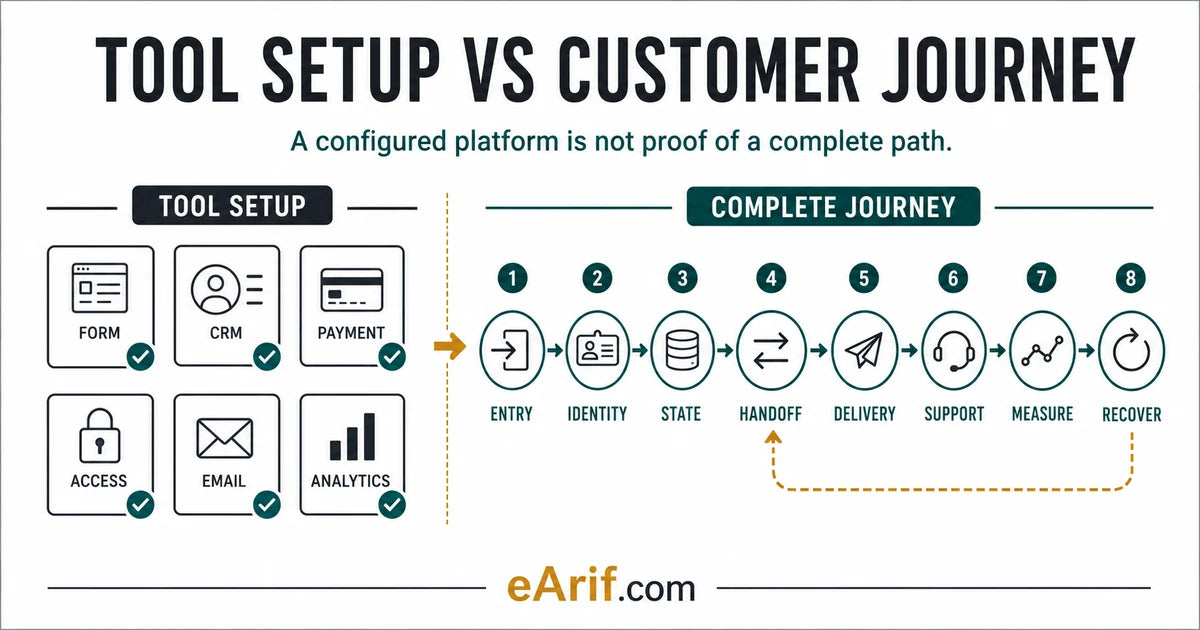
A platform can be configured correctly in isolation and still produce a poor operating result. A form may submit, but the CRM can create a duplicate. A payment can succeed, but the course entitlement can remain inactive. A workflow can send an email, but the responsible salesperson may never receive a task. GA4 can collect an event, but the business may compare it with a CRM report that uses a different person, date, or conversion definition.
This is why a tool-by-tool delivery list is not enough for CRM implementation. The customer does not experience a stack diagram. The customer experiences whether the next expected thing happens, on time, once, with the right context and a usable support route. The operating team experiences whether it can see the state, explain the decision, and recover without creating another problem.
Salesforce's current CRM strategy guidance starts with business goals, customer journeys, data, integrations, implementation, training, and measurement rather than treating software selection as the whole strategy. That does not create one universal implementation standard. It does support a useful boundary: configuration is one part of a wider customer and operating system.
What a tool setup can legitimately prove
A scoped setup can be a valid deliverable. It may prove that an account exists, permissions are assigned, a field is created, a form submits, a pipeline is configured, an approved workflow is published, a checkout accepts a test payment, a course is connected, or an analytics event reaches the intended property. The setup should still record its input, expected output, test conditions, owner, exclusions, and rollback or watch note.
The problem begins when that bounded evidence is described as proof of the complete customer journey. A successful form test does not prove duplicate handling, owner assignment, payment, access, support, or reporting. A successful payment does not prove fulfillment. A published automation does not prove that the correct records enroll, that delayed actions remain valid, or that failed runs are monitored. A dashboard total does not prove the underlying event, contact, order, and reporting definitions agree.
Use a tool setup when the boundary is genuinely narrow and dependencies are known. Use a journey review when the business result crosses systems, teams, customer states, or failure modes.
What a complete customer journey must prove
A complete journey does not mean every imaginable edge case is automated. It means the included path and its important exceptions are explicit, observable, tested, owned, and recoverable. Write one acceptance sentence before opening a platform. For example: A new qualified website inquiry should create or update one CRM contact, retain the approved source and consent context, enter the correct lifecycle and pipeline state, receive the agreed acknowledgement, create an owner task, and appear in the defined lead report.
That sentence names a person, entry, state, customer-visible result, team action, and measurement outcome. It also makes exclusions visible. Booking, proposal, payment, fulfillment, or long-term nurture can remain separate scopes instead of being silently assumed.
The following eight gates form a vendor-neutral acceptance model. Use the official platform references as examples of available states and evidence, then verify the exact account, plan, permissions, retention, and live behavior.
Gate 1: define the outcome and real entry event
Name the person or record, the exact entry event, the intended customer and team outcome, the environment, and the scope boundary. A label such as lead automation is too vague. Specify whether entry means a public form submission, calendar booking, paid order, completed payment, support request, import, manual stage change, webhook, or another event.
Record what identifies a valid entry, which test or internal records are excluded, what should happen next, and how long the next state may reasonably take. If the journey can begin from several sources, classify each source rather than assuming one form test proves them all. HubSpot, for example, documents form-level automation actions, but the existence of an action does not by itself prove the later CRM, sales, delivery, or reporting path.
Hold the journey when the team cannot agree on the start, the business outcome, the included audience, or the first observable evidence.
Gate 2: preserve identity, consent, and duplicate rules
Decide how the system recognizes the same person or account across forms, CRM records, bookings, payments, ecommerce, membership, support, and analytics. Record the primary match key, alternate identifiers, duplicate policy, merge behavior, overwrite rules, missing-identifier behavior, and the fields that must retain consent or source context.
Identity rules are platform-specific. HubSpot documents automatic and manual deduplication behavior using values such as email, company domain, record ID, and additional duplicate-management tools. That makes a useful implementation lesson: the visible name is not a stable identity contract. Test a new person, a returning person, a changed email where relevant, a duplicate candidate, and a missing or malformed key without publishing private customer data.
Hold the journey when one person can become several operational records, when separate people can be merged incorrectly, or when consent and source values can be overwritten without an agreed rule.
Gate 3: define authoritative state and accountable ownership
List the states that control the next decision: lifecycle stage, lead status, pipeline stage, appointment status, payment status, order status, fulfillment status, return status, access role, membership level, message status, support status, or reporting status. For each state, name the authoritative system, allowed transitions, owner, timestamp, and what an empty or conflicting value means.
Do not collapse different state models into one generic status. HubSpot describes lifecycle stages as a way to categorize contacts and companies by where they are in marketing and sales processes. Stripe PaymentIntents move through payment-specific statuses. Shopify separates order, payment, fulfillment, and return statuses. Those models answer different questions and may change at different times.
Hold the journey when the next action depends on a value that no system clearly owns, when two platforms can overwrite each other, or when the responsible person cannot see the current state.
Gate 4: prove every cross-tool trigger and data handoff
Map the ordered handoffs from entry to outcome. At each boundary, record the source event, payload or fields, destination, authentication owner, field mapping, transformation, timing, idempotency or duplicate control, retry behavior, rate or plan dependency, evidence location, and downstream action.
A transport-level success is not always a business success. A webhook can return a successful response while writing the wrong contact, stale field, duplicate opportunity, or unsupported state. Stripe recommends monitoring payment status with server-side webhooks rather than relying only on the client returning to a success page. Use the same evidence principle across integration tools: prove both receipt and the intended state change.
Hold the journey when a critical boundary has no execution evidence, when retries can repeat a non-idempotent action, or when a credential, field, tag, webhook, or workflow dependency has no owner.
Gate 5: verify customer-visible delivery or fulfillment
Define the result the person should actually receive: acknowledgement, booking confirmation, next-step email, paid order state, fulfillment, account creation, course or membership access, invoice, internal handoff, or another promised outcome. Record channel, sender or domain, expected timing, content owner, suppression and consent behavior, and proof that the intended recipient could use the result.
For ecommerce, payment and fulfillment are not interchangeable. Shopify documents separate order statuses, and its notification guidance distinguishes customer notifications from the underlying order workflow. For payments, a successful payment state does not by itself prove that a downstream fulfillment or access process completed. Trace a privacy-safe test from the transaction or order identifier to the final delivery state.
Hold the journey when the system proves an internal action but no one verifies the customer-visible result, or when delayed, cancelled, refunded, failed-payment, and returning-customer paths can leave the person in the wrong state.
Gate 6: verify team response, support, and ownership transfer
Customer journeys include the human operating path. Confirm that the responsible owner receives the task, notification, queue item, pipeline record, support context, deadline, and authority needed for the next action. Record reassignment, absence, escalation, duplicate task, and no-response behavior.
A workflow that sends a customer message but creates no accountable team action may produce a responsive-looking system with no operational follow-through. Likewise, an assigned owner field is weak evidence if the owner cannot see the record or does not know the service-level expectation. Test what the owner receives, not only what the workflow says it sent.
Hold the journey when a lead, buyer, member, or exception can wait without an owner, when the support team cannot find the relevant state, or when responsibility changes between teams without acceptance evidence.
Gate 7: connect measurement to an explicit source of truth
Define the business question before comparing tools. Record the metric, grain, numerator and denominator, date field, timezone, identity key, inclusion and exclusion rules, attribution boundary, freshness expectation, owner, and accepted tolerance. Then name which system is authoritative for that specific decision.
GA4 DebugView can help validate that development or test events are being collected, while Google notes that standard processing can take time and that recent report values may change. A CRM can represent operational contact or opportunity state. An ecommerce platform can represent orders, payments, and fulfillment. These sources can all be correct while answering different questions.
Hold the journey when a dashboard is treated as proof without a metric contract, when test events pollute production reporting, or when recent processing delay is confused with a broken handoff.
Gate 8: test failure, recovery, and controlled change
Choose likely failure cases before launch: invalid input, duplicate entry, missing consent, delayed webhook, failed payment, cancelled booking, unavailable integration, bounced message, missing access, unassigned record, stale report, or owner absence. For each case, record the signal, containment, evidence preservation, duplicate-safe retry or replay, manual fallback, customer communication owner, escalation, and next review.
Platform histories are useful but not interchangeable. HubSpot exposes workflow revision history. HighLevel exposes workflow execution and enrollment evidence. Zapier documents run statuses and replay behavior, including limits that must be reviewed before replaying. Confirm actual retention, permissions, and effects in the live account rather than assuming that every platform can undo or replay every action.
Hold the journey when the only recovery plan is to rerun everything, when the rerun can create duplicate messages, orders, access, or CRM state, or when no owner is watching the first live cases after a change.
Eight-gate tool setup vs complete journey evidence matrix
Use this table before accepting CRM, automation, ecommerce, membership, reporting, or integration work. A tool can pass its setup test while the journey row remains failed, unknown, not applicable with reason, or blocked by an owner decision.
| Evidence gate | Setup-only proof | Complete-journey proof | Hold condition | Minimum test evidence |
|---|---|---|---|---|
| 1. Outcome and entry | The form, checkout, calendar, import, or trigger runs | Defined person, real entry, intended outcome, timing, environment, and exclusions agree | Start or business result is vague | Labelled entry case, timestamp, expected next state, actual next state, owner |
| 2. Identity and consent | Required fields exist and one record is created | New, returning, duplicate, missing-key, source, and consent behavior follows an agreed identity rule | Records split, merge, or overwrite unpredictably | Privacy-safe identity cases with match result, retained values, and evidence location |
| 3. State and ownership | Statuses, stages, fields, and owner properties are configured | Each decision state has an authority, allowed transition, timestamp, and accountable owner | Systems disagree or no owner can act | Before-and-after state trace with authority and owner acceptance |
| 4. Cross-tool handoff | Connection authenticates or an action returns success | The intended record and fields arrive once, in time, and produce the expected downstream state | No execution evidence or duplicate-safe retry | Source event, payload reference, destination record, mapping, result, and run evidence |
| 5. Delivery or fulfillment | Email, order, access rule, or fulfillment action is enabled | The intended person receives and can use the promised result under normal and material exception states | Internal action passes but customer result is unknown | Recipient-safe confirmation tied to the correct order, payment, account, or message state |
| 6. Team response and support | Owner field, notification, task, or queue exists | The responsible team receives context, deadline, authority, reassignment, and escalation instructions | A record can wait without an accountable response | Owner-visible task or queue evidence and one absence or escalation case |
| 7. Measurement | Event, report, connector, or dashboard displays data | Metric contract, grain, date, identity, exclusions, freshness, source, and tolerance answer one business question | Sources are compared under different definitions | Debug evidence, processed-period comparison, metric definition, and decision owner |
| 8. Recovery and change | Logs or revision history are available | Failure signal, containment, duplicate-safe recovery, communication, approval, rollback boundary, and review owner are tested | Blind replay or no monitored recovery path | One controlled failure case, evidence trail, recovery result, open risk, and next review |
32-point complete customer journey readiness worksheet
Check an item only after current evidence is available. Selections stay in this browser and are not submitted. Completion means reviewed, not automatically healthy; keep results and private evidence in the approved operating record.
How to score the worksheet without creating false confidence
Do not turn the 32 checks into a universal health percentage. One missing payment-recovery owner can be more important than twenty complete configuration items. Classify every gate as verified, failed, unknown, not applicable with reason, or blocked by owner decision. Prioritize current customer harm, irreversible or duplicate actions, privacy and consent risk, money and access states, missing recovery, and unclear ownership.
A complete journey can still contain manual work. Manual review is acceptable when its trigger, queue, owner, response expectation, evidence, fallback, and measurement are explicit. Hidden manual work is the risk because the system appears automated while the outcome depends on someone remembering an undocumented step.
Example 1: website lead to qualified sales response
A setup-only review confirms that the form submits, a workflow is active, and an email sends. The complete-journey review uses a clearly labelled no-private-data test to confirm one CRM identity, retained source and consent context, intended lifecycle and pipeline states, owner assignment, acknowledgement, team task, response deadline, report inclusion, and recovery when the owner or integration is unavailable.
If the first visible problem is a handoff mismatch, use Why CRM handoffs break for diagnosis. If the full account needs a broader self-check, use the CRM automation audit checklist. Keep these intents separate from this setup-versus-journey acceptance guide.
Example 2: ecommerce order to fulfillment and reporting
A setup-only review confirms that checkout works and an order appears. The complete journey distinguishes payment, order, fulfillment, return, customer notification, CRM state, support context, purchase measurement, and exception ownership. It tests successful, failed, delayed, cancelled, refunded, and duplicate-prone states only where they are relevant and safe.
The ecommerce platform should remain authoritative for the commerce states it owns. GA4 can answer defined behavior and acquisition questions after collection and processing. The CRM can own agreed customer and operational states. A dashboard should not silently merge these definitions into one number.
Example 3: payment to course or membership access
A setup-only review confirms that the product, payment, access rule, and onboarding email exist. The complete journey traces the payment identifier to the correct WordPress or platform identity, entitlement, course or membership visibility, login path, onboarding message, CRM state, support view, failed-payment behavior, cancellation or refund behavior, and duplicate-safe recovery.
Use Why course members do not get access after payment when the need is educational diagnosis. Use a focused repair only when the failure is specific and the dependency boundary is known. Use the Systems Audit when live customers, several tools, conflicting states, or unclear recovery make a narrow change unsafe.
Platform evidence supports the decision; it does not replace it
Official documentation can explain lifecycle stages, deduplication, form actions, workflow revisions, payment statuses, webhooks, order statuses, notifications, debug tools, processing windows, run statuses, and replay controls. It cannot prove how a particular account is configured or whether the full business journey works. Verify current account permissions, plans, retention, integrations, custom fields, code, consent configuration, and team operating process.
Keep private evidence in the approved workspace. Public intake should not include passwords, API keys, payment details, customer exports, private screenshots, or real customer records. A safe first message can name the public entry path, expected outcome, affected tools, visible symptom, first low-risk check, live-risk state, owner, timing, and a redacted example.
Choose the next route from current evidence
- Use this guide when deciding whether a delivered tool configuration is enough or a complete journey review is required.
- Use the CRM automation handoff document checklist when the system is understood but operating documentation and ownership are missing.
- Use monthly CRM automation support when the journey is stable and recurring monitoring or controlled changes need an owner.
- Start with the Systems Audit when several tools, live customers, payments, access, reports, or uncertain dependencies are involved.
- Use Contact only after the current path and safe context can be described without private access.
Article FAQ
Tool setup and customer journey questions
Is CRM implementation the same as CRM tool setup?
Not always. Tool setup configures a bounded platform component. CRM implementation may also need identity rules, lifecycle and pipeline states, integrations, customer-visible delivery, team ownership, measurement, failure recovery, training, and handoff evidence across the complete included journey.
How do I test a complete customer journey?
Write the expected entry, identity, state, handoffs, delivery, team response, measurement, and recovery first. Then trace clearly labelled privacy-safe cases through every material boundary, compare expected with actual evidence, test relevant exceptions, and record owners and unresolved risks.
Who should own the customer journey after setup?
Assign one accountable journey owner, then name the business, platform, data, integration, delivery, support, measurement, recovery, and approval owners that operate the included path. A field containing an owner name is not enough unless that person can see and act on the state.
When is a Systems Audit more appropriate than another tool fix?
Use a Systems Audit when several tools or teams affect the outcome, live customers or money are at risk, authoritative states conflict, the first failure is unknown, or the team cannot define a safe test, containment step, recovery owner, and change boundary.
Sources and context
Official references for CRM journey states, evidence, and recovery
Related eArif context
Official references
This is a vendor-neutral implementation model. The current primary sources below support specific platform examples and the distinction between component configuration and end-to-end operating evidence. They do not create one universal customer-journey standard.
- Salesforce: create a CRM strategy around goals, customer journeys, data, integration, implementation, training, and measurement
- HubSpot: use lifecycle stages for contacts and companies
- HubSpot: record deduplication behavior and tools
- HubSpot: automate actions from form submissions
- HubSpot: view and revert workflow changes
- HighLevel: workflow execution logs and enrollment history
- Stripe: PaymentIntent lifecycle and statuses
- Stripe: monitor payment status and use webhooks for fulfillment
- Shopify: order, payment, fulfillment, and return statuses
- Shopify: order tracking and customer shipment updates
- Google Analytics: validate event collection with DebugView
- Google Analytics: data freshness and processing expectations
- Zapier: review workflow run statuses
- Zapier: replay behavior and limits
Sources were reviewed July 28, 2026. Platform interfaces, plans, permissions, retention, state models, and recovery behavior change; verify the current official documentation and the actual account before using a platform-specific procedure.
Prove the journey before adding another tool.
If the platforms look configured but the full lead, buyer, order, member, reporting, or support path is unclear, start with a Systems Audit and identify the first unproven handoff.
Start with a Systems Audit