
Key terms
Terms that separate access proof from a successful checkout
- Access contract: the documented expected state for payment, Keap contact and tags, WordPress user, Memberium level, LearnDash enrollment, login, email, and lifecycle behavior.
- Identity bridge: the rule that connects the correct CRM contact to the correct WordPress user without creating a duplicate or attaching access to the wrong email.
- Visibility: whether a user can see protected WordPress content. Visibility does not by itself prove LearnDash course or group enrollment.
- Enrollment: the LearnDash state that makes a user a participant in a course directly or through a group and can affect progress, drip timing, expiration, reporting, and completion actions.
- Lifecycle suppression: the documented behavior that pauses or removes access after failed payment, cancellation, suspension, refund, or another ineligible state while preserving the reason and recovery route.
- Recovery evidence: a redacted, dated record of expected state, observed state, fix or override, retest, owner, and rollback for an access exception.
Use this lesson safely
Apply the idea only after the affected path is clear.
- Identify the exact handoff, customer path, field, tag, trigger, report, or access rule before changing tools.
- Test with a low-risk example before touching live leads, payments, course access, reporting, support, or AI responses.
- Keep private client names, screenshots, customer records, payment data, passwords, and API keys out of public forms and messages.
- Document what changed, what was tested, what remains risky, and who owns the next step.
- Start with a Systems Audit when the problem touches several tools or the team cannot explain the current path.
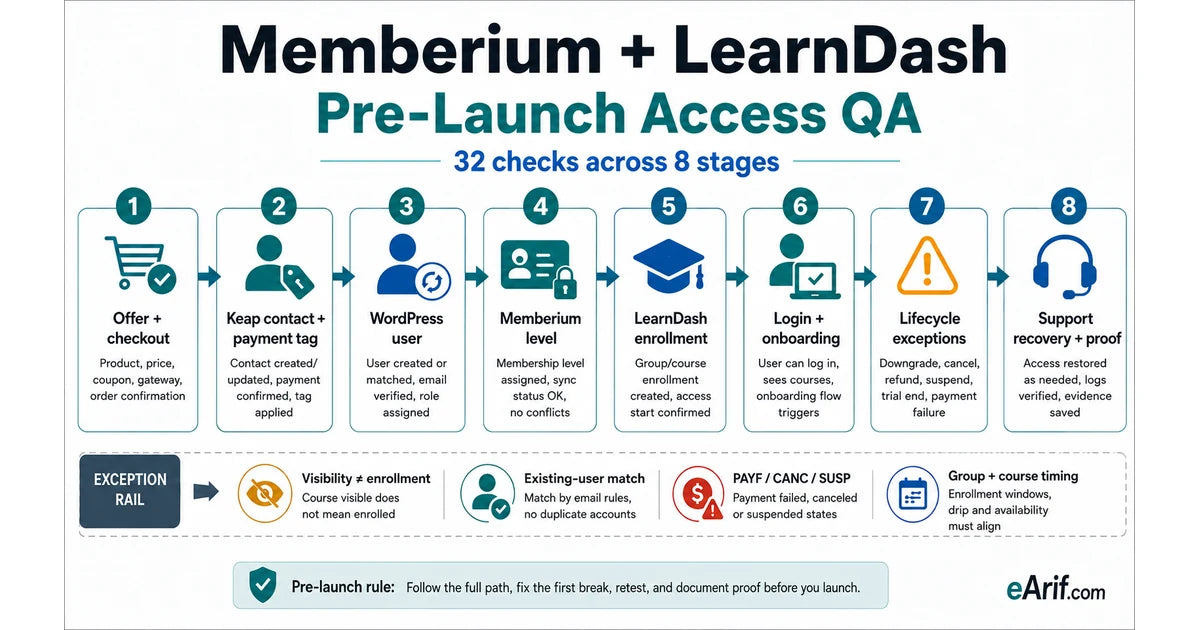
A successful checkout is only the first event in a Memberium and LearnDash launch. A buyer can pay while the wrong Keap contact receives the tag, the WordPress user is missing, the Memberium level is suppressed, the course is visible but the learner is not enrolled, the group start date blocks access, or the welcome email arrives before a usable password exists. Launch QA should follow the buyer through every system and compare the result with one written access contract.
This guide is for pre-launch and relaunch review. If a paying buyer has already missed access, use the payment-to-course access repair route. If the current Memberium, LearnDash, Keap, or WordPress rules are not documented, use the Memberium and LearnDash access audit. Keeping those intents separate prevents this checklist from competing with the symptom-diagnosis and paid repair pages.
Write the access contract before testing
For each offer, write one row that names the checkout product, qualifying payment state, Keap product action or tag, WordPress user expectation, Memberium membership level, LearnDash course or group, course access mode, start or expiration rule, first protected page, login method, onboarding message, failed-payment behavior, cancellation timing, support owner, and rollback. The row should say what must happen and which system owns each state.
- Commercial state: offer, checkout product, payment event, subscription state, refund rule, cancellation promise, and lifecycle owner.
- Identity state: Keap contact, match key, WordPress user, role, account status, password path, and duplicate-recovery rule.
- Access state: Memberium access and suppression tags, membership level, protected destination, LearnDash course or group, mode, timing, and expiration.
- Experience and proof: welcome message, login, first lesson, support route, expected timestamps, evidence owner, approval, and rollback.
Do not use a production customer's private record as the test plan. Use authorized test buyers and redacted evidence. Keep names, email addresses, payment details, passwords, API keys, full screenshots, and customer exports out of public forms, shared documents, and this browser-local checklist.
Separate payment, identity, visibility, and enrollment
These are four different proofs. Payment proves that the commerce system accepted or recorded a transaction. Identity proves that the intended Keap contact and WordPress user represent the same person. Memberium visibility proves that the user can see protected WordPress content under the current tags and membership rules. LearnDash enrollment proves that the user belongs to the course directly or through a group.
Memberium's official LearnDash guidance explicitly separates content visibility from course enrollment. A page or course link can be visible while the learner is not enrolled. The guide also describes AutoEnroll tags and login-time behavior in the documented Keap setup. Treat that as a version-specific implementation detail: confirm the current Memberium edition, LearnDash version, WordPress stack, and actual enrollment timing before relying on it.
Use the current LearnDash access mode deliberately
LearnDash's current course enrollment guidance documents Open, Free, Buy Now, Recurring, and Closed modes. It says Buy Now and Recurring should not be used when an external shopping cart or membership plugin owns purchase access; Closed is the external or manual enrollment mode. Older Memberium documentation may describe Open or Closed patterns, so prefer the current LearnDash rule and verify the exact installed versions instead of copying an old screen path.
Groups add another enrollment layer. LearnDash documents that group members are automatically enrolled in courses associated with the group. Group start dates, course start dates, expiration, prerequisites, and lesson scheduling can still change what the learner sees and when. Some group-based drip or expiration calculations depend on when a course was added to a group rather than only when a learner joined, so test the real date configuration instead of assuming that group membership settles timing.
Prove the WordPress identity bridge
Memberium combines a CRM contact with a matching WordPress user. Test a brand-new buyer and an existing CRM contact or WordPress user. Confirm the matching email, account status, role, password path, login redirect, duplicate handling, and what happens when the CRM and WordPress records already disagree. A welcome email should not promise access until the user exists, the password or reset path works, and the protected destination is ready.
Memberium documents password generation and existing-user behavior that can vary with configuration. If automation creates or updates the user, add a deliberate delay only when the current setup requires it, and verify the result from the buyer's browser. The acceptance criterion is a working login and correct access, not merely an automation step marked complete.
Map Memberium access and lifecycle tags
Memberium's Keap documentation describes membership levels as collections of tags. An access tag grants the membership, while PAYF, CANC, or SUSP states can suppress access and preserve why it is unavailable. Document which tag is authoritative, which states suppress it, who removes the suppressing state after recovery, and whether access returns automatically or requires a controlled support action.
Failed payment deserves both a loss-of-access test and a recovery test. Prove the qualifying failure event, grace-period promise, customer message, CRM state, Memberium state, support task, successful retry, removal of the failed-payment state, restored LearnDash access, and final notification. Do not test with unsafe public payment details or reuse old vendor dummy-card instructions without confirming the current processor's authorized test method.
Send onboarding only after access proof
The welcome message should use the same state that proves readiness, not an earlier checkout event that can race user creation or enrollment. Test the subject, sender, delivery, password or reset path, login URL, redirect, dashboard or course link, first lesson, mobile experience, resend path, and support route. Also test a user who is already logged in and a user who opens the message in a different browser.
A useful launch record contains the test scenario, expected state, observed state at every stage, timestamps, redacted evidence, result, owner, corrective action, retest, and rollback. A green payment receipt without identity, access, enrollment, and login evidence is incomplete.
Memberium and LearnDash pre-launch decision matrix
Run the scenarios that apply to the offer. Each row should end with a recorded result and owner, not a verbal assumption. The matrix distinguishes launch QA from post-purchase repair: a failed pre-launch scenario blocks promotion; a real buyer already affected routes to recovery and repair.
| Scenario | Expected proof | Common failure | Safe next action | Launch decision |
|---|---|---|---|---|
| New successful buyer | Accepted payment, one Keap contact, one WordPress user, intended Memberium state, correct enrollment, usable login, and first lesson | Checkout succeeds but identity, enrollment, or email is late or missing | Trace timestamps and the first failed handoff; retest one controlled buyer after the smallest correction | Pass only when the full buyer path is reproducible |
| Existing contact or WordPress user | The existing identity is matched, updated, and granted only the purchased access without duplicate records | A second contact or user is created, an old password fails, or old access conflicts | Document match keys, duplicate rules, password behavior, and merge or recovery ownership | Block launch until the existing-user path is safe |
| Content visible but course unavailable | Memberium visibility and LearnDash course or group enrollment both match the access contract | Protection rules reveal content but the learner is not enrolled | Inspect the current enrollment source, AutoEnroll or group logic, course mode, and login-time behavior | Visibility alone is a fail |
| Failed payment and recovery | Grace, suppression, message, support state, successful retry, access restoration, and evidence match the billing promise | PAYF or another suppression state remains after payment recovers, or access never pauses | Test the authorized processor sandbox or low-risk method and trace both failure and recovery events | Pass both directions before recurring billing launch |
| Cancellation or end of term | Access ends at the promised time and reporting preserves the cancellation reason and support exception | Immediate removal violates the offer, or access remains indefinitely | Align billing period, Keap state, Memberium suppression, LearnDash enrollment, email, and support timing | Block when policy and behavior disagree |
| Upgrade, downgrade, or multiple levels | New access appears, obsolete access changes deliberately, shared courses remain correct, and no tag conflict exists | Both levels remain authoritative or shared enrollment is removed | Map old and new tags, level priority, groups, shared courses, messages, and rollback before transition | Pass each supported transition |
| Group, dates, drip, or expiration | Course and group start dates, lesson timing, prerequisites, expiration, and re-enrollment match the learner promise | Membership is correct but date logic blocks a lesson or calculates from an unexpected event | Test with known dates and inspect direct versus group enrollment evidence | Block time-based launch until dates are proven |
| Support override and rollback | Support identifies the first failed state, applies an approved temporary recovery, records it, retests, and can reverse it | A manual tag or enrollment hides the root cause and becomes permanent | Use a time-bounded override with owner, reason, before-state, retest, expiration, and rollback | Pass only when recovery is documented and auditable |
32-point browser-local Memberium and LearnDash launch checklist
Check only what you can prove in the current authorized setup. Selections stay in this browser and are not submitted to eArif.com. Record detailed evidence in a private approved system; do not enter customer names, email addresses, payment data, passwords, API keys, credentials, or private screenshots here.
Run the tests in a controlled order
- Freeze the expected state. Approve the access contract and preserve privacy-safe before-state evidence before changing tags, levels, course settings, groups, or emails.
- Test one clean buyer. Follow the public offer and checkout path. Capture timestamps at payment, Keap, WordPress, Memberium, LearnDash, email, and first login.
- Test one existing identity. Use an authorized existing-contact scenario to prove matching, password behavior, old access, and duplicate prevention.
- Test visibility and enrollment separately. Confirm protected content and LearnDash participation from both the administrator view and the learner view.
- Test time and lifecycle states. Use current authorized test methods for failed payment, recovery, cancellation, upgrade or downgrade, group start, drip, expiration, and reactivation where the offer supports them.
- Test support recovery last. Give the runbook to the person who will handle launch questions. They should identify the first failed state without relying on the builder and complete a time-bounded recovery with rollback.
What a useful access QA record contains
Use one row per scenario. Record the offer, test-buyer type, expected payment state, expected Keap state, expected WordPress identity, expected Memberium level, expected LearnDash course or group, expected login and email, observed timestamps, first disagreement, redacted evidence reference, corrective action, result, owner, retest, rollback, and next review date.
Do not mark a scenario passed because an administrator can manually open the course or apply a tag. Pass it only when the supported customer path creates the right state and the support team can explain how it was proved.
Support recovery should not become hidden architecture
A manual enrollment or access tag can restore one learner quickly, but it can also hide the failed handoff and create a permanent exception. Require a reason, approver, expiration, customer-facing message, retest, and rollback. After the buyer is safe, investigate the first point where expected and observed state diverged.
Support should check in this order: accepted payment and subscription state; Keap contact and lifecycle tags; WordPress user and login; Memberium level and suppression state; LearnDash direct or group enrollment and date rules; onboarding delivery; then any manual override. This sequence prevents a late symptom from being mistaken for the root cause.
Choose the right eArif route
- Use this checklist before launch, relaunch, affiliate promotion, webinar traffic, or paid acquisition when the Memberium and LearnDash architecture is already understood.
- Use the Memberium and LearnDash access audit when current tags, levels, protection rules, enrollment sources, groups, dates, or lifecycle ownership are unclear.
- Use payment-to-course access repair when a real buyer has paid and already missed or received the wrong access.
- Use course members do not get access for platform-neutral symptom diagnosis.
- Use the membership access checklist when the stack is not specifically Memberium and LearnDash.
- Use failed-payment automation for memberships when billing lifecycle behavior is the primary problem.
- Use Systems Audit when checkout, payments, Keap, WordPress, email, reporting, support, and several owners create one cross-tool risk.
Limits of this guide
This checklist is a review method, not a promise that one configuration fits every site. Memberium editions, Keap product generations, LearnDash versions, WordPress plugins, payment tools, caches, email systems, custom code, and hosting environments differ. Some Memberium documents describe older interfaces or product behavior. Verify the current installation, current official documentation, and authorized test method before changing live access. Passing this checklist does not guarantee revenue, rankings, deliverability, or zero support requests.
Article FAQ
Memberium and LearnDash launch questions
Should a LearnDash course use Closed access with Memberium?
LearnDash's current enrollment guidance says to use Closed when an external shopping cart or membership plugin owns purchase access, rather than LearnDash Buy Now or Recurring. Older Memberium documentation may describe Open or Closed patterns, so verify the current LearnDash and Memberium versions and prove the actual enrollment path.
Why can a member see a course page but still not access the course?
Memberium content visibility and LearnDash enrollment are separate states. The protection rule may reveal a page while direct enrollment, AutoEnroll behavior, group membership, course mode, start date, prerequisite, drip, or expiration still blocks participation.
What should be tested after a failed membership payment recovers?
Verify the successful retry, Keap payment and lifecycle state, removal of PAYF or equivalent suppression, restored Memberium eligibility, retained or restored LearnDash enrollment, working login, customer notice, support record, and rollback. Test both loss and restoration of access.
What should I do after I learn what is broken?
Choose the smallest safe next step. Test one low-risk handoff yourself when the path is clear, use the related service when the failure is specific, start with the Systems Audit when several tools or live customers are involved, and keep learning when the evidence is still vague.
Sources and context
Official LearnDash and Memberium references used for this guide
Related eArif context
- Memberium and LearnDash access audit
- Payment-to-course access repair
- Course access failure guide
- Platform-neutral membership access checklist
- Failed-payment automation for memberships
- Memberium and LearnDash consultant route
- Keap tag cleanup checklist
- LearnDash and WordPress LMS services
- Systems Audit
- About Arifur Rahman
- Proof and evidence boundaries
- Privacy and safe intake
Official references
- LearnDash: course enrollment modes
- LearnDash: group access settings
- LearnDash: add courses to groups
- LearnDash: lesson access and scheduling
- LearnDash: supported and third-party plugin directory
- Memberium for Keap: LearnDash enrollment and visibility guide
- Memberium for Keap: managing membership levels
- Memberium for Keap: PAYF, CANC, and SUSP tags
- Memberium for Keap: creating and managing users
- Memberium for Keap: password generation behavior
- Memberium for Keap: failed-payment follow-up
- Memberium for Keap: LearnDash course-list shortcode reference
Prove access before launch traffic finds the gap.
If you cannot confidently name the current tags, membership rules, enrollment source, lifecycle behavior, test evidence, and recovery owner, start with the fixed-scope Memberium and LearnDash access audit.
Review the access audit