
Key terms
The billing and ownership terms are not interchangeable
- Zapier task: a successful action that runs. Triggers, Filters, Paths, failed actions, and steps that do not run generally do not count, while some AI, code, routing, MCP, and replay behavior has separate rates.
- Make operation and credit: an operation is a module run that processes or checks data. Credits are the billing unit. Most non-AI operations use one credit, but bundles can multiply downstream module runs and some AI or advanced features use variable rates.
- n8n execution: on current paid plans, one complete workflow run is the main usage unit, regardless of the number of steps or data processed. AI credits, retention, concurrency, hosting, and plan features remain separate considerations.
- Operating owner: the named person responsible for testing, alerts, retries, credentials, documentation, and changes after launch.
- Failure path: what the system records and who acts when a trigger, lookup, write, notification, or downstream system fails.
Decision safety checklist
Use the comparison to choose a safer next step, not to rebuild blindly.
- Map the real lead, booking, payment, access, follow-up, reporting, and support path before choosing a platform.
- Separate current pain from future ambition so useful existing logic is not removed by mistake.
- Check ownership: who will test, document, monitor, and improve the system after the first setup or migration.
- Use a migration map or Systems Audit when the decision affects live customers, payments, access, reporting, or several connected tools.
- Do not send passwords, API keys, private customer records, payment details, or unredacted screenshots in a first message.
The same CRM workflow exposes the real trade-offs
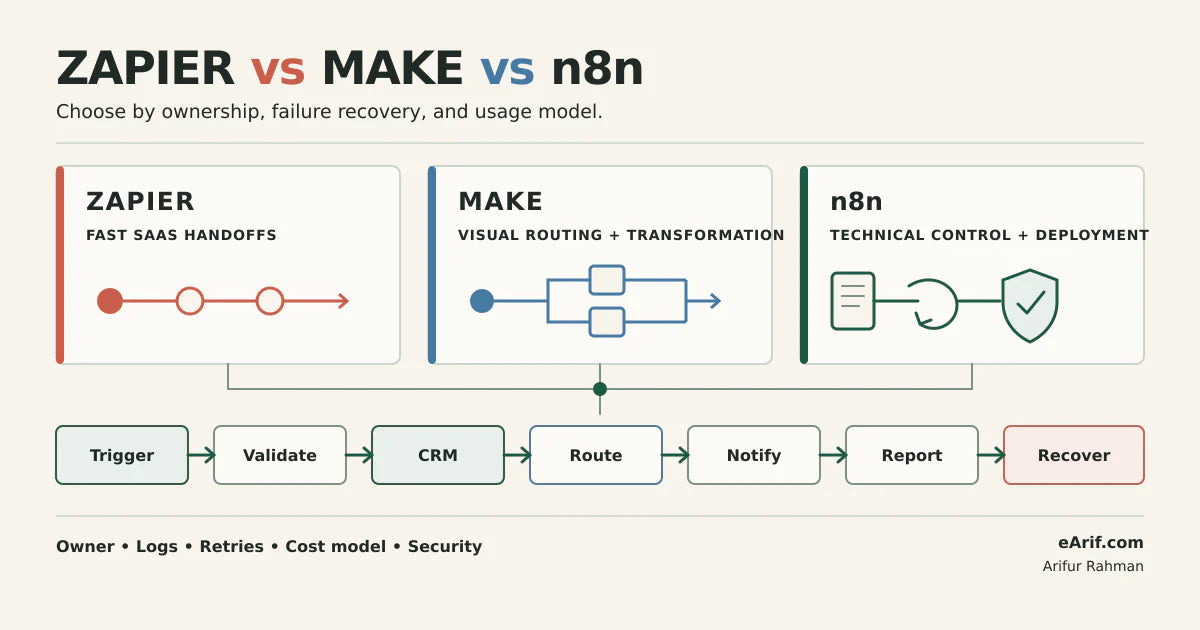
Compare the tools with one representative workflow instead of three different demos. A useful CRM test begins when a form or webhook receives a lead, validates required fields, searches for an existing contact, creates or updates the CRM record, routes the lead by offer or region, assigns an owner, sends an internal notification, records reporting data, and captures any failure for review.
That sequence tests more than whether a connector exists. It reveals how each platform handles branching, duplicate prevention, data transformation, credentials, retries, logs, handoff documentation, and usage at your actual record volume. It also shows whether the person expected to maintain the workflow can understand it after the original builder leaves.
Do not compare headline prices before comparing usage units
Zapier, Make, and n8n do not measure the same thing. Zapier generally counts successful actions as tasks. Make records module operations and bills with credits; the number of bundles moving through later modules can multiply usage. Current n8n paid plans are based primarily on complete workflow executions rather than each step. A price table that ignores these different units can make any platform look cheaper with the right example.
Start with monthly trigger volume, records returned per trigger, successful downstream writes, branches, loops, polling frequency, retries, AI usage, log retention, and the labor required to operate the system. Then apply each vendor's current pricing and plan rules. Vendor behavior and limits change, so this guide links to the current official documentation instead of freezing a misleading dollar comparison.
Zapier vs Make vs n8n CRM automation decision matrix
Use this as a shortlist, not a winner table. Confirm every plan-dependent feature in the live vendor documentation and in the account that will run the workflow.
| Criterion | Zapier | Make | n8n | What to verify |
|---|---|---|---|---|
| Likely operating owner | Business or operations user managing supported SaaS handoffs. | Operations builder comfortable reading a visual scenario and bundle history. | Technical operator or developer, especially for code, APIs, or self-hosting. | Name the person who will monitor, retry, document, and approve changes. |
| Workflow shape | Clear triggers and actions; Paths add conditional branches. | Visual scenarios with routers, filters, iterators, aggregators, and transformations. | Node-based workflows with API requests, code, webhooks, and reusable technical patterns. | Build the same CRM workflow and count branches, transformations, and external calls. |
| Branching behavior | Paths evaluate and run sequentially; actions inside running branches can consume tasks. | Routers and filters make multi-route processing visible; bundles can continue through eligible routes. | Branching is flexible, but the team must establish conventions for complex canvases and reusable logic. | Test overlapping conditions, fallback behavior, delays, and duplicate writes. |
| Custom API and code | Supported through webhooks, code, and platform tools, with plan and task implications. | HTTP and universal API modules support custom endpoints; code and advanced modules have their own credit rules. | Strong fit when HTTP, JavaScript or Python, custom nodes, CLI, or self-hosted capabilities are required. | List unsupported endpoints, authentication methods, payload sizes, and maintenance skills. |
| Failure evidence and retry | Zap history, replay, Autoreplay, and custom error handling are available, subject to plan behavior. | Scenario history and incomplete executions can preserve failed state; router routes may partially succeed. | Execution history supports retry with the current or original workflow and previous execution data. | Force timeout, invalid data, rate-limit, duplicate, and downstream-write failures. |
| Current usage model | Successful actions generally consume tasks; triggers, Filters, Paths, and failed or skipped actions generally do not. | Credits usually follow module operations; bundles multiply downstream runs and some AI features vary by tokens or other usage. | Current paid plans primarily count full workflow executions, regardless of steps; AI and plan resources are separate. | Estimate from one month's real triggers, records, branches, retries, polls, and AI calls. |
| Hosting and control | Vendor-hosted SaaS. | Vendor-hosted SaaS. | n8n Cloud or self-hosted Community, Business, and Enterprise options, depending on required features. | Decide who owns patching, backups, encryption, secrets, monitoring, scaling, and incidents. |
| Collaboration and governance | Plan-dependent team and enterprise controls. | Plan-dependent teams, roles, templates, API access, and enterprise controls. | Plan-dependent shared projects, roles, environments, source control, log streaming, and security features. | Verify the exact plan for access control, environments, history, audit, and retention. |
| Start here when | Speed, supported apps, and non-technical ownership outweigh custom control. | Visual routing and data transformation need more operational visibility. | Technical control, custom APIs or code, or deployment ownership is a real requirement. | Keep the current tool if it already passes the operating and failure-path tests. |
Run a CRM-specific proof test before choosing
- Freeze the test workflow. Use the same trigger, sanitized sample record, CRM object, branch rules, notifications, reporting step, and recovery requirement in every platform.
- Define the source of truth. State whether the form, payment platform, CRM, membership system, ecommerce platform, or another database owns each field.
- Test the happy path. Confirm the correct contact, company, opportunity, tag, owner, task, message, and report state without creating duplicates.
- Force five failures. Test a missing required field, a duplicate record, an expired credential, an API rate limit or timeout, and a downstream write that partially succeeds.
- Inspect recovery evidence. Check whether the owner can find the failed run, understand the input and output, repair the cause, retry safely, and prove the CRM ended in the correct state.
- Estimate one month of usage. Include polling, bundles, branches, loops, retries, replays, AI calls, retained logs, and any self-hosted infrastructure work.
- Hand it to the real operator. Ask the future owner to explain the workflow, pause it, find a failed record, and follow the rollback note without the builder guiding them.
- Score keep, repair, or migrate. A new platform must improve a measured constraint enough to justify migration risk and retraining.
Estimate cost with the same workload
Record monthly triggers, records per trigger, successful action steps, module runs per bundle, polling checks, branches, iterators, aggregators, retries, replays, AI model calls, and required log retention. For Zapier, model successful billable actions and any special task rates. For Make, model trigger and downstream module operations after bundle multiplication, then add variable AI usage where applicable. For n8n Cloud, model complete workflow executions plus the plan resources the team needs. For self-hosted n8n, add infrastructure, upgrades, backups, monitoring, security, and incident-response labor.
This workload sheet is more useful than a static price table because it can be rerun when volume, workflow design, or vendor pricing changes. It also exposes whether the largest cost is platform usage or the time spent finding and repairing failures.
Failure recovery matters more than the happy path
Zapier's current documentation describes successful actions as the main task unit. Paths and Filters do not themselves consume tasks, but actions inside a running branch can. Paths execute sequentially, so a delay in an earlier branch can affect later branches. Zap history, replay, Autoreplay, and custom error handling should be tested against the account's plan and the workflow's real failure cases.
Make separates operations from credits and processes bundles through modules. A module may run once for every incoming bundle, which can increase later operations. Its current documentation describes scenario history, error handlers, and incomplete executions. With a router, one route can fail while another eligible route continues, so a partially successful run needs an explicit reconciliation rule.
n8n's execution history can retry a failed run with the currently saved workflow or the original workflow while reusing previous execution data. That is useful only when the operator knows whether replaying a write is idempotent. Add lookup-before-create logic, external identifiers, and a clear recovery status so a retry does not create a second contact, order, opportunity, or access grant.
Cloud versus self-hosted n8n is a separate decision
n8n offers vendor-hosted plans and a self-hosted Community Edition. Self-hosting can increase deployment and credential control, but it transfers operational responsibility to the business. The owner must plan upgrades, backups, encryption keys, database protection, webhook exposure, secrets, monitoring, scaling, and incident recovery. n8n's security-audit feature checks common risks such as unused credentials, database expressions, file-system nodes, risky or community nodes, unprotected webhooks, missing settings, and outdated instances; it does not replace a complete security program.
Choose self-hosting because a documented control, deployment, data-location, or integration requirement justifies it, not because the software download appears inexpensive.
How AI steps change the decision
AI steps add variable output, token or credit usage, and a new failure class: a technically successful run can still produce an incorrect decision. Keep deterministic CRM writes separate from model judgment where possible. Validate structured output, allowlist permitted actions, set confidence or exception routes, require human approval for consequential changes, and log the model input, output, tool call, CRM write, and reviewer decision within the applicable privacy boundary.
Zapier, Make, and n8n all support AI-related workflow patterns, but the platform name does not remove the need for validation, idempotency, permission controls, and recovery. For an agentic workflow, compare how safely the team can constrain and review actions rather than how quickly a demo can call a model.
When not to migrate
- The current workflow reliably creates the right CRM state and already has a named owner, useful logs, alerts, safe retry behavior, and current documentation.
- The problem is an incorrect trigger, field map, duplicate rule, credential, or CRM process that would be copied into the new platform.
- The cost case uses vendor headline prices instead of the same measured workload.
- The team has no sanitized test record, acceptance checklist, rollback note, or parallel-run period.
- The migration is intended to future-proof an undefined requirement rather than solve a current verified constraint.
If the existing platform passes the proof test, document and improve it. Migration is justified when a verified constraint in ownership, observability, control, capacity, security, or maintainability cannot be repaired reasonably in the current setup.
Decision notes
- Keep the current connector: when it passes the CRM proof test and the owner can detect, diagnose, retry, and document failures.
- Test Zapier first: when supported SaaS apps, fast delivery, and a non-technical operating owner are the strongest requirements.
- Test Make first: when visual routing, bundle-level transformation, and operations-led inspection are necessary.
- Test n8n first: when custom APIs or code, technical ownership, or deployment control are verified requirements.
- Separate n8n hosting from workflow selection: choose self-hosting only after assigning infrastructure, backup, security, monitoring, and incident owners.
- Hold the decision: when the team cannot name the source of truth, failure owner, retry rule, volume model, test record, and rollback path.
- Get implementation help: use the Zapier, Make, and n8n automation consulting service for a known workflow, the CRM automation audit when failures need diagnosis, or the Systems Audit when several business systems are involved.
Comparison FAQ
Zapier, Make, and n8n decision questions
Which is easiest for CRM automation: Zapier, Make, or n8n?
Zapier is often the shortest starting path for supported SaaS apps and non-technical operators. Make can be clearer for an operations builder who needs visual routing and transformation. n8n usually requires stronger technical ownership, especially when code, APIs, or self-hosting are involved. Test the real future owner, not an abstract beginner.
Which is cheapest: Zapier, Make, or n8n?
There is no reliable universal answer because the platforms use different billing units. Zapier generally counts successful actions, Make uses credits tied mostly to module operations and bundles, and current n8n paid plans count complete workflow executions. Compare the same monthly workload and include retries, AI use, retention, and self-hosting labor.
Should a small business self-host n8n?
Only when a documented control or deployment requirement justifies it and someone owns upgrades, backups, encryption, credentials, monitoring, scaling, and incidents. n8n Cloud or a managed SaaS connector is usually safer when no technical infrastructure owner exists.
What if I found this page from a tool-versus-tool search but the issue is urgent?
Use the comparison to name the affected customer path, then choose the smallest safe next step. If one workflow, form, calendar, payment action, access rule, or report is broken, use the related service. If several tools or live customers are affected, start with the Systems Audit instead of continuing feature research.
Sources and context
Official documentation used for this comparison
Related eArif context
Official references
- Zapier: how task usage is measured
- Zapier: current task usage rates
- Zapier: branching logic with Paths
- Zapier: workflow error troubleshooting
- Make: credits
- Make: how features use credits
- Make: operations and bundles
- Make: error handling and incomplete executions
- n8n: plans, executions, hosting, and current feature matrix
- n8n: execution history and retry options
- n8n: self-hosted security audit
Vendor documentation and pricing were reviewed on July 26, 2026. Verify current plan behavior before purchasing or migrating.
Test the workflow before changing the tool.
Map one live CRM workflow, its failure path, and its operating owner before deciding to keep, repair, or migrate the automation layer.
Start a Systems Audit