
Key terms
Terms for reviewing CRM automation trust
- Run status: a platform-specific signal such as successful, errored, filtered, delayed, on hold, waiting, or failed. It describes execution state, not necessarily the business outcome.
- Outcome evidence: proof that the intended downstream customer or operating result exists in the authoritative system.
- Silent failure: a missing, delayed, duplicate, stale, or incorrect result that does not create an obvious platform error.
- Reconciliation: a defined comparison between expected inputs or outcomes and the actual records, states, or totals produced.
- Recovery path: the owned procedure for containment, evidence preservation, correction, duplicate-safe retry or replay, communication, and closure.
- Change control: the record of who changed what, why, when, under which test and approval boundary, with a watch and rollback decision.
Use this lesson safely
Apply the idea only after the affected path is clear.
- Identify the exact handoff, customer path, field, tag, trigger, report, or access rule before changing tools.
- Test with a low-risk example before touching live leads, payments, course access, reporting, support, or AI responses.
- Keep private client names, screenshots, customer records, payment data, passwords, and API keys out of public forms and messages.
- Document what changed, what was tested, what remains risky, and who owns the next step.
- Start with a Systems Audit when the problem touches several tools or the team cannot explain the current path.
Automation trust usually declines after launch, not during the demo
A new workflow is easy to trust when one clean test record follows the happy path. The form creates a contact, the tag appears, the email sends, and the builder shows green. Real operations add returning contacts, missing values, delayed webhooks, changed permissions, expired connections, duplicated events, refunds, cancellations, rate limits, team edits, owner absence, and downstream systems with different state models. The workflow can remain active while the result becomes incomplete or wrong.
This is an operational evidence problem. The automation canvas describes intended logic. Run history describes what the platform recorded. The customer, CRM, payment, access, support, and reporting systems show whether the intended business result occurred. None of these surfaces should be substituted for the others.
Current platform documentation supports this distinction. HighLevel provides execution logs and enrollment history, including contact paths and error visibility. HubSpot provides action logs, enrollment history, issues, and workflow revisions, with documented retention boundaries. Zapier distinguishes several run statuses and notes that a polling trigger that finds no new data may not appear in run history. Microsoft explains that not every Power Automate failure generates a per-run email, so the monitoring view or run history is needed for complete failure visibility. These tools provide useful evidence, but the business still has to define what should be proved and who acts when it is not.
Four levels of automation trust
Use four levels to avoid calling every published workflow reliable:
- Configured: the trigger, conditions, fields, actions, credentials, and settings exist and a bounded test can run.
- Observed: the team can locate input, execution, downstream state, timing, and customer-visible outcome evidence for normal and material exception cases.
- Recoverable: failures, no-run conditions, and mismatches have a response owner, containment rule, duplicate-safe correction, communication boundary, and closure evidence.
- Governed: material changes have purpose, owner, test cases, approval, release time, watch period, rollback boundary, and review history.
A workflow may be configured without being observed. It may be observed without being safely recoverable. It may recover once while remaining vulnerable to uncontrolled edits. Trust should describe the highest level supported by current evidence, not the most reassuring platform screen.
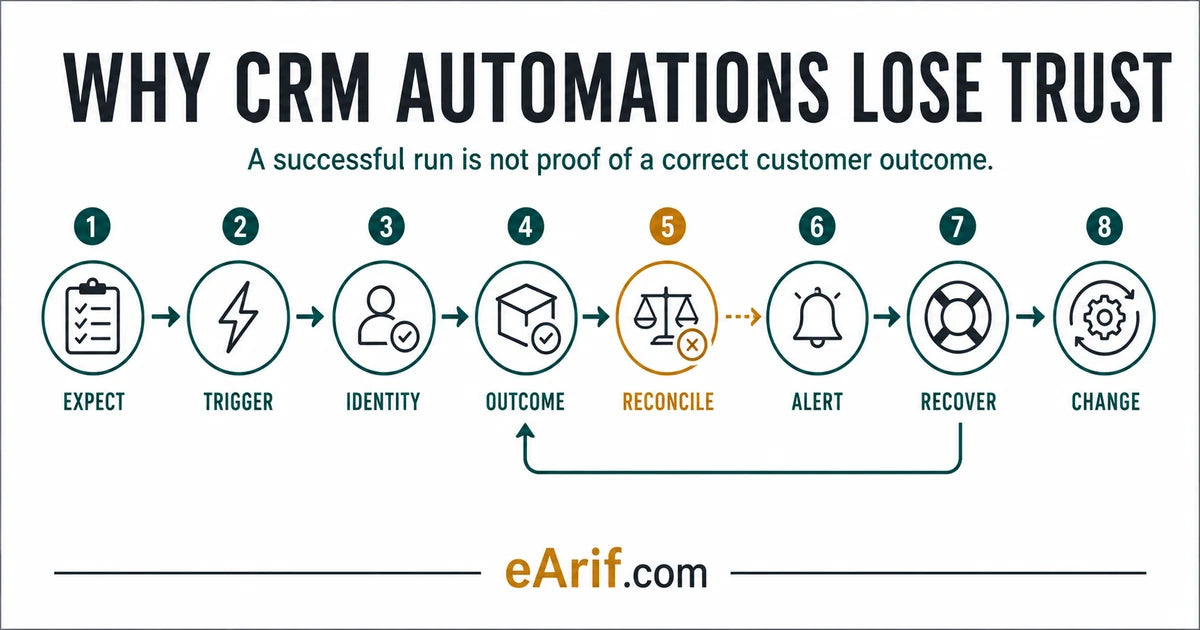
Gap 1: the expected customer and operating outcome is undefined
A label such as new lead workflow or payment automation is not an acceptance rule. Define who or what enters, the exact qualifying event, the intended customer-visible result, the intended team action, the authoritative downstream state, expected timing, exclusions, and evidence location.
For example: A valid website consultation request should create or update one CRM contact, preserve approved source context, assign an owner, send one acknowledgement, create one response task due within the agreed window, and appear in the qualified-inquiry report. This sentence can be tested. It also exposes what is outside scope, such as proposal, payment, fulfillment, or long-term nurture.
Trust hold: the team cannot write one expected-outcome sentence or cannot agree which system proves completion.
Gap 2: trigger and input baselines are missing
Teams often monitor failed runs but not missing runs. If a trigger stops firing, there may be no failed execution to inspect. Establish a baseline for expected event sources, valid and invalid input rules, normal volume or cadence, polling or webhook behavior, timezone, source identifiers, required fields, consent context, and the first evidence that entry was accepted or rejected.
HighLevel's current trigger statistics can show attempted, matched, and unmatched trigger activity for supported workflows. Zapier notes that a polling check with no new data does not appear as a run. Power Automate recommends checking for a sudden drop in run count because it can indicate that the trigger stopped. The lesson is vendor-neutral: no-error evidence is weak when expected activity itself is not monitored.
Trust hold: zero runs could mean zero demand, a broken trigger, a disconnected source, a filter mismatch, or a reporting gap, and the team cannot distinguish them.
Gap 3: identity and state are ambiguous across systems
A technically successful action can update the wrong record, create a duplicate, overwrite a newer value, or advance a state that another system does not recognize. Define the primary and alternate identity keys, duplicate and merge behavior, empty-value and overwrite rules, authoritative system for each decision state, allowed transitions, timestamps, and conflict handling.
Do not treat a contact name, email preview, tag, generic status, or last-updated time as a complete identity contract. A payment status, CRM lifecycle stage, opportunity stage, order state, fulfillment state, access entitlement, message result, and analytics event answer different questions. Record which state controls each next action.
Trust hold: one person, order, subscription, booking, or membership can have conflicting records or states, and no rule determines which value wins.
Gap 4: run status is mistaken for customer outcome evidence
A platform may report success because its own action completed. That does not prove that the destination wrote the intended record, that the right person received the message, that access became usable, that a payment produced fulfillment, or that the team completed the next task.
HighLevel's own race-condition troubleshooting shows an example where an action appeared successful in execution logs while the expected tag was absent on the contact. Zapier documents successful, filtered, held, handled, scheduled, and other statuses at run and step level. Stripe warns that webhook deliveries can be duplicated or arrive out of order. These examples make the same operational point: read the platform signal, then verify the authoritative downstream state.
For every critical action, record a correlation key that can safely connect the source event, workflow run, destination record, customer-visible result, and support context without publishing private data.
Trust hold: the only evidence is a green node, successful HTTP response, sent status, or completed run inside the automation platform.
Gap 5: silent downstream mismatches are not reconciled
Explicit errors are often easier to find than silent omissions. A run can finish while one field is stale, one branch is skipped, one owner is missing, one message is suppressed, one purchase is not attributed, or one entitlement is not granted. Reconciliation asks whether expected and actual outcomes agree at a defined grain and time window.
Choose a useful comparison: valid form submissions versus CRM creates or updates; paid orders versus fulfillment or access states; booked appointments versus owner tasks; messages expected versus delivered, suppressed, bounced, or held; qualified opportunities versus report inclusion. Define the identifiers, timestamps, exclusions, tolerance, freshness window, and owner before comparing totals.
A total alone can hide offsetting errors, such as one missing record and one duplicate. Use record-level traces for critical exceptions and aggregate checks for trend monitoring. Keep test and internal data labelled and excluded under an agreed rule.
Trust hold: no one compares expected inputs or outcomes with actual downstream records, so a silent mismatch can persist until a customer reports it.
Gap 6: alerts do not contain an owner, context, or response deadline
An email saying workflow failed is not a response system. A useful alert names the workflow and environment, affected record or correlation key, failure or mismatch type, first failed or unknown step, customer and business risk, evidence link, containment instruction, accountable owner, response expectation, escalation route, and duplicate-risk warning.
Platform notifications have boundaries. HighLevel documents that workflow error notifications are off by default and that notification cadence and covered actions matter. Microsoft documents that some Power Automate failure types do not generate a per-run email, while its monitoring view shows all failed runs. Zapier can delay error notifications until final autoreplay attempts finish. Confirm current settings and behavior instead of assuming that the platform will always notify the right person immediately.
Assign alerts to an operating role or shared queue where possible, then name the current responsible person. An alert sent only to the original builder is fragile when that person is unavailable or leaves.
Trust hold: alerts are disabled, go to an unmonitored inbox, lack enough context to act, or have no response and escalation owner.
Gap 7: retries and replays are not duplicate-safe
Retrying is a new action with business consequences. It may resend a message, create another contact or opportunity, repeat a payment-side update, duplicate a task, regrant access, or overwrite a newer state. Before retry or replay, identify what already succeeded, what failed, what is safe to repeat, what must be skipped, and how the destination detects a duplicate.
Zapier documents differences between replaying errored steps and replaying an entire run, plus limits and status behavior. Make documents incomplete executions and scenario run replay; replay uses previous trigger data through the current scenario and can process modules that previously succeeded. n8n allows retry with the currently saved or original workflow. Stripe recommends idempotency keys for safely retrying supported API requests and separate duplicate-event controls for webhooks.
Recovery should preserve the original evidence, create a new recovery record, and reconcile the final outcome. Do not erase the only trace by deleting the failed run or replacing it with a screenshot-free verbal note.
Trust hold: the recovery instruction is simply run it again, with no record-level state check, idempotency or duplicate rule, customer communication boundary, or final reconciliation.
Gap 8: workflow changes are not controlled or reviewed
A reliable workflow can become untrustworthy after a small edit to a trigger, filter, field mapping, wait, branch, credential, template, owner, integration version, or downstream object. Record the change purpose, affected path, owner, approver, before-state evidence, test cases, release time, watch period, rollback boundary, and unresolved risk.
HubSpot exposes workflow revision history with change, time, and user evidence for supported workflows. HighLevel audit logs record time-stamped user and action context with documented retention. These histories help answer what changed, but they do not replace a business acceptance test or guarantee that every external dependency is reversible.
After a material change, verify one normal case, relevant exception cases, the no-run signal, downstream outcome, reconciliation, alert path, and recovery boundary. Increase observation during the first live period instead of waiting for the regular review.
Trust hold: no one can identify the last material change, its test evidence, approval, affected records, watch owner, or rollback decision.
Eight-gap CRM automation trust evidence matrix
Use this matrix after launch or before accepting ongoing support. A reassuring platform signal can still leave the customer outcome unproved. Mark each gap verified, failed, unknown, not applicable with reason, or blocked by an owner decision.
| Evidence gap | What can look reassuring | Missing proof | Required control | Minimum pass evidence |
|---|---|---|---|---|
| 1. Expected outcome | Workflow name and actions look sensible | Who enters, what should happen, when, and where completion is proved | Written acceptance sentence and scope boundary | Defined actor, event, customer result, team action, authoritative state, timing, exclusions, and owner |
| 2. Trigger baseline | No failed runs are visible | Whether valid source activity was attempted, matched, rejected, delayed, or absent | Expected-volume or cadence check plus source and filter evidence | Source count, valid-entry rule, first accepted or rejected evidence, timezone, and no-run owner |
| 3. Identity and state | A contact or object was updated | Whether it was the correct record and authoritative state | Identity, duplicate, overwrite, state-authority, and conflict rules | Privacy-safe new, returning, duplicate, missing-key, and conflicting-state traces |
| 4. Business outcome | Run, step, API call, or message reports success | Whether the intended downstream and customer-visible outcome exists | Correlation from source event through destination and final result | Source ID, run evidence, destination record, authoritative state, customer or team result, and timing |
| 5. Reconciliation | Totals look plausible or complaints are low | Missing, duplicate, stale, suppressed, or misclassified outcomes | Expected-versus-actual comparison at a defined grain | Metric contract, record-level exceptions, tolerance, freshness window, owner, and closure trail |
| 6. Alert response | The platform can send error notifications | Coverage, recipient, context, response deadline, escalation, and no-run detection | Actionable alert contract and owned queue | Controlled alert test with affected key, evidence link, risk, owner, response time, and escalation result |
| 7. Safe recovery | Retry, replay, or rerun control is available | What already succeeded and whether repetition creates a duplicate or stale overwrite | Containment, idempotency or duplicate rule, selective correction, and final reconciliation | One controlled failure, preserved original evidence, recovery record, final state, communication decision, and owner closure |
| 8. Controlled change | The workflow is currently active | Who changed what, why, with which test, approval, watch, and rollback boundary | Material-change record and post-release review | Before and after evidence, named owner and approver, test cases, release time, watch result, open risk, and next review |
32-point CRM automation trust scorecard
Check an item only when current evidence exists. Selections stay in this browser and are not submitted. The total is a maturity signal, not a guarantee; any unresolved customer harm, payment, access, consent, privacy, duplication, or ownership risk overrides a high score.
How to interpret the score without creating false confidence
Use the total as a prompt for investigation:
- 0 to 8 checks: largely unproved. The team may know the workflow design but lacks operating evidence.
- 9 to 16 checks: partly observable. Some runs can be inspected, but silent failures, ownership, or recovery may remain unclear.
- 17 to 24 checks: observable but fragile. Normal cases have evidence, while exception response or controlled change is incomplete.
- 25 to 31 checks: substantially recoverable with named gaps. Do not accept the total until each unchecked item is classified by risk and owner.
- 32 checks: all review items have current evidence. This still does not guarantee uptime, correct platform configuration, every edge case, or a future business outcome.
Do not average away a critical gap. One unsafe replay path, unowned payment exception, missing course access, consent overwrite, private-data exposure, or customer-impacting silent failure can override thirty completed checks. Record the score date, workflow version, included path, evidence window, reviewer, open risks, and next review so a future total is comparable.
Example 1: lead form to sales response
The workflow builder can show a successful form trigger, contact action, notification, and email. Trust requires more: valid submissions should create or update one intended contact, retain approved source and consent context, enter the correct state, assign an available owner, create a due task, send one usable acknowledgement, and appear in the agreed inquiry report.
Reconcile valid form submissions with CRM create-or-update outcomes and owner tasks for the same window. Investigate missing, duplicate, unmatched, suppressed, delayed, and unassigned cases. Test the alert and recovery path with clearly labelled no-private-data QA values. If the question is where the first cross-tool mismatch occurs, use Why CRM handoffs break. This article owns the ongoing trust controls after the path is live.
Example 2: payment to membership or course access
A payment-side success and a completed automation run do not prove that the correct person can use the purchased access. Link a safe payment or order identifier to the CRM identity, entitlement rule, account, course or membership visibility, onboarding message, support view, and reporting state. Classify delayed payment, failed payment, refund, cancellation, duplicate event, changed email, and previous access where relevant.
Stripe documents retries, duplicate webhook events, and event-ordering limits. That means a recovery path should not assume each event arrives once or in sequence. Preserve processed event identifiers or another approved duplicate control, retrieve authoritative state where appropriate, and verify final access before closing the exception.
Example 3: AI-assisted lead follow-up
An AI step can complete while the output remains wrong for the lead, brand, policy, price, timing, or current customer state. Trust requires structured input, source context, allowed task boundary, confidence or exception rule, human-review queue, send authority, evidence retention, privacy controls, and a fallback when the model or tool call does not produce an acceptable result.
Use the AI lead follow-up guide for the specific human-review boundary. Keep AI output review separate from the broader post-launch monitoring, reconciliation, recovery, and change controls owned by this article.
Set a review cadence by risk, not by habit
- After every material change: verify the changed path, adjacent dependencies, no-run condition, alert, downstream result, and rollback boundary during a defined watch period.
- Daily or near-real-time for critical paths: consider payment, access, high-value lead routing, customer communication, and other time-sensitive outcomes where a silent gap creates material harm. Choose cadence from actual risk and volume.
- Weekly: review trigger volume, errors, held or waiting work, unresolved mismatches, owner response, repeated causes, and recoveries that remain open.
- Monthly: review workflow inventory, inactive or ownerless paths, credentials, notifications, retention, duplicate patterns, change history, documentation, platform updates, and retirement candidates.
There is no universal safe cadence. A low-volume internal enrichment workflow and a high-volume payment-to-access path should not receive the same monitoring design. Record why the cadence is sufficient, who reviews it, what evidence is retained, and what changes the review frequency.
Keep the intent boundaries clear
- Use Tool setup vs customer journey before implementation acceptance, when deciding whether configured components prove the complete included path.
- Use Why CRM handoffs break when diagnosing the first failure across a specific live journey.
- Use the CRM automation handoff document checklist when evidence, ownership, monitoring, recovery, and change instructions need to be transferred to an operating team.
- Use the CRM automation audit checklist for a broader self-review across the account and connected stack.
- Use monthly CRM automation support when stable automations need recurring monitoring, controlled changes, and an owner.
- Use the CRM automation audit when current workflows need a focused evidence and reliability review.
- Start with the Systems Audit when several tools, live customers, money, access, conflicting states, or unknown dependencies make a narrow workflow review unsafe.
What to prepare for a focused CRM automation audit
Prepare workflow names, business purpose, included customer path, expected outcomes, active sources, current owners, known symptoms, recent change window, monitoring surfaces, sample volumes, and redacted correlation keys. Do not send passwords, API keys, payment details, full customer exports, private screenshots, or unredacted customer records through public intake.
A safe first message can name the affected workflow, tools involved, expected outcome, actual symptom, approximate timing, whether live customers are affected, the first safe check already completed, current owner, and a redacted example. The Proof and Privacy pages explain evidence and access boundaries before private system review.
Article FAQ
CRM automation reliability questions
Can a CRM automation show successful and still be wrong?
Yes. A successful run can prove that the automation platform completed an action without proving that the correct downstream record, state, message, access, task, fulfillment, or report outcome exists. Verify the authoritative customer and operating result with a correlation key.
What should I check first when a team no longer trusts an automation?
Write one expected-outcome sentence, then trace one recent privacy-safe case from the real trigger through identity, workflow execution, destination state, customer-visible result, owner action, and measurement. The first missing or conflicting evidence usually identifies the next safe check.
How often should CRM automations be monitored?
Choose cadence from customer harm, money, access, message timing, volume, reversibility, and detection delay. Review every material change during a watch period, monitor critical paths more frequently, and run weekly and monthly operating reviews where the risk justifies them.
When is a CRM automation audit appropriate?
Use a focused CRM automation audit when workflows are active but outcomes, monitoring, ownership, recovery, or change history are unclear. Use a broader Systems Audit when several tools, teams, live customers, payments, access, reports, or unknown dependencies affect the result.
Sources and context
Official references for automation evidence, monitoring, recovery, and change
Related eArif context
Official references
This is a vendor-neutral reliability model. The current primary sources below support specific examples of platform execution evidence, monitoring boundaries, retries, replay, duplicate controls, and change history. They do not prove the configuration or outcome of any individual account.
- HighLevel: workflow execution logs and enrollment history
- HighLevel: workflow error notifications and settings
- HighLevel: audit logs, user activity, and retention
- HubSpot: workflow action logs, enrollment history, issues, and retention
- HubSpot: view and revert workflow changes
- Zapier: review run and step statuses
- Zapier: replay behavior, attempts, and limits
- Zapier: diagnose duplicate data and timeout replay risk
- Make: incomplete executions and recovery options
- Make: scenario run replay behavior and constraints
- n8n: execution filters and retry with current or original workflow
- Microsoft Power Automate: failure notifications and complete monitoring coverage
- Stripe: webhook retries, ordering, and duplicate-event handling
- Stripe: idempotent requests for safe API retries
Sources were reviewed July 28, 2026. Platform interfaces, plans, notification defaults, retention, statuses, replay behavior, and limits change; verify the current official documentation and actual account before using a platform-specific procedure.
Make the outcome observable before rebuilding the workflow.
If active CRM automations no longer have clear outcome evidence, monitoring ownership, duplicate-safe recovery, or controlled change, start with a focused CRM automation audit and identify the first trust gap.
Review CRM Automation